Skyrim -Elys- MemInfo
⚪ Last updated 2012⚠️ Install Order · 4 steps
Install in this order, then this mod last — most mods fail to load without their framework and dependencies in place.
Preview
🔍 Analysis
- 👍 5.3% endorsement rate — high engagement, a strong quality signal
- 🏆 #78 of 85 Utilities mods in this game by downloads
📋 About This Mod
========================================== Skyrim -Elys- MemInfo v0. 9. 8. 4 pre-release ==========================================
1. Description 2. Requirements 3. Installing 4. Optional Settings 5. Uninstalling 6. Backup 7. Conflicts/Known Errors 8. Credits 9. Contact and Information 10. Disclaimer
=============== 1. DESCRIPTION ===============
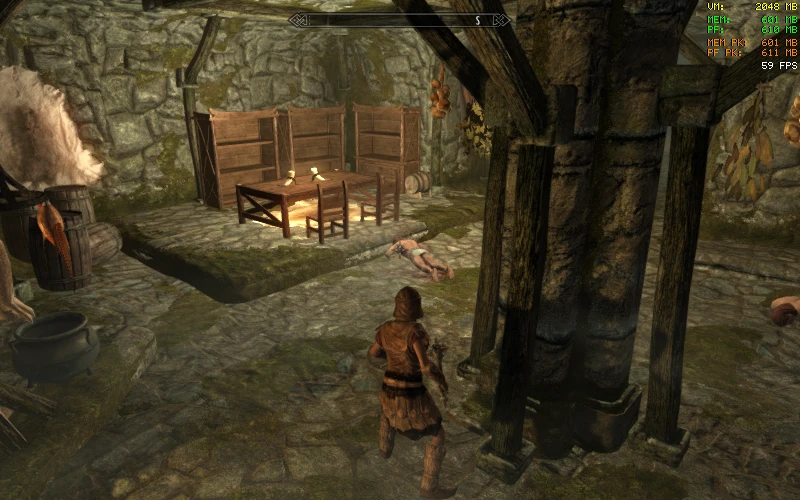
This plugin will display Memory Usage and Frames per Second information on the top right corner of your screen. Use the ScrollLock key (or optionally the NumLock or CapsLock key) to show or hide the following values on your screen:
VM : The maximum Virtual Memory Skyrim can address.
MEM : The current amount in megabytes of physical memory used by Skyrim. PF : The current amout in megabytes used by Skyrim in the Windows Pagefile.
MEM PK: The highest value of MEM reached during the session. PF PK: The highest value of PF reached during the session.
FPS: Frames per Seconds.
You also the possibility to display the MemInfo, Skyrim and SKSE versions, the open handles count, and a clock by tweaking the settings (See 4. Optional Settings section below)
This plugin is mostly intented for testing purpose while tweaking Skyrim settings.
================ 2. REQUIREMENTS ================
Skyrim version 1. 1. 21 or above is required. Skyrim Script Extender ( http://skse.silverlock.org/download/skse_1_02_01. 7z ) version 1. 1 or above. At least Windows XP SP1.
============== 3. INSTALLING ==============
Extract the content of this archive into your Skyrim folder. ( by default the folder is "C:\Program Files (x86)\Steam\SteamApps\common\skyrim" ) If correctly extracted you should find SKSE_Elys_MemInfo.dll inside your "<Skyrim installation folder>\DATA\SKSE\Plugins\"
========================== 4. OPTIONAL SETTINGS ==========================
You have the possibility to set various details such as the toggle key, positions, fonts, colors, names and sizes by modifying SKSE_Elys_MemInfo.ini with a basic text editor such as Notepad.
================ 5. UNINSTALLING ================
Delete SKSE_Elys_MemInfo.dll and SKSE_Elys_Uncapper.ini from your "<Skyrim installation folder>\DATA\SKSE\Plugins\" ( by default "C:\Program Files (x86)\Steam\SteamApps\common\skyrim\DATA\SKSE\Plugins\" ) And then delete this SKSE_Elys_MemInfo_README.txt.
=============== 6. BACKUP ===============
As a surviving golden rule, always backup all your save games before trying a new mod.
A lightweight SKSE plugin that displays memory usage and FPS in the top-right corner of Skyrim's screen. A classic utility from 2012 with strong community adoption (4,825 endorsements, 91,700 downloads). Ideal for modders and performance enthusiasts who want real-time system stats without external tools.
✨ Key Features
📊 Pros & Cons
✅ Pros
- Community staple with 4,825 endorsements and 91,700 downloads
- Simple, focused tool—does exactly what it says
- No external dependencies beyond SKSE
⚠️ Cons
- Last updated in 2012—may not work with the latest Skyrim Special Edition or Anniversary Edition
- No configuration options mentioned—likely just on/off
- Outdated for modern modding setups; consider alternatives like SSE Display Tweaks
For classic Skyrim players who want a quick, no-frills FPS and memory overlay. Perfect for modders testing performance or curious players who like seeing system stats. Skip if you're on Skyrim Special Edition or want customizable HUD options.
💡 Beginner Tips
- Make sure you have SKSE installed and launch the game through skse_loader.exe, not the default launcher.
- If you're on Skyrim Special Edition, this mod won't work—look for SSE-compatible alternatives.
- The overlay appears in the top right corner; if you don't see it, check that the plugin is enabled in your mod manager.
📊 Mod Details
- Game
- Skyrim LE Mods
- Author
- Elys
- Version
- 0.9.8.4
- Downloads
- 91,700
- Endorsements
- 4,825
- Category
- Utilities
- Created
- 11/29/2011
- Updated
- 5/18/2012
🔧 How to Install Skyrim LE Mods
Download from Nexus.
📖 Full step-by-step install guide for Skyrim LE →
Visit the official mod page for specific installation instructions for this mod.
🎮 Need cheat codes or console commands? Check ur gaming wiki for Skyrim LE commands, item IDs, and more.
Keep browsing — more Skyrim LE mods await