Save game script cleaner
⚪ Last updated 2015⚠️ Install Order · 3 steps
Install in this order, then this mod last — most mods fail to load without their framework and dependencies in place.
Preview
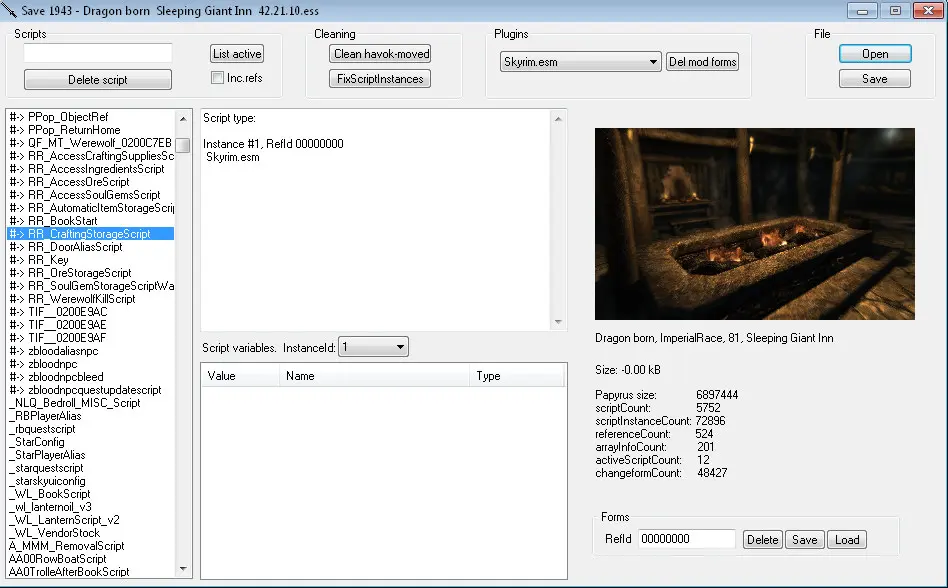
🔍 Analysis
- 👍 5.4% endorsement rate — high engagement, a strong quality signal
- 🏆 #13 of 85 Utilities mods in this game by downloads
📋 About This Mod
My personal tool, i share it here, if you can have use for it.
Always create a backup for you save, before using this!
Need a editor, that supports new string count format by Crash fixes? SkyrimTools by Mark Fairchild
In case that you antivirus doesn't like a file: It seems like antiviruses often gives a false alarms for files written on certain tools/programming languages, and that seems to happen for this tool. So, it's possible, that your antivirus program goes mad, when you downloaded this.
This program is created using RosAsm, so source is included in .exe file. Available in misc files too. Be free to edit it as you wish.
How to use it?
1. Click open, choose a save game file.
2. Click "FixScriptInstances", it removes all orphan script instances.
3. This is optional, and not compatible with all mods. Click a Delete all #
4. Push save or save as button. Make sure you have backups for both savename.ess and savename.skse (if its installed). Load a save in the game, and save it again. Now it should be fully cleaned. Re-saving removes script names etc.
Auto backup, if on,(default) creates a backup from your save, named as backup-date-time.ess and backup-date-time.skse. In versions 2. 00< only savename.ess backup is created.
"Clean other" this cleans orphan array7 items + visited worldspace array items having a formId 0. "Clean formlists" removes all form lists items with refId 0.
Dont use "Inc.refs", unless you know what forms it deletes!
Game crashes when saving a cleaned save? Here's how awjnash got it to work: I was having an issue where whenever my game saved it instantly crashed to the desktop (CTD). This is what worked for me:
1) Be very careful here! I used this Skyrim utility, version 2. 06 BETA. However, I did not use any of the advanced options and did not click the " Delete # " button. Also, I made sure that I check-marked the " Create Backup " check-box before I saved just in case things went bad! You never know!
2) I deleted old game saves that I no longer needed. This is also good for your PC overall because it frees up hard-drive space! Your Skyrim game saves are located in a folder found in Windows: Documents>My Games>Skyrim>Saves. Be very careful here not delete game saves that you actually still want to load or use! I would leave yourself about 5 to 10 recent game saves just in case one becomes corrupt or something. You never know! An
Save game script cleaner is a utility tool for Skyrim that removes selected Papyrus scripts from save game files. With over 43,000 endorsements and 800,000 downloads, it's a proven solution for fixing bloated or corrupted saves. Last updated in 2015, it remains a go-to for modders dealing with script-related issues.
✨ Key Features
📊 Pros & Cons
✅ Pros
- Massive community trust — 43k endorsements and 800k downloads prove it works
- Essential for fixing script bloat that causes lag and crashes
- Simple tool with a clear purpose: clean your save, save your game
⚠️ Cons
- Last updated in 2015 — may not support the latest Skyrim Special Edition or Anniversary Edition
- No detailed instructions provided — you'll need to know which scripts to remove
- Removing the wrong scripts can break your save, so it's not for careless users
For Skyrim modders who have heavily modded playthroughs and encounter save bloat or script-related issues. Also for players who want to clean up orphaned scripts after uninstalling mods. Skip if you're on a vanilla playthrough or don't understand Papyrus scripts.
💡 Beginner Tips
- Always back up your save file before cleaning — this tool is powerful and irreversible
- Identify which mods you've uninstalled and remove their leftover scripts specifically
- Use a save cleaner like this after uninstalling script-heavy mods to prevent bloat
📊 Mod Details
- Game
- Skyrim LE Mods
- Author
- Hadoram
- Version
- 2.06
- Downloads
- 803,468
- Endorsements
- 43,335
- Category
- Utilities
- Created
- 3/23/2014
- Updated
- 9/10/2015
🔧 How to Install Skyrim LE Mods
Download from Nexus.
📖 Full step-by-step install guide for Skyrim LE →
Visit the official mod page for specific installation instructions for this mod.
🎮 Need cheat codes or console commands? Check ur gaming wiki for Skyrim LE commands, item IDs, and more.
Keep browsing — more Skyrim LE mods await