Real Days and Months
⚪ Last updated 2011⚠️ Install Order · 3 steps
Install in this order, then this mod last — most mods fail to load without their framework and dependencies in place.
Preview
🔍 Analysis
- 👍 6.3% endorsement rate — high engagement, a strong quality signal
- 🏆 #53 of 57 User Interface mods in this game by downloads
📋 About This Mod
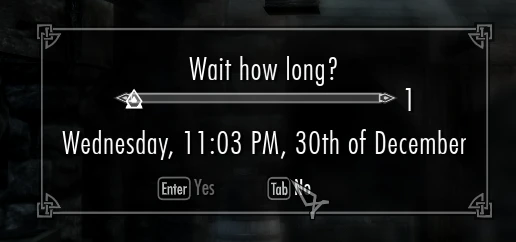
~A Skyrim remake of my popular Oblivion mod, \"Real Days and Months\", which adds the real days and months on the sleep/wait menu. ~Installation 1. Extract the files to a temporary location. 2. Examine the folder structure and make corrections where necessary. 3. Copy files to (install folder) your Skyrim Data folder. 4. Start Skyrim Launcher, click \'Data Files\', place a checkmark beside the .esp file \"Real Days.esp\" and \"Real Months.esp\". ~Uninstallation 1. Start Skyrim Launcher, click Data Files, uncheck the .esp file(s). 2. Delete the files/folders associated with the mod: a. \"Real Days.esp\" b. \"Real Months.esp\" ~Incompatibility None known, except for other mods that change the days/months. ~Known Issues or Bugs None known. If any more are found, please tell me on the comments! ~LoganZezima IF YOU LIKE THIS MOD, PLEASE ENDORSE IT AND COMMENT! THANK YOU!
Real Days and Months is a Skyrim UI mod that replaces the generic day and month names on the sleep/wait menu with real-world ones. It's a simple quality-of-life improvement for players who want more immersive timekeeping. With 874 endorsements and 13,885 downloads, it's a well-received classic from 2011.
✨ Key Features
📊 Pros & Cons
✅ Pros
- Community favorite with 874 endorsements and nearly 14k downloads
- Simple and effective—does exactly what it says without bloat
- Works for immersion lovers who want realistic time tracking
⚠️ Cons
- Last updated in 2011—may not be compatible with Skyrim Special Edition or Anniversary Edition without patches
- Only affects the sleep/wait menu, so don't expect changes elsewhere
For Skyrim players who care about immersion and want the in-game calendar to match the real world. Perfect for roleplayers who track time for mods like needs or survival. Skip if you're on Special Edition or want more than a tiny UI tweak.
💡 Beginner Tips
- If you're on Skyrim Special Edition, check if there's a port or use a mod manager to convert the oldrim file—it might still work but test it.
- This mod only changes the sleep/wait menu, so don't be alarmed if other UI elements stay the same.
- Since it's from 2011, load it early in your load order to avoid conflicts with other UI mods.
📊 Mod Details
- Game
- Skyrim LE Mods
- Author
- LoganZezima
- Version
- 1.0
- Downloads
- 13,885
- Endorsements
- 874
- Category
- User Interface
- Created
- 12/1/2011
- Updated
- 12/1/2011
🔧 How to Install Skyrim LE Mods
Download from Nexus.
📖 Full step-by-step install guide for Skyrim LE →
Visit the official mod page for specific installation instructions for this mod.
🎮 Need cheat codes or console commands? Check ur gaming wiki for Skyrim LE commands, item IDs, and more.
Keep browsing — more Skyrim LE mods await