Quest Eraser -- Remove Quest Objectives from Your Journal
⚪ Last updated 2013⚠️ Install Order · 4 steps
Install in this order, then this mod last — most mods fail to load without their framework and dependencies in place.
Preview
🔍 Analysis
- 👍 6.7% endorsement rate — high engagement, a strong quality signal
- 🏆 #3 of 31 Quests and Adventures mods in this game by downloads
📋 About This Mod
UPDATE: You can now pick and choose which quest objectives to remove from your journal.
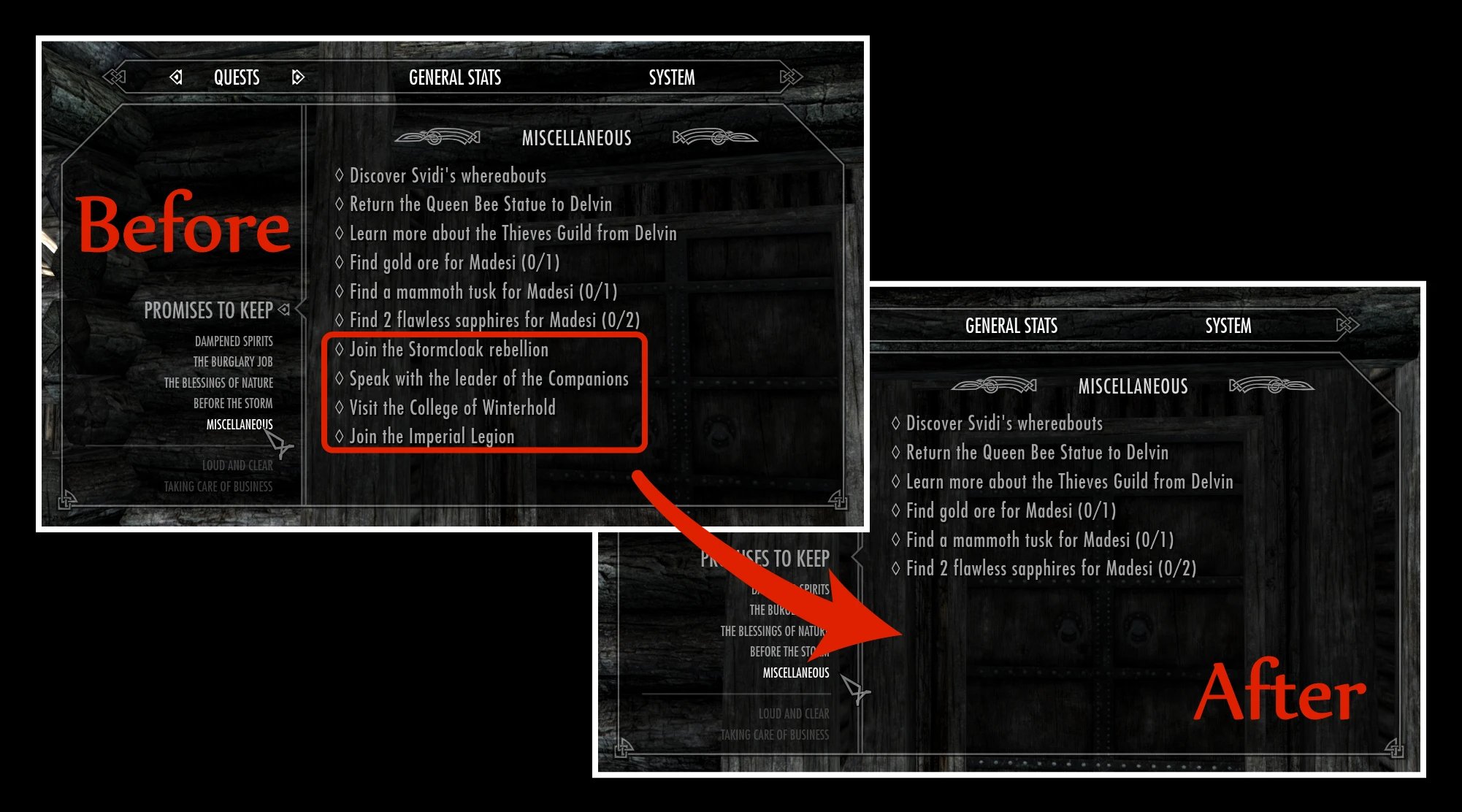
This mod will remove various quest objectives from your journal.
This mod does NOT delete the actual quests from the game. You can still choose to complete the quests even after you've removed the objectives from your journal.
This mod was designed primarily for use with The Choice Is Yours in order to remove quest objectives that may already be present in your journal prior to installing The Choice is Yours. However, this mod can be used alone if desired.
The activator is located inside the Drunken Huntsman in Whiterun. Look for the ledger book underneath the stairs.
When activated, certain quest objectives will be removed from your journal. You are given the option to remove all of the qualifying quest objectives or to remove only some of them. Even if you choose "ALL," the Quest Eraser will only remove specific quest objectives, not every single quest in your journal. If you choose "SOME," then you will see a series of message boxes asking you whether your would like to remove specific quest objectives from your journal.
This mod does not prevent you from getting quest objectives. It simply removes them after they have appeared in your journal. Use The Choice Is Yours if you wish to prevent rumors and gossip from automatically triggering quests.
Once again, you can still complete any of these quests even after you've removed the objectives from your journal.
The quest objectives removed by this mod are:
- []Talk to Aventus Aretino
[
]Join the Stormcloak Rebellion[]Join the Imperial Legion
[]Investigate the Bards College
[]Visit the College of Winterhold
[]Speak with the leader of the Companions
[]Visit the Shrine of Azura
[]Speak to Sinding
[]Ask about Balgruuf's strange children
[]Go to the Shrine of Talos
[]Talk to Danica about the Gildergreen being destroyed
[]Speak to Lod
[]Talk with Barbas
[]Investigate the man wandering the streets near the Bards College
[]Investigate the Boethiah cultist
[]Find the shrine of Boethiah
[]Find the cult of Boethiah
[]Visit the museum in Dawnstar
[]Speak to Silus inside his house
[]Speak to the witchhunter about the abandoned house
[]Speak to Verulus about the Hall of the Dead
[]Speak to Degaine
[]Find Kesh at the Peryite Shrine
[]Participate in a drinking contest with Sam Guenvere
[]Speak to Falion
Included in Version 1. 1:
[]Find the Redguard woman
[]Identify Riften's skooma dealer
[]Listen to Ja
Quest Eraser lets you remove specific quest objectives from your journal, designed to pair with The Choice Is Yours. With over 3,300 endorsements and 50,000 downloads, it's a proven tool for Skyrim players who want to clean up their quest log and tailor their experience.
✨ Key Features
📊 Pros & Cons
✅ Pros
- Community favorite with 3,377 endorsements and 50,439 downloads
- Pairs perfectly with The Choice Is Yours for a streamlined quest experience
- Gives you full control over your journal clutter
⚠️ Cons
- Last updated in 2013 — may have compatibility issues with current Skyrim versions
- Requires The Choice Is Yours to work as intended, so it's not standalone
- No detailed instructions or feature list provided by the author
For Skyrim players who use The Choice Is Yours and want to fine-tune their journal by removing specific quest objectives. Skip if you don't use that mod or prefer a more automated quest management solution.
💡 Beginner Tips
- Make sure you have The Choice Is Yours installed first, as Quest Eraser is designed to work alongside it.
- Use a mod manager like Vortex or Mod Organizer 2 to keep track of your load order and avoid conflicts.
- Test the mod on a new save or after a clean save to ensure journal entries are removed as expected.
📊 Mod Details
- Game
- Skyrim LE Mods
- Author
- kryptopyr
- Version
- 1.15
- Downloads
- 50,439
- Endorsements
- 3,377
- Category
- Quests and Adventures
- Created
- 11/10/2012
- Updated
- 1/2/2013
🔧 How to Install Skyrim LE Mods
Download from Nexus.
📖 Full step-by-step install guide for Skyrim LE →
Visit the official mod page for specific installation instructions for this mod.
🎮 Need cheat codes or console commands? Check ur gaming wiki for Skyrim LE commands, item IDs, and more.
Keep browsing — more Skyrim LE mods await