MultiXwm
⚪ Last updated 2014⚠️ Install Order · 3 steps
Install in this order, then this mod last — most mods fail to load without their framework and dependencies in place.
Preview
🔍 Analysis
- 👍 5.8% endorsement rate — high engagement, a strong quality signal
- 🏆 #52 of 85 Utilities mods in this game by downloads
📋 About This Mod
Raxdiam took over developpement of Multixwm You can download it on the Fallout 4 nexus : http://www.nexusmods.com/fallout4/mods/3663/
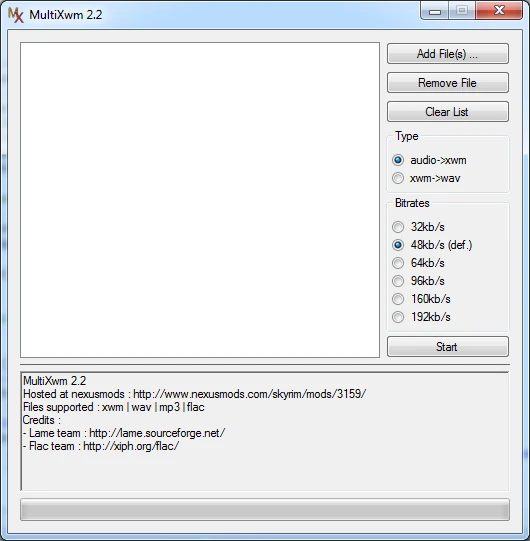
This program lets you convert multiples WAV and MP3 files into XWM files in one go. I saw in the forum that some people requested something like that, there's a batch out but I just went with it. The converted files are in the /output folder. Files types supported : xwm, wav, mp3, flac. ogg will come eventually. Windows only, also please guys, extract the zip before running the program.
UPDATES 2014-08-18 : As I don't really have the time to update this anymore, I've released the source files for 2. 3. It's kind of a mess of a code, but if anyone wants to take a shot a it, just do it! You can assume 2. 3 as the final release from me and it most likely won't be updated anymore. You can also check out some other converter like : Xwm Ninja : http://www.nexusmods.com/skyrim/mods/53132 Skyrim Audio Converter : http://www.nexusmods.com/skyrim/mods/8303/
v2. 3 : this should fix ERROR_PATH_NOT_FOUND errors, it was a quirck in how C# handle the current folder v2. 2 : fixed some stuff and added flac support v2. 1 : fixed extension bug and made progress bar working v2. 0 : ported code to c# and fixed bugs, it should work correctly now, errors messages should be more to the point too. You might need . NET runtimes to run it. v1. 3 : added bitrates options, those are the ones documented in xWMAEncode, any other value i tried failed v1. 2 : fixed clear list button and added mp3 support v1. 1 : added an option to convert xwm back to wav
BUGS - It doesn't support utf8 named files or paths. That include japanese, chinese, russian, arabic characters (and a whole bunch of other). Rename your files to latin characters before converting them and put the program in a folder where there aren't any utf8 characters too (like in C:multixwm). I'll get around to fix that eventually.
MultiXwm is a utility mod that converts multiple audio files to the xwm format, a common need for modding games like Skyrim. With 8,829 endorsements and 151,973 downloads, it's a popular tool despite its last update in 2014. It's a straightforward batch converter for modders who need to process audio files efficiently.
✨ Key Features
📊 Pros & Cons
✅ Pros
- Community staple for audio conversion (8,829 endorsements)
- Batch conversion saves time when processing many files
- Proven track record with 151,973 downloads
⚠️ Cons
- Last updated in 2014 – may not support newer audio formats or game versions
- No detailed documentation provided in the description
- Requires manual setup – no installer or mod manager integration mentioned
For modders who need to convert audio files to xwm for games like Skyrim or Fallout. If you're working with custom sounds or music, this tool is essential. Skip if you don't mod audio or use games that don't require xwm.
💡 Beginner Tips
- Make sure your source audio files are in a compatible format (like wav or mp3) before converting.
- Test a single file first to ensure the output works in your game before batch converting.
- Keep the original audio files backed up in case you need to reconvert with different settings.
📊 Mod Details
- Game
- Skyrim LE Mods
- Author
- Vikichan
- Version
- 2.3
- Downloads
- 151,973
- Endorsements
- 8,829
- Category
- Utilities
- Created
- 12/9/2011
- Updated
- 8/18/2014
🔧 How to Install Skyrim LE Mods
Download from Nexus.
📖 Full step-by-step install guide for Skyrim LE →
Visit the official mod page for specific installation instructions for this mod.
🎮 Need cheat codes or console commands? Check ur gaming wiki for Skyrim LE commands, item IDs, and more.
Keep browsing — more Skyrim LE mods await