Bellyaches HD Dragon Replacer Pack
⚪ Last updated 2013⚠️ Install Order · 3 steps
Install in this order, then this mod last — most mods fail to load without their framework and dependencies in place.
Preview
🔍 Analysis
- 👍 4.1% endorsement rate — high engagement, a strong quality signal
- 🏆 #59 of 453 Models and Textures mods in this game by downloads
📋 About This Mod
WRf5MqhOgg0 Not my ENB. Primary screenshots taken with vanilla lighting
Screenshots are welcome!
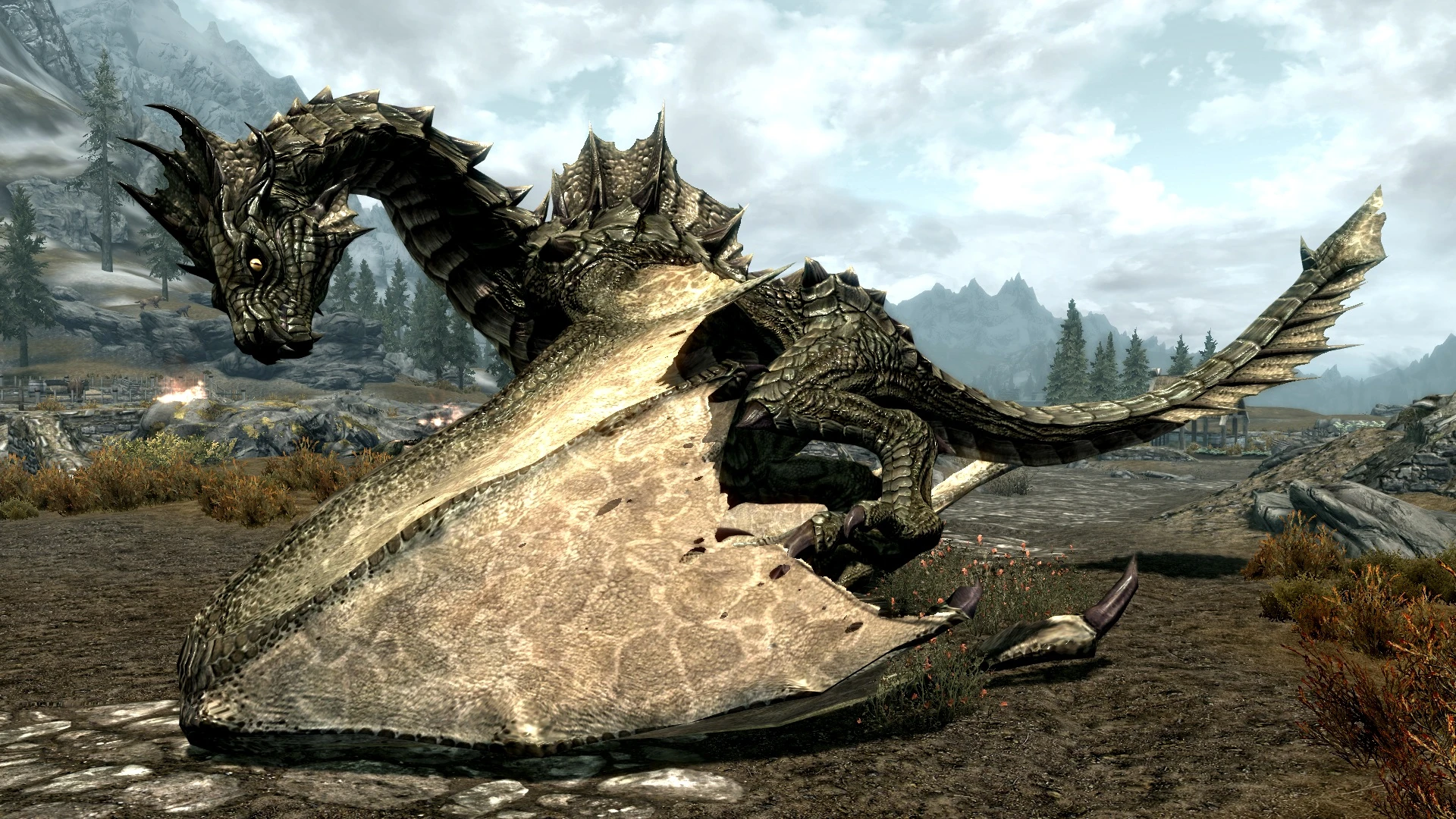
Bethesda's HD DLC made most dragons look better, but by no means great. Skyrim uses the same size textures for its massive dragon models as it does for suits of armor. Besides that, there are a LOT of minor issues with the textures and the meshes themselves... Mis-matched horn colors, awful eye textures, desaturated coloring, bland details, low-resolution translucent files, seam issues galore, and a very strange "grease-like" look applied to several of the dragon meshes.
What does this all mean? Dragons look fine from a distance, but fairly awful up close.,, Well no more! What started as a re-work of Odahviing turned into a full pass on each of the ten dragons in Skyrim and it's DLC's. The amount of changes on each dragon type varies, with some needing more work than others. Regardless, Bellyache & I visually inspected each texture/mesh with a microscope to correct as much as humanly possible within a timely manner. At least without completely reworking Bethesdas work from scratch.
Improvements over the official High-Definition Texture-Pack:
Coloring looks more natural and less desaturated and washed out than before. Many horns/spines were poorly colored or completely the wrong color. Fixed/Reduced as many bad texture & mesh seams as possible. Removed or significantly reduced the 'Grease-like' look on some dragon models, which exacerbated seam issues further. Odahviing's gotten a facelift. He was completely missing an eye texture, coloring was terrible (he was pink), and corrected several seams. Blood Dragon was just plain ugly. Fixed the Alpha-channel, gave it eyes that don't look like a frog, and introduced some yellow coloring in the wings and membranes for added contrast & detail. Alduin is slightly darker and completely grey-scale, enhancing his stylized theme that is inspired from volcanic rock & glass. Completely new eye texture for most dragon types. The Ancient Dragon never had a high-resolution texture, it does now. Increased resolution of the translucent file for the various dragon wings, creating exponentially higher detail within the wing membranes. Changed the color of the mouth/gums from a strange purple to a more natural pink, filled in some ugly holes where teeth apparently used to be. We tried to fix up the Revered, Serpentine, and Legendary Dragons from DLC's... But they're bad, even after the final HD DLC update, it didn't help very much.
Installation*
Nexus Mod Manager - Download and &
Bellyaches HD Dragon Replacer Pack remasters the textures for all ten dragon types in vanilla Skyrim, Dragonborn, and Dawnguard. It's a classic, highly endorsed mod (30,369 endorsements) that improves visual fidelity without altering gameplay. Last updated in 2013, it remains a popular choice for Skyrim players seeking enhanced dragon appearances.
✨ Key Features
📊 Pros & Cons
✅ Pros
- Massive community trust with 30,369 endorsements and over 733k downloads
- Improves the look of every dragon in the game, making encounters more epic
- Works with the base game and both major DLCs, so it's a one-stop visual upgrade
⚠️ Cons
- Last updated in 2013, so it may not be optimized for the Special Edition or Anniversary Edition without manual conversion
- Texture replacer only — if you're looking for new dragon models or behaviors, this won't add them
For Skyrim players who want a quick, lore-friendly visual upgrade to dragons without touching gameplay. Perfect for those who appreciate classic mods and don't mind a bit of manual setup. Skip if you're on Special Edition and expect a plug-and-play install, or if you want new dragon types.
💡 Beginner Tips
- If you're on Skyrim Special Edition, you may need to convert the textures using Cathedral Assets Optimizer or find a ported version.
- Place the textures in your Data folder or use a mod manager like Vortex or Mod Organizer 2 to keep your setup clean.
- Load order doesn't matter for texture replacers, but ensure no other mod overwrites these files if you want the intended look.
📊 Mod Details
- Game
- Skyrim LE Mods
- Author
- Wrig675
- Version
- 1.3
- Downloads
- 733,219
- Endorsements
- 30,369
- Category
- Models and Textures
- Created
- 1/8/2013
- Updated
- 5/27/2013
🧩 Commonly Used Together
Users add these mods to the same collections — a real compatibility signal, not an AI guess.
🔧 How to Install Skyrim LE Mods
Download from Nexus.
📖 Full step-by-step install guide for Skyrim LE →
Visit the official mod page for specific installation instructions for this mod.
🎮 Need cheat codes or console commands? Check ur gaming wiki for Skyrim LE commands, item IDs, and more.
Keep browsing — more Skyrim LE mods await