Alternate Book Fonts
⚪ Last updated 2011⚠️ Install Order · 3 steps
Install in this order, then this mod last — most mods fail to load without their framework and dependencies in place.
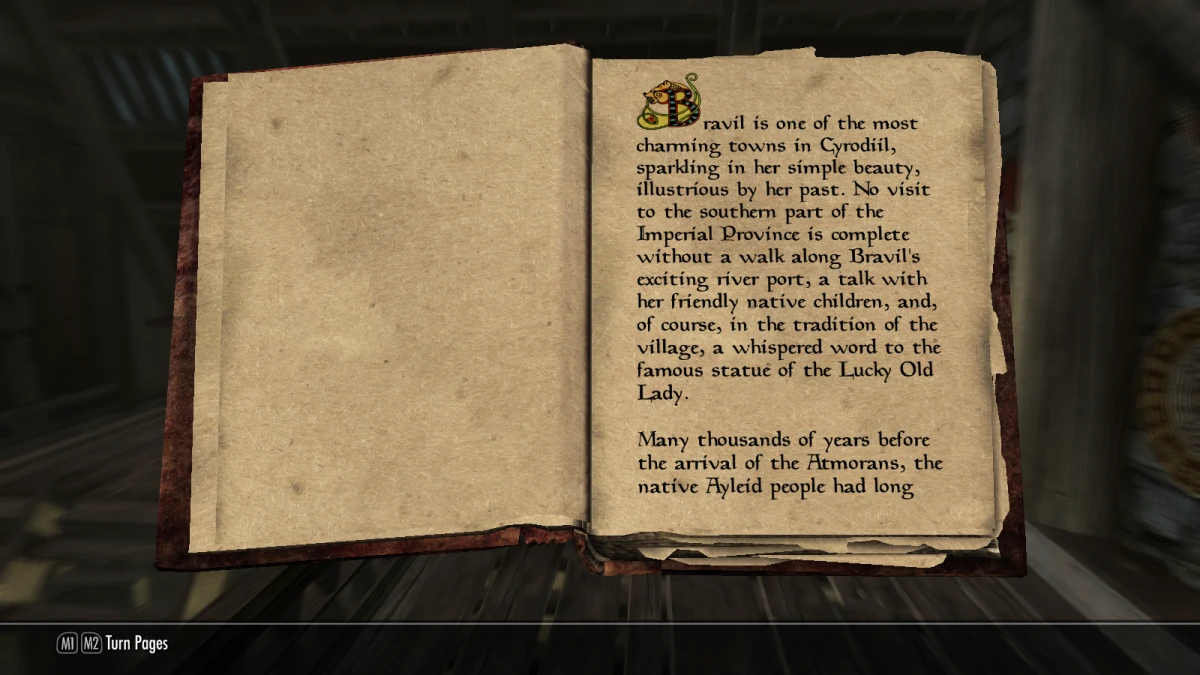
Preview
🔍 Analysis
- 👍 5.5% endorsement rate — high engagement, a strong quality signal
- 🏆 #27 of 57 User Interface mods in this game by downloads
📋 About This Mod
This mod is no longer supported.
I'm leaving the files up for whoever wants them, as they won't ruin your game or anything, but there are better alternatives out there. If you're installing things manually, remember to back up the files it overwrites.
━━━━━━━━━━━━━━━━━━━━━━━━━━━━I love reading the in-game books, but find the default font used difficult to read at times. While at first I only uploaded Planewalker, I don't see anything wrong with including a few more. If you have any suggestions please let me know, I won't promise to add all of them but I am curious to see what others want. Note that I'm only going to add fonts whose licensing allows it.
Current fonts available:
Old Typefaces
Planewalker
If the font you want isn't up here and its licensing doesn't allow for conversion, you can do it yourself. Using the sIRF Generator (http://www.sifrgenerator.com/), you can convert ttf font files to swf files, which the game can use. Note that some fonts may not have all the characters necissary, and I've found that some don't work even if they do though I can't figure out why. After this, you need to edit the file 'fontconfig.txt' in your interface folder like so:
Add the following line:
fontlib "Interface\yourfontname.swf"
And change the following line:
map "$SkyrimBooks" = "SkyrimBooks_Gaelic" Normal
map "$SkyrimBooks" = "yourfontname" Normal
Obviously, replace yourfontmane with whatever you called the swf file.
If you're using another mod that edits fonts, you'll likely have to edit the fontconfig.txt as shown above.
Screenshots also show the book texture from Realistic Paper (http://www.skyrimnexus.com/downloads/file.php?id=937), which I highly recommend.
Alternate Book Fonts is a UI mod for Skyrim that replaces the default book fonts with Planewalker, the font used on Magic: The Gathering cards in Morrowind. With 951 endorsements and over 17,000 downloads, it's a popular choice for players seeking a nostalgic or distinct look for in-game books. Last updated in December 2011, it remains a simple cosmetic tweak.
✨ Key Features
📊 Pros & Cons
✅ Pros
- Community favorite with 951 endorsements and over 17,000 downloads—clearly a well-liked mod.
- Gives your books a distinct, card-game aesthetic that stands out from the vanilla look.
- Lightweight and focused—does exactly one thing without bloating your load order.
⚠️ Cons
- Last updated in December 2011—likely hasn't been tested with Skyrim Special Edition or Anniversary Edition, so compatibility is a gamble.
- Only changes book fonts—if you're looking for a broader UI overhaul, this won't scratch that itch.
For Skyrim players who want a nostalgic nod to Morrowind or a unique, card-inspired look for in-game books. Perfect for lore enthusiasts and collectors who read every book they find. Skip if you prefer vanilla fonts or want a more comprehensive UI change.
💡 Beginner Tips
- Since the mod is from 2011, check if it works with your Skyrim version—if you're on Special Edition, you may need to manually extract and place the font files.
- Use a mod manager like Vortex or Mod Organizer 2 to install and easily disable if you want to revert.
- If the font doesn't appear in-game, verify the mod's files are in the correct Data folder and that your load order isn't overriding them.
📊 Mod Details
- Game
- Skyrim LE Mods
- Author
- evercharmer
- Version
- 1.0
- Downloads
- 17,237
- Endorsements
- 951
- Category
- User Interface
- Created
- 12/20/2011
- Updated
- 12/21/2011
🔧 How to Install Skyrim LE Mods
Download from Nexus.
📖 Full step-by-step install guide for Skyrim LE →
Visit the official mod page for specific installation instructions for this mod.
🎮 Need cheat codes or console commands? Check ur gaming wiki for Skyrim LE commands, item IDs, and more.
Keep browsing — more Skyrim LE mods await