Lin-Z, Play My Favorite Songs
⚪ Last updated 2024Preview
🔍 Analysis
- 👍 0.0% endorsement rate
- 🏆 #67 of 421 Gameplay mods in this game by downloads
📋 About This Mod
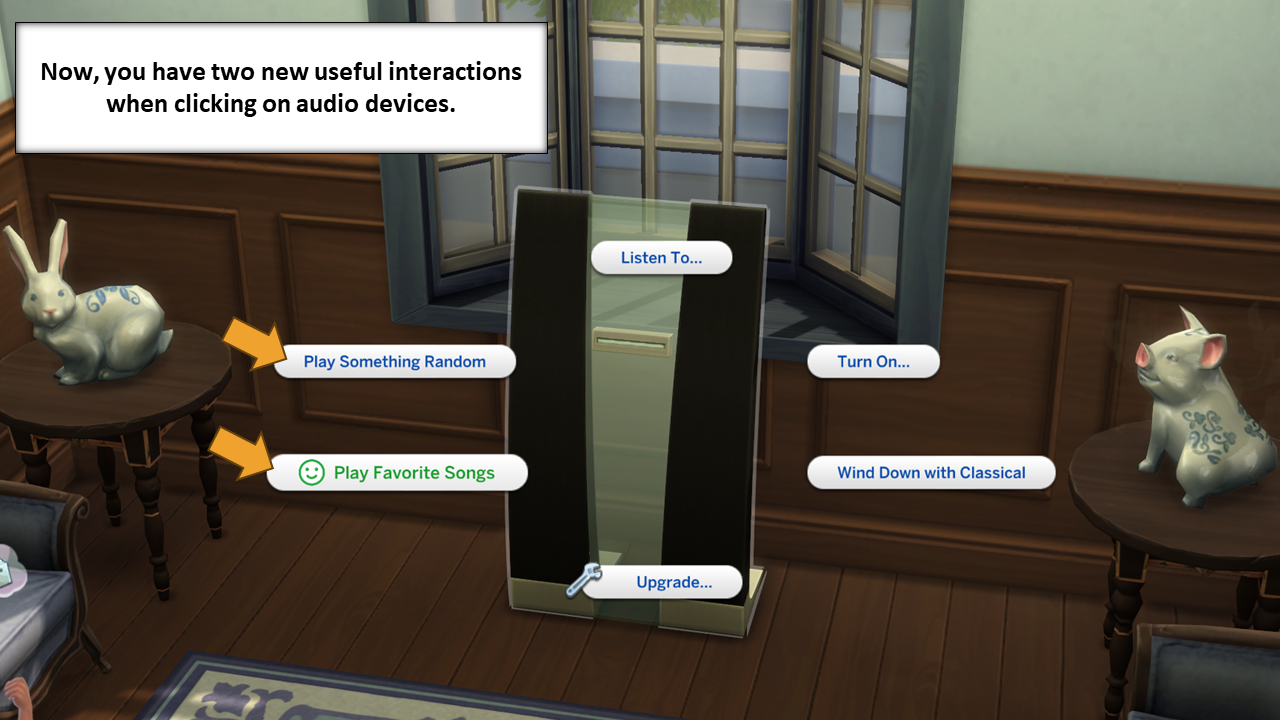
Description: If you like me and always forget what music genres your sims like, this mod is made for you. As you can see in the picture below, after installing this mod, you will be able to command a sim to listen to the music genre they like in any stereo device with just one click. Plus, you can also command them to listen to a random music among all genres available. Overrides, Compatibilities, and Dependencies: This mod doesn t override anything. So, it s (probably) compatible with any other mod. You don t need any Kits, Expansion, Game, or Stuff Packs to use this mod. IMPORTANT : This mod requires Scumbumbo s XML Injector Script Mod to work. If you don t have it, you can download it from his Memorial webpage (see the link below). You only need the script mod (the .package file isn t necessary). https://www.curseforge.com/sims4/mods/xml-injector Translations: At this moment, this mod is only available in the following languages: English So, when using the game in another language, some parts (that use text from the game) may appear in the desired language. Still, some text (those included by this mod) will appear in English. Feel free to translate this mod. If you contact me, I can put a link to your translation on this page. How to install: Just put the ".package" file in the mods folder (generally at this address ...\Documents\Electronic Arts\The Sims 4\Mods). If you want the control autonomy buttons to be hidden under shift click + "testingcheats true", you should download only the file at the Additional Files Tab. Acknowledgments: Sims 4 Studio Team Scumbumbo Triplis Changelog: FIX: Make the mod to work again. BUG FIX: Sims will no longer reset after telling Lin-Z to play something random. BUG FIX: Sims will no longer try to listen to two genres at same time!
Lin-Z, Play My Favorite Songs is a gameplay mod that lets you command Sims to listen to their favorite songs with a single click. It has 4,316 downloads but no endorsements, and was last updated in August 2024. The description is minimal, so details on functionality are limited.
✨ Key Features
📊 Pros & Cons
✅ Pros
- One-click action makes it super convenient to queue up music for your Sims.
- Taps into existing Sim preferences, so it feels natural in gameplay.
- Decent download count (4,316) suggests some community interest.
⚠️ Cons
- Zero endorsements might mean it's untested or has issues.
- Last updated in August 2024—could be outdated for newer game patches.
- No detailed description, so you're flying blind on features and compatibility.
This is for Sims players who want more control over their Sims' music listening habits without micromanaging. If you enjoy adding small quality-of-life tweaks to your gameplay, this could be a neat addition. But if you're looking for a polished, well-documented mod, you might want to look elsewhere.
💡 Beginner Tips
- Check if your game version is compatible with the mod's last update date.
- Test the mod in a spare save to see if it works as expected before adding to your main game.
- Look for any additional files or instructions in the mod's download folder.
📊 Mod Details
- Game
- Sims 4 Mods
- Author
- FDSims4Mods
- Version
- FD_LinZPlayMyFavoriteSongs_v1.03
- Downloads
- 4,316
- Endorsements
- 0
- Category
- Gameplay
- Created
- 1/24/2024
- Updated
- 8/11/2024
🔧 How to Install Sims 4 Mods
Drop .package files into Mods folder.
📖 Full step-by-step install guide for Sims 4 →
Visit the official mod page for specific installation instructions for this mod.
🎮 Need cheat codes or console commands? Check ur gaming wiki for Sims 4 commands, item IDs, and more.
Keep browsing — more Sims 4 mods await