RE4 Overlay and Cheat Utils
⚪ Last updated 2023Preview
🔍 Analysis
- 👍 3.0% endorsement rate — high engagement, a strong quality signal
- 🏆 #4 of 49 UI mods in this game by downloads
📋 About This Mod
Source GitHub repo for dev version: https://github.com/lingsamuel/RE4_Overlay
RE4 Overlay
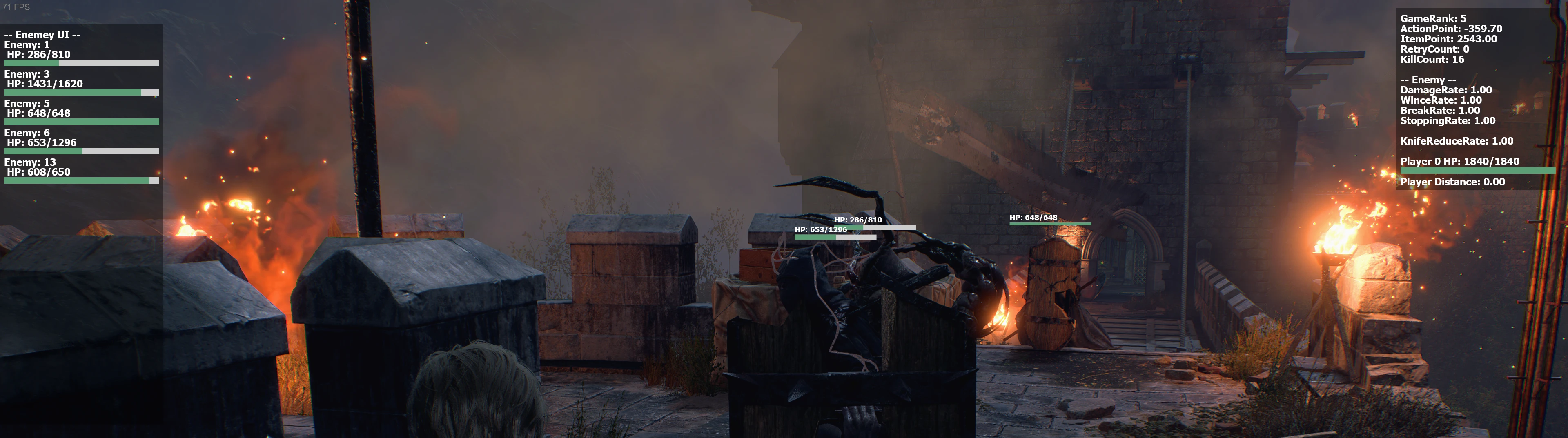
Display dynamic game rank and enemy stats, display floating HP bar, cheat utils (full HP, no hit mode, edit PTAs, edit action point, edit item point, infinite items, disable enemy attack, skip CG and radio message, gacha charm prediction), manual save, etc.
Installation:
-
[]Install REFramework and REFramework Direct2D. They are requirements.
[
]Put the file to reframework/autorun. The final path should be "RESIDENT EVIL 4 BIOHAZARD RE4\reframework\autorun\RE4_Overlay.lua"├── dinput8.dll
├── re4.exe
├── reframework
│ ├── autorun
│ │ ├── RE4_Overlay.lua
│ │ └── reframework-d2d.lua
│ └── plugins
│ └── reframework-d2d.dll
Configuration:
-
[]Open the REFramework menu by press the Insert key.
[
]Open "Script Generated UI > RE4 Overlay" - Do anything you want.
Manual Save:
"Script Generated UI > RE4 Overlay > Save Management"
You need to save at least once every time you restart the game or reset the script to enable this feature. (due to some technical limitation)
This feature is considered to be dangerous. Backup your saves!
Manual save sometimes doesn't inc the Save Counter in some area, sometimes the counter +1 normally, I guess that's because the player is near a save point (typewriter or auto save point), not sure.
But a successful save will always change the "Last modified timestamp" field.
Known Issues:
- Skip Radio will break merchant unlock and new map marker. I have tried many many many different approaches and none of them can do the trick. In the foreseeable future, I won't focus on this issue.
- With "Infinite Item" enabled, you shouldn't pick up items that will exceed the max stack size, otherwise the game will have some unexpected behaviors.
-
[]Open the REFramework menu by press the Insert key.
RE4 Overlay and Cheat Utils is a lightweight UI mod for Resident Evil 4 (2023) that adds an overlay, cheat utilities, and manual save support. Originally built for speedrunning, it remains in active development. With 1,275 endorsements and 42,056 downloads, it's a popular tool for players seeking enhanced control and convenience.
✨ Key Features
📊 Pros & Cons
✅ Pros
- Solid community backing with 1,275 endorsements and over 42k downloads
- Manual save support is a lifesaver for speedrunners and players who want control
- Active development means new features and fixes are likely on the way
⚠️ Cons
- Still in development, so expect bugs and incomplete features
- Cheat utilities might break with future game updates
- Overlay could conflict with other UI mods or anti-cheat systems
For RE4 remake speedrunners who need manual saves and a clean overlay for timing. Also for players who want cheat options for testing or casual fun. Skip if you're strictly vanilla or worried about mod stability.
💡 Beginner Tips
- Since it's a UI mod, use a mod manager like Fluffy Mod Manager to keep it organized and easy to toggle.
- If you're on PC, make sure to disable any anti-cheat or play offline to avoid issues with cheat utilities.
- Check the mod page regularly for updates, as the author is actively developing and may add new features.
📊 Mod Details
- Game
- Residentevil42023 Mods
- Author
- lingsamuel
- Version
- 0.7.0
- Downloads
- 42,056
- Endorsements
- 1,275
- Category
- UI
- Created
- 3/25/2023
- Updated
- 9/27/2023
🔧 How to Install Resident Evil 4 (2023) Mods
Download from Nexus Mods.
📖 Full step-by-step install guide for Resident Evil 4 (2023) →
Visit the official mod page for specific installation instructions for this mod.
🎮 Need cheat codes or console commands? Check ur gaming wiki for Resident Evil 4 (2023) commands, item IDs, and more.
Keep browsing — more Resident Evil 4 (2023) mods await