Health Bars
⚪ Last updated 2024Preview
🔍 Analysis
- 👍 3.3% endorsement rate — high engagement, a strong quality signal
- 🏆 #1 of 49 UI mods in this game by downloads
📋 About This Mod
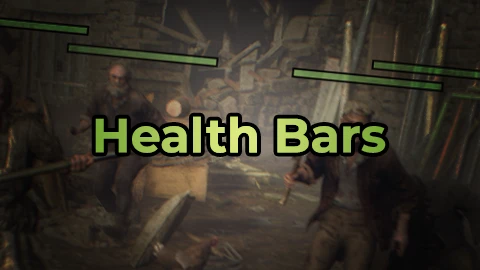
Overlay mod for that draws health bars on top of enemies' heads.
I highly recommend to NOT use this mod during the first playthrough because it will ruin the intended experience.
If you like my mods, please consider making a small donation! That would be very helpful for me to maintain existing mods and create new ones in the future!
Suggestion: Try it in a combination with another of my mods: Damage Numbers! For the full "Modern Gaming Experience" xD
Links:
Buy Me a Tea
Requirements:
-
[]REFramework (Nightly v1. 5. 4 or above);
[
]REFramework Direct2D (v1. 0. 1 or above) - Optional, makes bar outline thickness work. Without it the thickness will always be 1 pixel. Required for Chinese localization to work.How to install:
-
[]Install REFramework;
[
]Install REFramework Direct2D;Windows: Works normally.
Linux: Latest Experimental Proton seems to have it working normally as well (cursey/reframework-d2d#5).
Steam Deck: I've seen people getting it working but I don't have the exact instructions.
You will have to figure it out yourself and/or search the nexus pages for information (REFramework, REFramework Direct2D).
[]Download the mod;
[]Extract the mod from the archive and place it in Resident Evil 4 folder. Final path should look like this: /RESIDENT EVIL 4 BIOHAZARD RE4/reframework/autorun/Health_Bars.lua
- For customization: press Insert key to open/close REFramework menu, then press Script-generated UI tab, then press Health Bars button.
cursecat - creator of REFramework and REFramework Direct2D.
praydog2 - creator of REFramework.
Coconutat - Simplified Chinese Localization.
-
[]Install REFramework;
Health Bars is a UI overlay mod that draws health bars above enemies' heads, making combat easier to read. With over 5,000 endorsements and 159,000 downloads, it's a popular quality-of-life addition for players who want clear visual feedback during fights.
✨ Key Features
📊 Pros & Cons
✅ Pros
- Huge community trust: 5,185 endorsements and 159k downloads show it's a go-to for many players.
- Simple, focused feature: health bars on enemies' heads—exactly what it says, no bloat.
- Lightweight overlay mod, so it shouldn't tank your FPS or clutter your screen.
⚠️ Cons
- No details on customization—if you want to tweak bar size or color, you might be out of luck.
- Overlay mods can sometimes conflict with other UI mods or HUD tweaks, so watch for clashes.
- Last updated in April 2024—if the game has had patches since, it might need a compatibility check.
For players who struggle to track enemy health in the heat of battle and want a clear, always-on indicator. Also great for streamers or content creators who want viewers to see enemy status at a glance. Skip if you prefer a minimal UI or already use a comprehensive HUD overhaul that includes health bars.
💡 Beginner Tips
- If you're using a mod manager, just drop the file in and enable it—no extra steps needed.
- Check your in-game settings for any UI scale options to make sure the bars align with your resolution.
- Since it's an overlay, make sure to load it after other UI mods to avoid conflicts.
📊 Mod Details
- Game
- Residentevil42023 Mods
- Author
- GreenComfyTea
- Version
- 2.0
- Downloads
- 159,408
- Endorsements
- 5,185
- Category
- UI
- Created
- 3/19/2023
- Updated
- 4/27/2024
🧩 Commonly Used Together
Users add these mods to the same collections — a real compatibility signal, not an AI guess.
🔧 How to Install Resident Evil 4 (2023) Mods
Download from Nexus Mods.
📖 Full step-by-step install guide for Resident Evil 4 (2023) →
Visit the official mod page for specific installation instructions for this mod.
🎮 Need cheat codes or console commands? Check ur gaming wiki for Resident Evil 4 (2023) commands, item IDs, and more.
Keep browsing — more Resident Evil 4 (2023) mods await