Refined Controller Mapping RE4 UHD
⚪ Last updated 2022Preview
🔍 Analysis
- 👍 3.5% endorsement rate — high engagement, a strong quality signal
- 🏆 #19 of 51 Miscellaneous mods in this game by downloads
📋 About This Mod
in my opinion, but I could not stand the button mapping. So I created my own.
I use a LogiTech controller so I'm not sure if the QTE prompts are any different
but my prompts are X, A, L2 and R2. These prompts will not be accurate with
the buttons, BUT, I was surprised to discover that it is much easier.
-
[]Auto Run
[
]Auto Knife Swing[]Easier QTEs
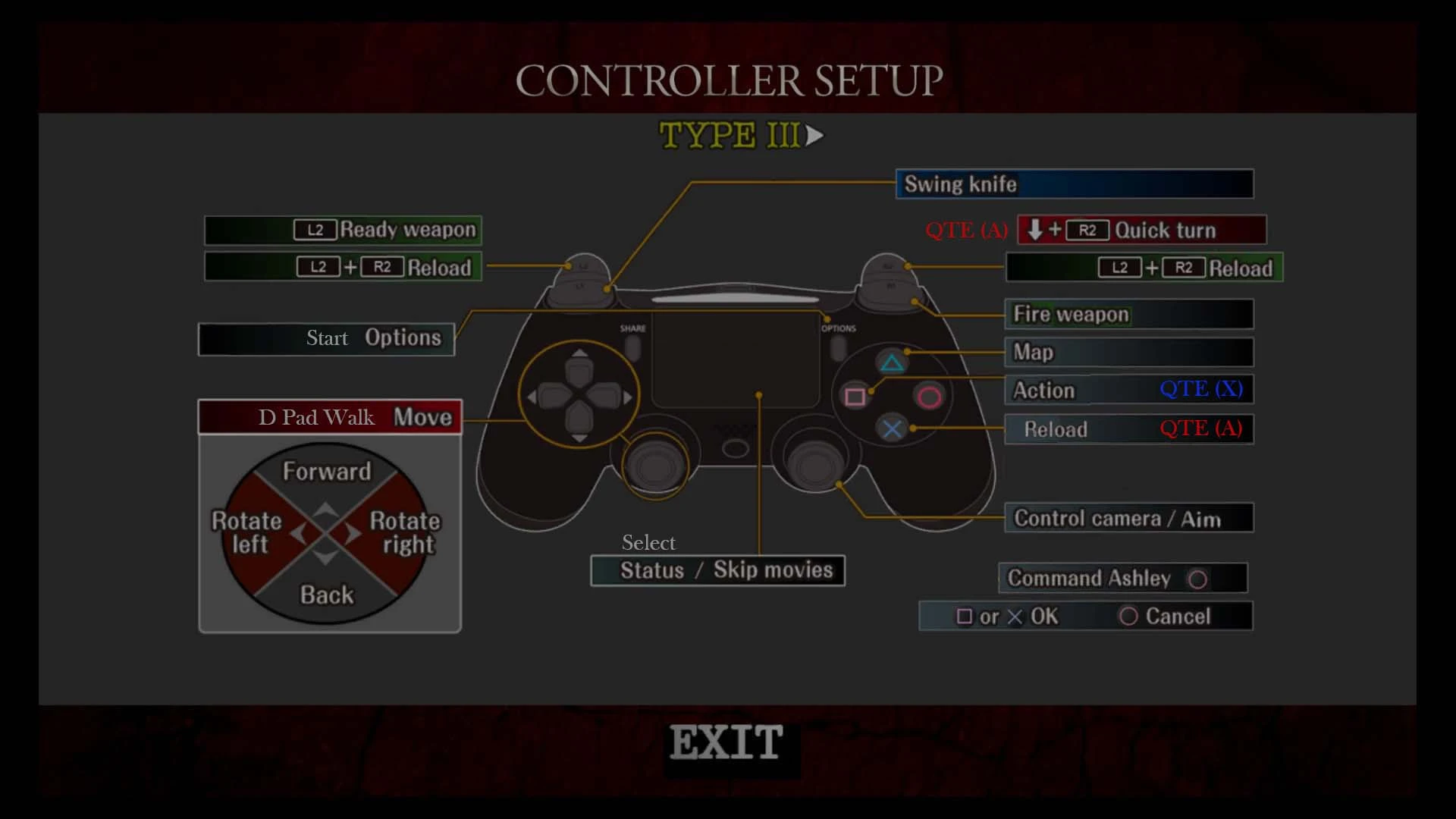
[]Controller Type III
- []Update v1. 1
to use the Easier QTEs method on all but the El Gigante fights and the final action of the Krauser QTE fight. In those two cases you should use the A
button for rapid tapping.
The B button (O on Playstation) acts as Cancel when you are in menu on all versions, it had no other purpose. Command Ashley has been repurposed
to function with the B button because it had no use outside of a menu screen.
Press forward on the left analog stick and the character will run without holding a second button. Pressing forward with the D-pad will make the character walk. Useful for the blind convict fight. Using the D-pad while holding R2 will manually run.
Auto Knife Swing
Removed the 'Ready Knife' so now when you press or hold L1 the character will swing continuously until you release the button. No need to hold a second button.
Easier QTEs
Unintended but I discovered as a byproduct of this setup that QTEs were much simpler, well, most of them are, once you train yourself not to rely on what the screen is telling you. Almost every QTE can be successful by clicking L2+R2+X (X button is Square on Playstation). The reason for this is that L2 functions as the 'A' button now and almost every prompt in the game is either L2+R2 or X+A, so when you click L2+R2 you are also clicking A. By clicking X as well you are essentially clicking both actions, L2+R2(A)+X, which won't fail.
I personally enjoy this setup having both the gun and the knife used by the same finger and I feel more like I am using the whole controller rather than one side. That said, there are two QTE fights that can be problematic.
- []The El Gigante fights -Fixed with minor tweak of v1. 1
you can the X button. With this fight I would get four to five swipes with the blade rapidly hitting the R2 button compared to six to seven slashes with
the X button.
- []Krauser QTE fight -Fixed with minor tweak of v1. 1
it is random or not. I died a few times and it was always the same sequence. At any rate, I'm not sure if I was just slow or if it is the problem with R2
not being able to hit rapidly. It is achievable and I didn't find either of these fights frustrating enough to alter my buttons.
- []Box / Jar Snakes
the aim down. Begin your slice straight ahead but immediately aim down. In most cases you will cut the snake with the first blow as the knife moves
at a downward angle.
Simply place the Input.ini file into the BIO4 folder. Overwrite when prompted.
If there is another mod that alters the Input.ini file then open the .ini files, scroll all the way to the bottom and copy from ###XINPUT_CONTROLLER_C and replace that section on the mod's .ini. Save, close and play game.
This mod is for the Resident Evil 4 Ultimate HD version on Steam. I cannot say if it will work on any prior version or any console.Other Mods by MageMaglor
Master Thief Armor Rem
A personal controller mapping preset for Resident Evil 4 Ultimate HD Edition that enables Auto Run, Auto Knife Swing, and simplifies roughly 95% of quick-time events. With 136 endorsements and 3,847 downloads, it's a niche quality-of-life tweak for players who want a more relaxed control scheme.
✨ Key Features
📊 Pros & Cons
✅ Pros
- Auto Run alone is a game-changer for your thumb—no more holding the stick forward for hours.
- Auto Knife Swing means you'll never miss a knife prompt again, which is huge for crowd control.
- QTE simplification is a godsend if you've failed those mashing sequences one too many times.
⚠️ Cons
- It's a personal preset, so it may not match your preferred button layout—expect to tweak it.
- Only works with RE4 UHD, so if you're on the original or a different version, you're out of luck.
- Since it's from 2022, there's a chance it might conflict with other controller mods or newer patches.
This is for RE4 UHD players who want a more relaxed, less finger-straining experience, especially those who struggle with QTEs or find constant running tedious. It's also great for players who prefer a more automated combat style and don't mind adjusting to a preset layout.
💡 Beginner Tips
- Before installing, make sure your controller is configured in-game so the preset applies correctly.
- If the QTE changes feel too easy, you can always revert to the default mapping in the game's options.
- Test the Auto Run and Knife Swing in the village area first to get a feel for the new controls.
📊 Mod Details
- Game
- Resident Evil 4 Mods
- Author
- MageMaglor
- Version
- 1.1
- Downloads
- 3,847
- Endorsements
- 136
- Category
- Miscellaneous
- Created
- 4/10/2022
- Updated
- 4/10/2022
🔧 How to Install RE4 Mods
Use Fluffy Mod Manager. Drop mods into /Mods/ folder.
📖 Full step-by-step install guide for RE4 →
Visit the official mod page for specific installation instructions for this mod.
🎮 Need cheat codes or console commands? Check ur gaming wiki for RE4 commands, item IDs, and more.
Keep browsing — more RE4 mods await