re4_tweaks - Fixes and tweaks for Resident Evil 4 UHD
⚪ Last updated 2023Preview
🔍 Analysis
- 👍 1.9% endorsement rate — high engagement, a strong quality signal
- 🏆 #2 of 51 Miscellaneous mods in this game by downloads
📋 About This Mod
Current features:
-
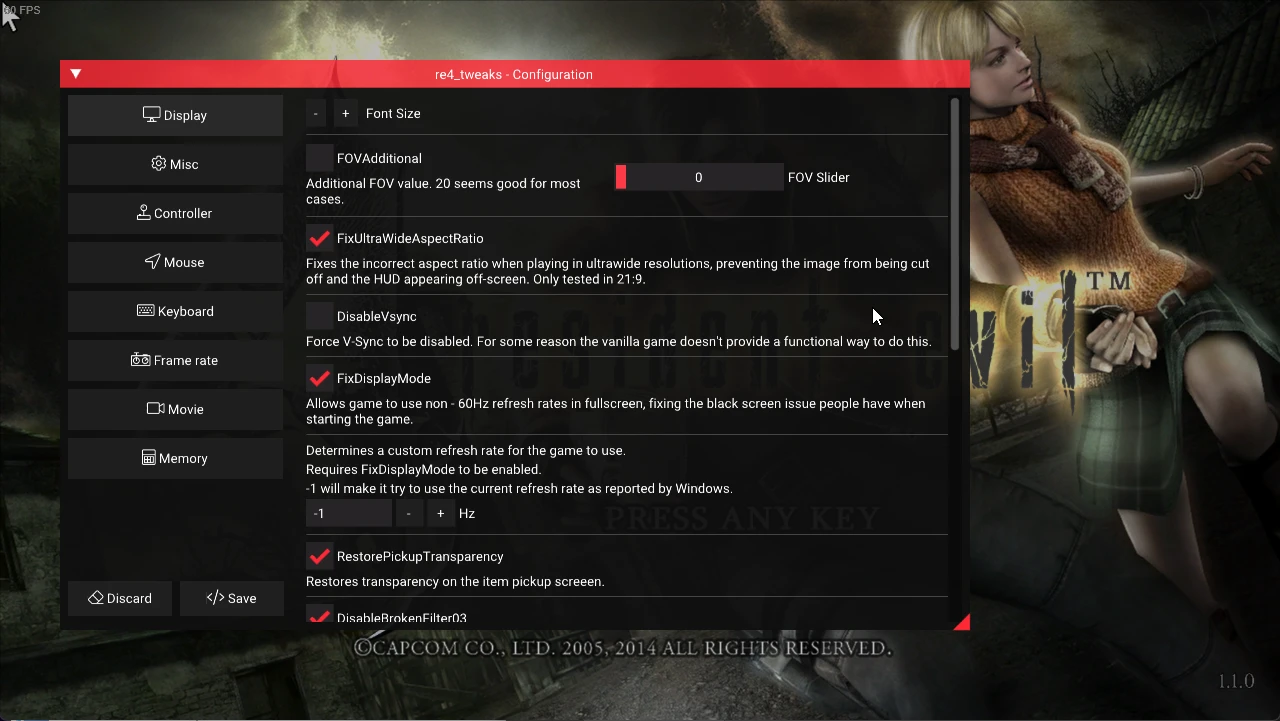
[]Increase FOV - Increases the default FOV. Useful to prevent motion sickness in some people.
[
]Fix ultrawide aspect ratio - Fixes the incorrect aspect ratio when playing in ultrawide resolutions, preventing the image from being cut off and the HUD appearing off-screen. 21:9 and 32:9 are supported. (Minor visual bugs may occur in 32:9).[]Remove black bars in 16:10 - Removes top and bottom black bars that are present when playing in 16:10. Will crop a few pixels from each side of the screen.
[]Fix DPI scale - Forces game to run at normal 100% DPI scaling, fixes resolution issues for players that have above 100% DPI scaling set.
[]Disable V-Sync - Forces V-Sync to be disabled. For some reason the vanilla game doesn't provide a functional way to do this.
[]Fix display mode/black screen issue - Allows the game to use non-60Hz refresh rates in fullscreen, fixing the black screen issue people have when starting it.
[]Override laser color - Overrides the color of the laser sights. Includes bonus "RainbowLaser" option.
[]Restore pickup screen transparency - Restores a transparency effect that is missing from the item pickup screeen.
[]Comparison: https://i.imgur.com/YwuC04m.png
[]Fix blurry image - Fixes a problem related to a vertex buffer that caused the image to be slightly blurred, making the image much sharper and clearer.
- []Comparison: https://i.imgur.com/Zv76Uhi.png
[
]Enable GC blur - Restores DoF blurring from the GC version, which was removed/unimplemented in later ports.[]Enable GC scope blur - Restores outer-scope blurring when using a scope, which was removed/unimplemented in later ports.
[]Borderless window - Whether to use a borderless-window when using windowed-mode.
[]Separate volume sliders - Allows seperate adjustment of background music/sound effect/cutscene volume.
[]Mouse turning - Makes the mouse turn the character instead of controlling the camera, similar to Resident Evil 5.
[]Raw mouse input - Makes the game use Raw Input for aiming and turning. Greatly improves mouse input by removing negative/positive accelerations that were being applied both by the game and by Direct Input.
[]Replace framelimiter - Implements a new reduced-CPU-usage FPS limiter.
[]Vulkan renderer - Enables the use of the DXVK-based vulkan renderer, which provides better performance on newer hardware.
[]Multithread Fix - Enables fixes for multithreaded DirectX9, giving a slight performance boost.
[]Restore demo videos - Restores the playback of demo videos that play when the game is idle at the main menu or the "press any key" screen for about 20 seconds. More info in the config menu/.ini file.
[]NTSC Mode - Unlocks minor difficulty boosts previously exclusive to the NTSC console versions of RE4.
[]DetachCameraFromAim - When using the "Modern" mouse setting, the game locks the camera position to the aiming position, making both move together. Although this is the expected behavior in most games, some people might prefer to keep the original camera behavior while also having the benefits from "Modern" aiming. Enabling this will also restore the horizontal aiming sway that was lost when the devs implemented "Modern" aiming.
[]Fix sniper zoom - When playing with keyboard and mouse, this fixes an annoying bug which would cause your camera to be off-center after you zoomed in with a sniper rifle.
[]Fix sniper focus - When zooming in and out with the sniper rifle using a mouse, this option makes the "focus" animation look similar to how it looks like with a controller.
[]Fix "Retry/Load" mouse selector - Prevents the game from overriding your selection in the "Retry/Load" screen when moving the mouse before confirming an action. This bug usually causes people to return to the main menu by mistake, when they actually wanted to just restart from the last checkpoint.
[]Key Icon Fallback - Game is missing icons for certain keyboard languages, normally they would be made invisible, but can now have English equivalents shown instead.
[]Allow reload without aiming - Removes the ne
re4_tweaks is a project designed to fix and tweak the Steam UHD port of Resident Evil 4. With strong community backing (3,532 endorsements, 183,601 downloads), it's a popular choice for players who want to address issues in this specific version. The author doesn't list exact changes, but the mod's track record is solid.
✨ Key Features
📊 Pros & Cons
✅ Pros
- Massive community trust: 3,532 endorsements and 183,601 downloads — this mod is battle-tested.
- Focused on fixing the UHD port's problems without changing the core gameplay, so it's a pure improvement.
- Designed specifically for the Steam version, so it integrates cleanly with that release.
⚠️ Cons
- The description doesn't specify which fixes or tweaks are included, so you'll need to dig into the mod page or files to see what it does.
- Only works with the Steam UHD edition — if you have the original 2007 PC version or a console, this won't help.
- Last updated March 2023 — any official game updates released after that date will not be covered by this mod.
For Resident Evil 4 UHD players on Steam who are frustrated by technical issues like crashes, stuttering, or missing effects. For those who want a community-made patch that doesn't add new content or alter the original experience. Skip if you're looking for new weapons, models, or a total conversion.
💡 Beginner Tips
- After extracting the mod files, place them in the game's root directory (where the game executable is) — that's typically Steam/steamapps/common/Resident Evil 4.
- If the mod includes an .ini file, open it with a text editor to enable or disable individual tweaks to suit your setup.
- If the game fails to start after installing, use Steam's 'Verify integrity of game files' to restore original files, then reinstall the mod carefully.
📊 Mod Details
- Game
- Resident Evil 4 Mods
- Author
- nipkow
- Version
- 1.9.1
- Downloads
- 183,616
- Endorsements
- 3,501
- Category
- Miscellaneous
- Created
- 8/5/2021
- Updated
- 3/22/2023
🔧 How to Install RE4 Mods
Use Fluffy Mod Manager. Drop mods into /Mods/ folder.
📖 Full step-by-step install guide for RE4 →
Visit the official mod page for specific installation instructions for this mod.
🎮 Need cheat codes or console commands? Check ur gaming wiki for RE4 commands, item IDs, and more.
Keep browsing — more RE4 mods await