SpeedHUD
🟡 Updated this year⚠️ Install Order · 1 step
Install in this order, then this mod last — most mods fail to load without their framework and dependencies in place.
Preview
🔍 Analysis
- 👍 0.0% endorsement rate
- ✅ Updated 256 days after the latest game patch — actively maintained
📋 About This Mod
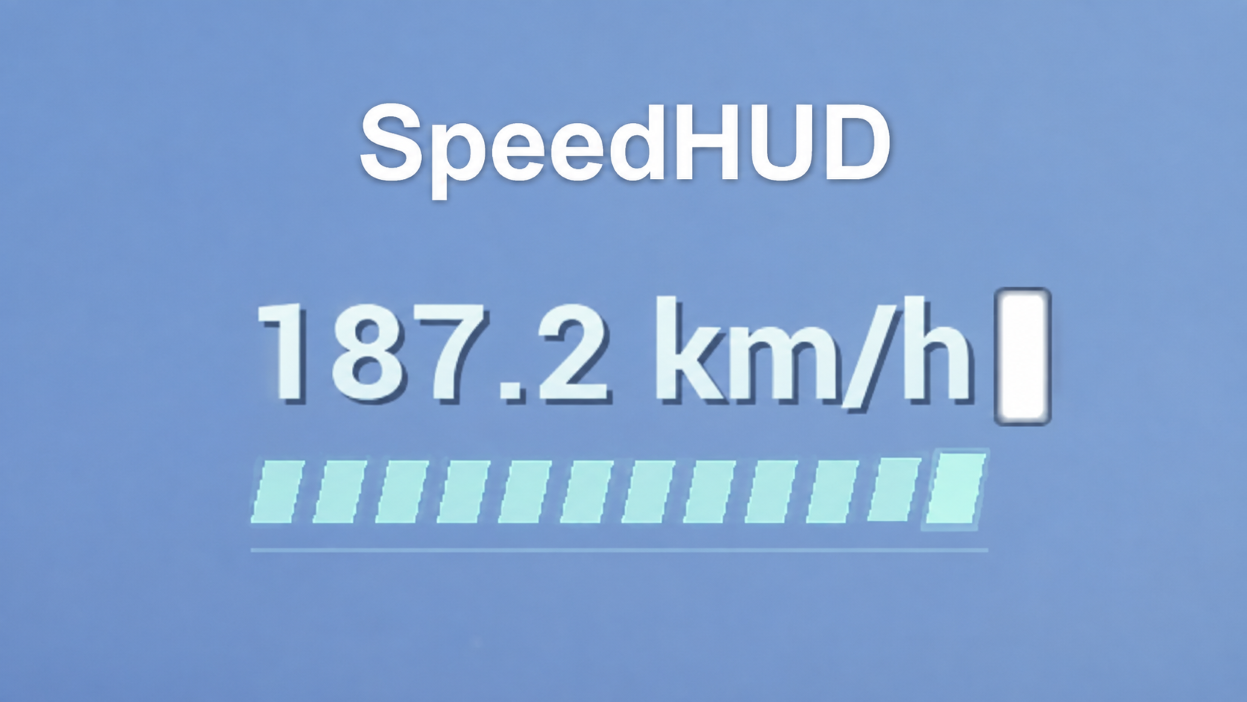
SpeedHUD 1.1.3 -Display your current absolute speed in km/h at the upper-left corner. -Detect walking, swimming, riding, flying, gliding, ascending, diving, falling, dashing, and sliding states. -Show full 3D speed, including vertical movement, while flying, gliding, or falling. -Use a compact 16-segment bar that changes color and shape with the current state. -Read movement state and velocity without changing movement values. -Enable UE4SS Experimental, PalSchema, and SpeedHUD in Mod Management. -Restart the game. The HUD appears automatically after entering a world; no controls are required. Layout Controls: Ctrl + Shift + F6: Enter layout mode; press again to save and exit Arrow Keys: Move the HUD by 1% Shift + Arrow Keys: Move the HUD by 5% Ctrl + Shift + F7: Reset to the default upper-left position Ctrl + Shift + F8: Cancel changes and restore the previous position Close any open game menus before entering layout mode.
SpeedHUD 1. 1. 3 -Display your current absolute speed in km/h at the upper-left corner. -Detect walking, swimming, riding, flying, gliding, ascending, diving, falling, dashing, and sliding states. -Show full 3D speed, including vertical movement, while flying, gliding, or falling. -Use a compact 16-segment bar that changes color and shape with the current state. -Read movement state and velocity without changing movement values. -Enable UE4SS Experimental, PalSchema, and SpeedHUD in Mod Management. -Restart the game. The HUD appears automatically after entering a world; no controls are required. Layout Controls: Ctrl + Shift + F6: Enter layout mode; press again to save and exit Arrow Keys: Move the HUD by 1% Shift + Arrow Keys: Move the HUD by 5% Ctrl + Shift + F7: Reset to the default upper-left position Ctrl + Shift + F8: Cancel changes and restore the previous position Close any open game menus before entering layout mode.
📊 Mod Details
- Game
- Palworld Mods
- Author
- 76561198082203867
- Version
- N/A
- Downloads
- 6,151
- Endorsements
- 0
- Category
- PalSchema, UE4SS, Utilities, User Interface
- Created
- 8/4/2026
- Updated
- 8/6/2026
🔧 How to Install Palworld Mods
Subscribe on Steam Workshop. Mods auto-download and install. Launch the game to activate.
📖 Full step-by-step install guide for Palworld →
Visit the official mod page for specific installation instructions for this mod.
🎮 Need cheat codes or console commands? Check ur gaming wiki for Palworld commands, item IDs, and more.
Keep browsing — more Palworld mods await