Ultrawide Fix
🟡 Updated this year⚠️ Install Order · 1 step
Install in this order, then this mod last — most mods fail to load without their framework and dependencies in place.
Preview
🔍 Analysis
- 👍 0.0% endorsement rate
- ✅ Updated 231 days after the latest game patch — actively maintained
- 🏆 #13 of 23 UE4SS, User Interface mods in this game by downloads
📋 About This Mod
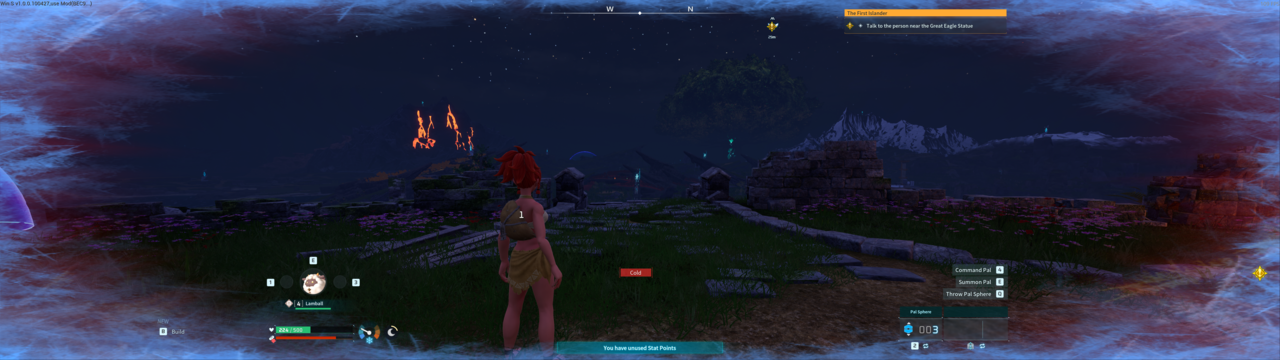
Ultrawide Fix Palworld's UI wasn't built for ultrawide, so half your HUD ends up way out in your peripheral vision: health bar, quest tracker, notifications, hotbar, chat, even the Settings menu, all of it glued to the far edges of the screen. This pulls everything back in toward center. Also fixes the FOV (no more cropped/zoomed view) and shifts the camera off-center a bit so your character isn't sitting dead in the middle blocking your view. On top of that, you can push FOV past the game's normal ~90 cap and zoom the camera out further than vanilla allows. Easiest way is just dragging the FOV slider in the Settings menu like normal, it now goes further than it used to. Hotkeys work aswell. Requires UE4SS Experimental (Palworld). Subscribe to that too, this mod does nothing on its own. Default hotkeys - CTRL + [ / CTRL + ] : how far the HUD gets pulled in - Left / Right arrow : camera offset - Shift+[ / Shift+] : FOV (same value as the Settings menu slider, stays in sync either way) - Home / End : camera zoom-out distance All hotkeys are rebindable, and modifier keys are supported as well. Close Palworld first. The config file is only read when the game launches and gets overwritten when it exits, so edit it while the game's closed. Find config.cfg in your Palworld install: Mods\NativeMods\UE4SS\Mods\UIPaddingUW\config.cfg Each *_key line takes a key name, optionally with a modifier in front written as MODIFIER+KEY (e.g. CONTROL+OEM_SIX). Valid modifiers are SHIFT, CONTROL, ALT. For valid key names see https://docs.ue4ss.com/lua-api/table-definitions/key.html. Known issues The "B Build" hint in the bottom-left doesn't move. Everything else does.
📊 Mod Details
- Game
- Palworld Mods
- Author
- 76561198018521352
- Version
- N/A
- Downloads
- 1,248
- Endorsements
- 0
- Category
- UE4SS, User Interface
- Created
- 7/10/2026
- Updated
- 7/11/2026
🔧 How to Install Palworld Mods
Subscribe on Steam Workshop. Mods auto-download and install. Launch the game to activate.
📖 Full step-by-step install guide for Palworld →
Visit the official mod page for specific installation instructions for this mod.
🎮 Need cheat codes or console commands? Check ur gaming wiki for Palworld commands, item IDs, and more.
Keep browsing — more Palworld mods await