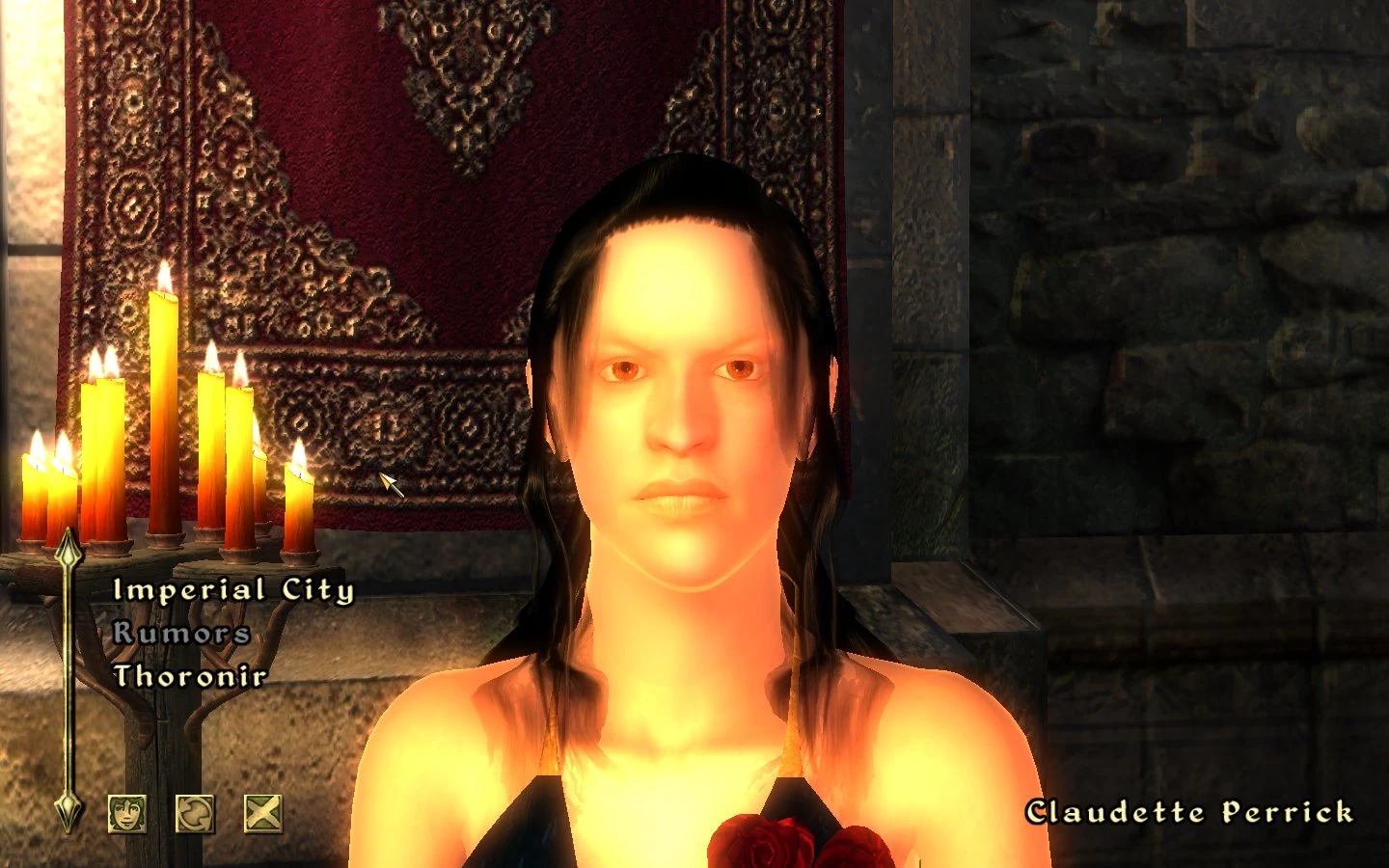
Saram corean hair for NPCs
⚪ Last updated 2010⚠️ Install Order · 2 steps
Install in this order, then this mod last — most mods fail to load without their framework and dependencies in place.
Preview
🔍 Analysis
- 👍 3.5% endorsement rate — high engagement, a strong quality signal
- 🏆 #27 of 50 NPC mods in this game by downloads
📋 About This Mod
Name: Saram and Corean Hair for NPC\'s Version: 1. 0 Date: 6/12/2009 Category: NPCs Requirements: Oblivion Patch 1. 2. 0. 214 Recommended: Oblivion Mod Manager Author(s): IDKRRR textures and meshes, micalov ESP Source: http://www.tesnexus.com/downloads/file.php?id=8440 Description =========== *if you downloaded version 1 fix for missing textures Temp fix open \"textues\" folder and move the content of it to \"textures\" sorry ** Changes female non beast race NPC\'s to use saram and corean hairs. Details ======= This mod takes the awsome Corean and Saram race hair models created by IDKRRR models and adds them to the female NPC\'s of oblivion and the default races for players to use. 90% of the NPC\'s changed hair color remains the same, just left the beast races untouched and a few female redguards who use the \"corn row\" style hair. Install ======= This archive is distributed in what LHammonds calls OMOD-Ready format. It allows you to manually extract and install like most other mods but it also allows you to use Oblivion Mod Manager and import this archive with all the settings pre-configured for an OMOD file. Pick which method you are going to use for installation: Manual Installation - = or = - OBMM Installation Manual Install -------------- 1. Extract this archive to any folder and then copy the contents to Oblivion\'s Data folder. You can ignore or delete the \"omod conversion data\" folder. 2. Start Oblivion Launcher, click Data Files, and enable the .esp file(s). OBMM Install ------------ Create the OMOD (Do this section only once) 1. Copy archive to (install folder)\\Oblivion\\obmm\\omod\\ 2. Start Oblivion Mod Manager. 3. Click the Create button. 4. Click the Add Archive button, find and select the archive, then click Yes. 5. Click the Create omod button, then click OK when it finishes. Install the mod using OBMM 1. Start Oblivion Mod Manager. 2. Double-click the name of the mod in the right-hand side of the OBMM screen. (icon should turn blue) Uninstall ========= Pick which method you are going to use for uninstall based on how you installed it: Manual Uninstall - = or = - OBMM Uninstall Manual Uninstall ---------------- 1. Start Oblivion Launcher, click Data Files, uncheck the .esp file(s). 2. Delete the files/folders associated with the mod. ??? MOD Authors, if you\'ve kept your mod\'s files in their own sub-folders, simply list the folders here. ??? If the files are in common/used folders, you\'ll need to list each file since you don\'t want players being told to delete folders that are likely to contain files to other mods. Example #1 (unique folders to your mod - RECOMMENDED): Oblivion\\Data\\Meshes\\Saram_n_corean_hair Oblivion\\Data\\Textures\\Sarem_n_corean_hair Oblivion\\Data\\Saram_corean_NPC_hair_1_0.esp Oblivion\\Data\\IDKRRR_hairs_on_NPCs_readme.txt OBMM Uninstall -------------- 1. Start Oblivion Mod Manager. 2. Double-cl
This mod replaces the hair of female non-beast race NPCs with Saram and Corean hair styles. It requires a manual texture fix for version 1. With 248 endorsements and 7,033 downloads, it's a niche cosmetic overhaul for players wanting varied NPC hair.
✨ Key Features
📊 Pros & Cons
✅ Pros
- Community-tested with 248 endorsements and over 7,000 downloads.
- Adds visual variety to female NPCs with new hair styles.
- Simple concept—just changes hair, no complex gameplay alterations.
⚠️ Cons
- Requires manual texture fix—author notes a typo in folder name.
- Last updated in 2010, so may be incompatible with newer game versions.
- Only affects female non-beast races; beast races and males unchanged.
For Oblivion players who want to freshen up the look of female NPCs with new hair styles. If you're tired of the default hair and want a quick cosmetic change, this is for you. Skip if you play beast races or want more comprehensive NPC overhauls.
💡 Beginner Tips
- After installing, check the 'textues' folder and move its contents to 'textures' to fix missing textures.
- Use a mod manager like Oblivion Mod Manager to easily install and uninstall.
- Load order matters—place this mod after other NPC overhaul mods to ensure hair changes apply.
📊 Mod Details
- Game
- Oblivion Mods
- Author
- idkrrr models and textues-micalov ESP
- Version
- 1.1
- Downloads
- 7,033
- Endorsements
- 248
- Category
- NPC
- Created
- 6/12/2009
- Updated
- 9/19/2010
🔧 How to Install Oblivion Mods
Download from Nexus.
📖 Full step-by-step install guide for Oblivion →
Visit the official mod page for specific installation instructions for this mod.
🎮 Need cheat codes or console commands? Check ur gaming wiki for Oblivion commands, item IDs, and more.
Keep browsing — more Oblivion mods await