RD Koldorn Ayleid IC
⚪ Last updated 2008⚠️ Install Order · 2 steps
Install in this order, then this mod last — most mods fail to load without their framework and dependencies in place.
Preview
🔍 Analysis
- 👍 6.5% endorsement rate — high engagement, a strong quality signal
- 🏆 #122 of 185 Models And Textures mods in this game by downloads
📋 About This Mod
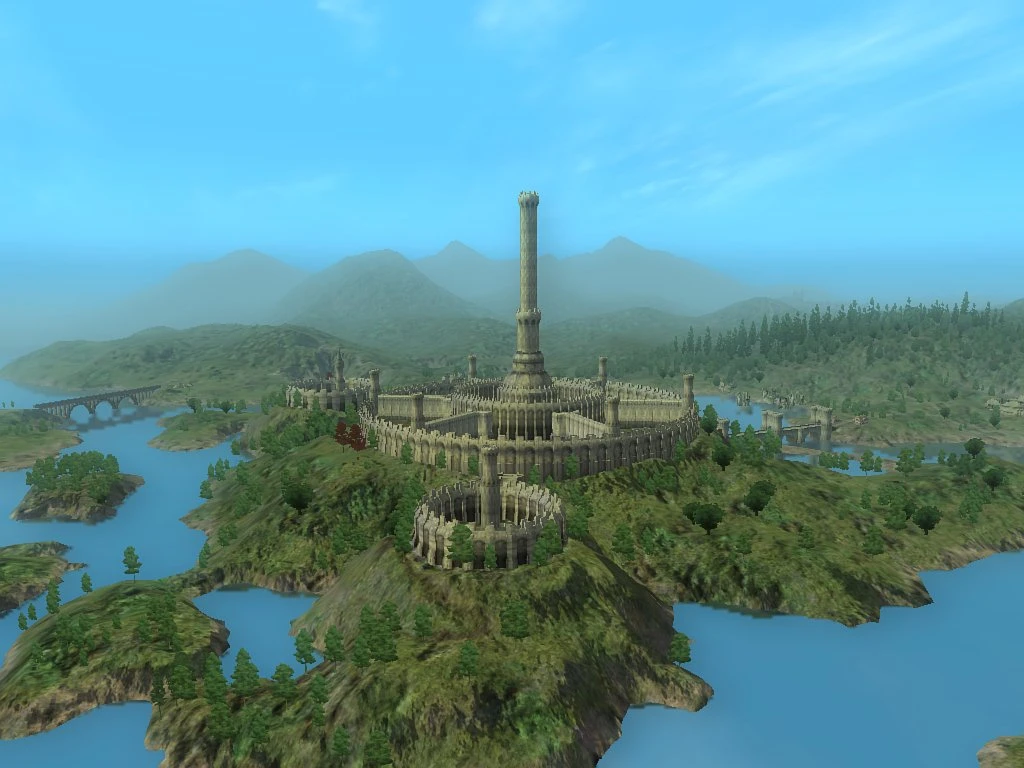
================================ = Koldorn Ayleid Imperial City Retexture = ================================ Created By : Ryu Doppler Textures from Bethesda and Koldron Respectively. =================== = Details : Ryu Doppler = =================== To me in my game, the textures used for the Imperial City\'s always looked a out of place for a former Ayleid city. In my imagination for my game, since the Imperial City was supposed to have once been the capital of the Ayleids, I expected it\'s textures to reflect it somewhat. I wished this sort of texture similarity to exist in my game, and as I use Koldorn\'s Ayleid textures I decided I would make a merge. Taking one of Koldorn\'s textures, I worked to blend it with the Normal IC textures to make a mix that was still the Imperial City, but made it seem more Ayleid gritty to match the Ayleid ruins. My first attempt had a loss of detail, but I was able to restore lost detail with a few simple overlay techniques. And what I got was a retexture that suited my purposes perfectly. Essentially, the purpose of this mod is to make the IC match the textures of the Koldorn Ayleid Ruin retexture. Based on my current preference for it to be so. It is provided for others in the case that they would wish the same, or just want a IC texture replacer. ================= = Background Notes = ================= This is a texture replacer, which has the potential to conflict with other texture replacers that affect the same files. It will overwrite files located within the following folder paths from your Oblivion Data folder: textures\\architecture\\godstatues\\, textures\\architecture\\imperialcity\\, and textures\\architecture\\statue\\. So as a precaution, it advised that before installing the texture replacer to back up these three folders in case you wish to revert back to before. Also, these textures don\'t come with any normals, so they won\'t conflict with any normalmaps edits that may be present. Personally, I find that Bomrets normals complement the mod very nicely, but it\'s really up to you what normals edits you want to use with it. =========== = Installation = =========== Simply unpack the archive, then copy and paste the textures folder into your Oblivion Data folder. ============= = Uninstallation = ============= To remove this, you will need to manually delete the files that came with this mod. The list of all the files is as follows: In \"textures\\architecture\\godstatues\\\" ------------------------------------------------------ godakatosh.dds godarkay.dds goddibella.dds godjulianos01.dds godkynareth.dds godmara.dds godseptim.dds godstendarr.dds godzenithar.dds In \"textures\\architecture\\statue\\\" ----------------------------------------------- icdragonstatue01.dds statueimperial2.dds statueimperial03.dds statueimperial04.dds statueimperial05.dds statueimperial.dds statueimperialdestroyed.dds I
📊 Mod Details
- Game
- Oblivion Mods
- Author
- Ryu Doppler
- Version
- 1.0
- Downloads
- 757
- Endorsements
- 49
- Category
- Models And Textures
- Created
- 12/31/2007
- Updated
- 1/7/2008
🔧 How to Install Oblivion Mods
Download from Nexus.
📖 Full step-by-step install guide for Oblivion →
Visit the official mod page for specific installation instructions for this mod.
🎮 Need cheat codes or console commands? Check ur gaming wiki for Oblivion commands, item IDs, and more.
Keep browsing — more Oblivion mods await