Qarls Texture Pack III - QTP3
⚪ Last updated 2014⚠️ Install Order · 2 steps
Install in this order, then this mod last — most mods fail to load without their framework and dependencies in place.
Preview
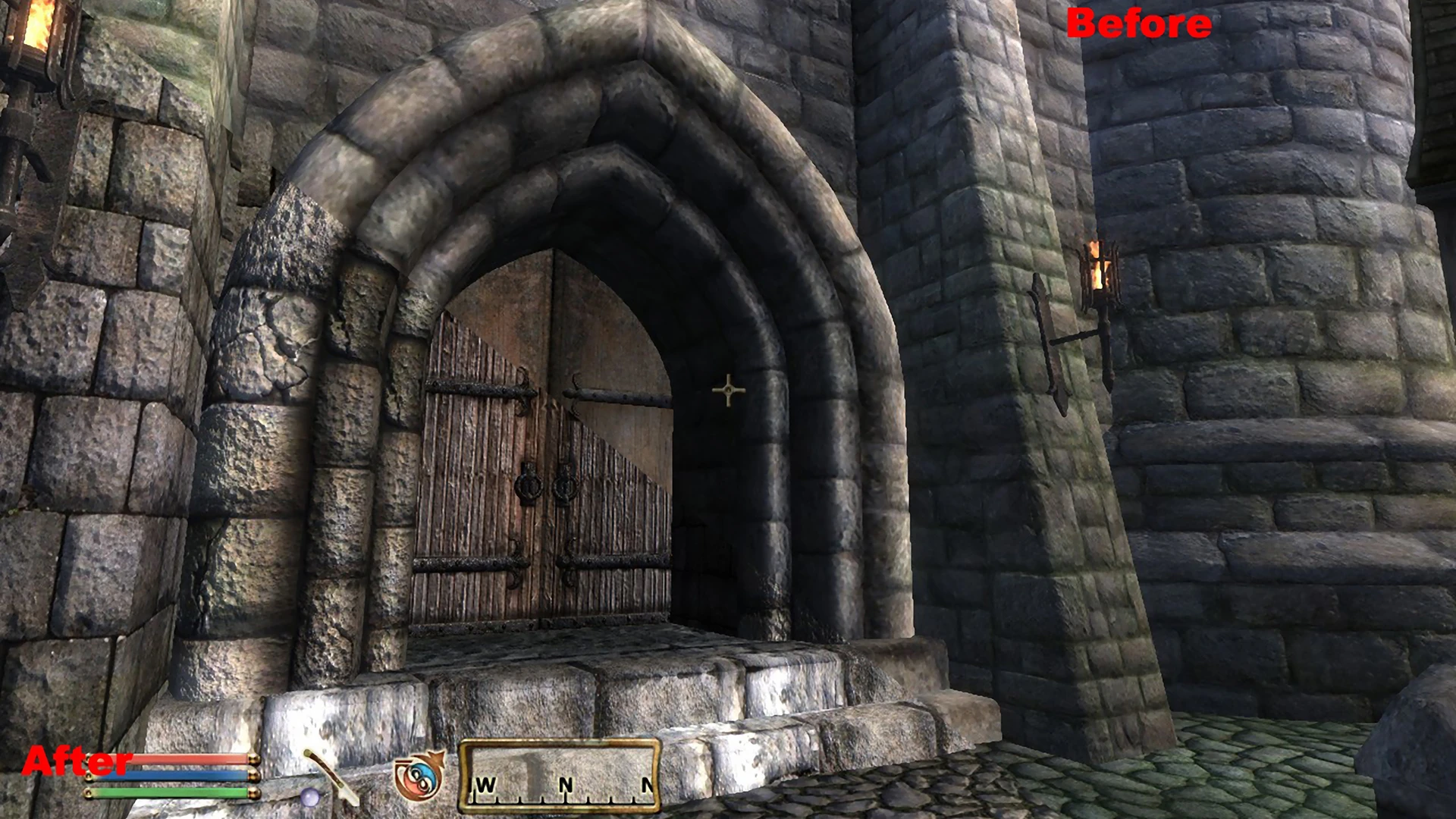
🔍 Analysis
- 👍 2.6% endorsement rate — high engagement, a strong quality signal
- 🏆 #106 of 485 Models And Textures mods in this game by downloads
📋 About This Mod
I could not get the OMOD to work with NMM, so I extracted the OMOD by "bangsboomstik" (much thanks to him for packaging it) and packaged it for upload here. Remember to use ArchiveInvalidation.
Original readme
Qarl's Texture Pack III for TES IV: Oblivion
Created by Qarl
Contents
[]Description
[]Installation
[]Usage
[]Contact Me
[]Issues
[]Version History
[]Credits
Description
The purpose of this package is to make TES IV: Oblivion look even better than when you bought it. To do this I've created new textures, normal maps, specular and parallax maps to replace a large number of those in the game with ones which are higher resolution and more photorealistic, while at the same time still very close to the original feel of Bethesda's intentions. Replacement meshes are also included to use parallax mapping. However, due to the increased resolution, machines with lower-end graphics cards may see severe slow-down with this mod.
Features
-
[]Most textures are 4 times the size of the originals. Some, even more. This makes things seem much clearer and sharper in-game.
[]A large number of meshes have been altered to take advantage of the game engine's parallax shader.
[]Only parts of the mesh which NEED parallaxing have the parallax flag enabled. This removes unwanted artifacts parallaxing can cause around corners.
[]Textures which use the parallax shader have been altered at the mipmap level so that things look very 3D from a distance but do not get the soupy artifacts associated with the parallax effect when viewed close-up.
[]Advanced normal map techniques used to make landscape textures seem very 3D.
[]Landscape color maps and normal maps edited at the mipmap level to reduce the tiling effect in the distance.
[]Mesh fixes from the Unofficial Oblivion Patch are included.
Things retextured
-
[]Architecture
[
]Landscape[]Rocks
[]Dungeons
[]Blood splatters, falling snowflakes, butterflies
[]Furniture, and other medium-sized clutter
Things NOT retextured
-
[]Clothes, armor, weapons, creatures, NPCs
[
]Foliage, the sky[]Kvatch, the Arena, and the Oblivion realm
Issues
-
[]Some video cards may not be able to render the 2 textures I put in the game with 1024x4096 resolution. If you see black pillars or other black areas in the Imperial City, your video cards is one of these. You'll need to remove the following files:
texturesarchitectureimperialcityiccol01.dds
texturesarchitectureimperialcityichcol01.dds[
-
[]Some video cards may not be able to render the 2 textures I put in the game with 1024x4096 resolution. If you see black pillars or other black areas in the Imperial City, your video cards is one of these. You'll need to remove the following files:
-
[]Clothes, armor, weapons, creatures, NPCs
-
[]Architecture
Qarl's Texture Pack III (QTP3) is a comprehensive texture overhaul for Oblivion, offering high-resolution replacements for the game's environments and objects. With 3,881 endorsements and 147,732 downloads, it's a community favorite. Last updated in 2014, it remains a popular choice for players seeking visual upgrades.
✨ Key Features
📊 Pros & Cons
✅ Pros
- Massive download count (147k) and 3.8k endorsements — this is a proven, community-approved texture overhaul.
- All-in-one package means you don't have to juggle multiple texture mods; just install and go.
- High-resolution textures breathe new life into Oblivion's dated visuals, making the game look noticeably better.
⚠️ Cons
- Last updated in 2014 — may have compatibility issues with newer mods or Oblivion patches.
- Large file size (typical for texture packs) could be a pain for slower connections or limited disk space.
For Oblivion players who want a comprehensive visual upgrade without hunting down dozens of individual texture mods. If you're a modding veteran comfortable with manual installation, this is a solid choice. Skip if you prefer modern, actively maintained texture packs or need specific texture categories only.
💡 Beginner Tips
- Make sure to back up your original textures or use a mod manager like Oblivion Mod Manager (OBMM) to handle installation and uninstallation cleanly.
- Load order matters: place QTP3 early in your mod list so other mods can overwrite its textures if needed.
- Check the mod's comments section on Nexus for user-reported compatibility issues with other popular mods like Better Cities or Unique Landscapes.
📊 Mod Details
- Game
- Oblivion Mods
- Author
- Qarl
- Version
- 1.3
- Downloads
- 147,732
- Endorsements
- 3,881
- Category
- Models And Textures
- Created
- 1/25/2014
- Updated
- 1/25/2014
🔧 How to Install Oblivion Mods
Download from Nexus.
📖 Full step-by-step install guide for Oblivion →
Visit the official mod page for specific installation instructions for this mod.
🎮 Need cheat codes or console commands? Check ur gaming wiki for Oblivion commands, item IDs, and more.
Keep browsing — more Oblivion mods await