Oblivion Load Screens - Skyrim Edition
⚪ Last updated 2012⚠️ Install Order · 2 steps
Install in this order, then this mod last — most mods fail to load without their framework and dependencies in place.
Preview
🔍 Analysis
- 👍 3.1% endorsement rate — high engagement, a strong quality signal
- 🏆 #41 of 60 User Interfaces mods in this game by downloads
📋 About This Mod
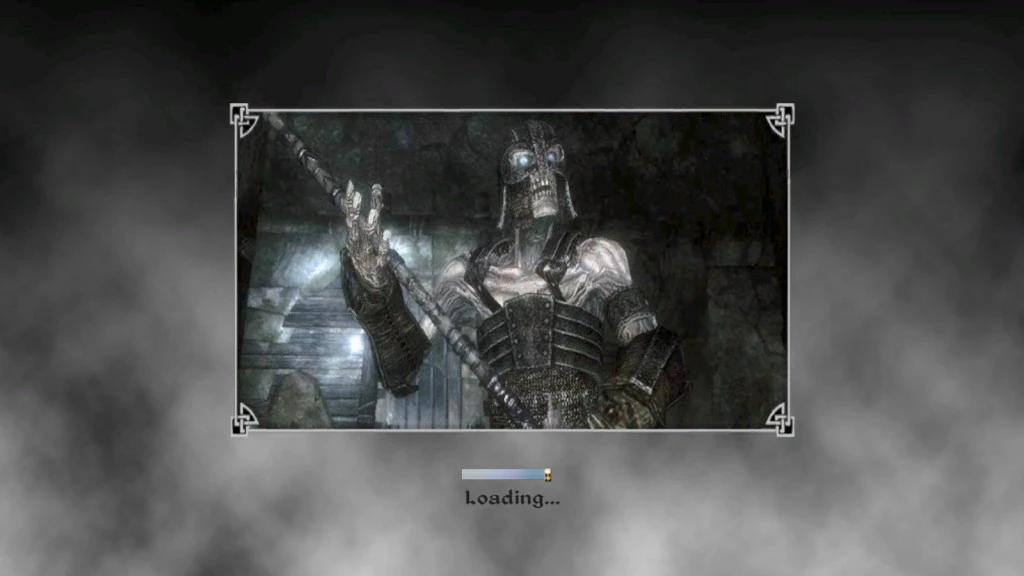
Version: 1. 0 Date: 4/17/2012 Author: Hanaisse Requirements: ================= Oblivion 1. 2. 416 Description: ================= Load screen replacers for Oblivion, full of pictures of Skyrim! These include cities, villages, scenic landscape, creatures, people, and of course, dragons. Details: ================= Available are 5 sets, each containing (mostly) the same pictures with different backgrounds to suit your preference. Use only one at a time or bad things will happen Skyrim Set - 140+ pictures on a Skyrim-like foggy background. With text descriptions. Skyrim No Text Set - same as Skyrim set. No text. Vanilla Set - 80+ pictures, on a background like original Oblivion load screens. With text descriptions. Dark Brotherhood Set - same pictures as Skyrim set, on a Dark Brotherhood themed background. Pictures are black and white with red tone. No text. Border Frame Set - 90+ all new different pictures focusing on beautiful scenic and landscape views. No text. Each set includes new matching load bars. Darn compatibility files are also available to maintain Darn text. Pictures are screenshots from several sources, used with full permission. Very special thanks and full credits to the folks at TES Alliance who helped me make this happen; Darkstone Arthmoor InsanitySorrow Donnato All backgrounds are by me. Do I have to mention these contain spoilers? Install: ================= Manual; 1. Extract this archive to any folder and then copy the contents to Oblivion\'s Data folder. 2. Start Oblivion Launcher, click Data Files, and enable the OLS_SE_xx.esp file. BAIN; (recommended) 1. Copy the entire archive into your Oblivion Mods\\Bash Installers folder. 2. In Wrye Bash Installers tab, highlight the new archive. 3. Right click the archive name and click Install. 4. In Wrye Bash Mods tab, check the OLS_SE_xx.esp. 5. Run BOSS to sort load order. 6. Rebuild bashed patch - import graphics, do not merge. For Darn compatibility, install a set as above. Find the corresponding folder in the Darn compatibility archive, copy/paste the file loading_menu.xml into Data\\Menus. Let it overwrite. Un-Install: ================= Manual; 1. Start Oblivion Launcher, click Data Files, and disable the OLS_SE_xx.esp file. 2. Delete the following files/folders; Data\\Menus\\loading_menu.xml file Data\\Textures\\Menus\\Loading\\Hana folder Data\\Textures\\Menus\\Stats\\stat_skill_level_ribbon_empty.dds and stat_skill_level_ribbon_full.dds BAIN; 1. In Wrye Bash Mods tab, rebuild bashed patch, removing the graphics tag. 2. Deselect the OLS_SE_xx.esp associated with this mod. 3. In Wrye Bash Installers
📊 Mod Details
- Game
- Oblivion Mods
- Author
- Hanaisse
- Version
- 1.0
- Downloads
- 1,727
- Endorsements
- 53
- Category
- User Interfaces
- Created
- 4/19/2012
- Updated
- 4/19/2012
🔧 How to Install Oblivion Mods
Download from Nexus.
📖 Full step-by-step install guide for Oblivion →
Visit the official mod page for specific installation instructions for this mod.
🎮 Need cheat codes or console commands? Check ur gaming wiki for Oblivion commands, item IDs, and more.
Keep browsing — more Oblivion mods await