Order of the Dragon - Map Addon
⚪ Last updated 2014⚠️ Install Order · 2 steps
Install in this order, then this mod last — most mods fail to load without their framework and dependencies in place.
Preview
🔍 Analysis
- 👍 7.2% endorsement rate — high engagement, a strong quality signal
- 🏆 #50 of 60 User Interfaces mods in this game by downloads
📋 About This Mod
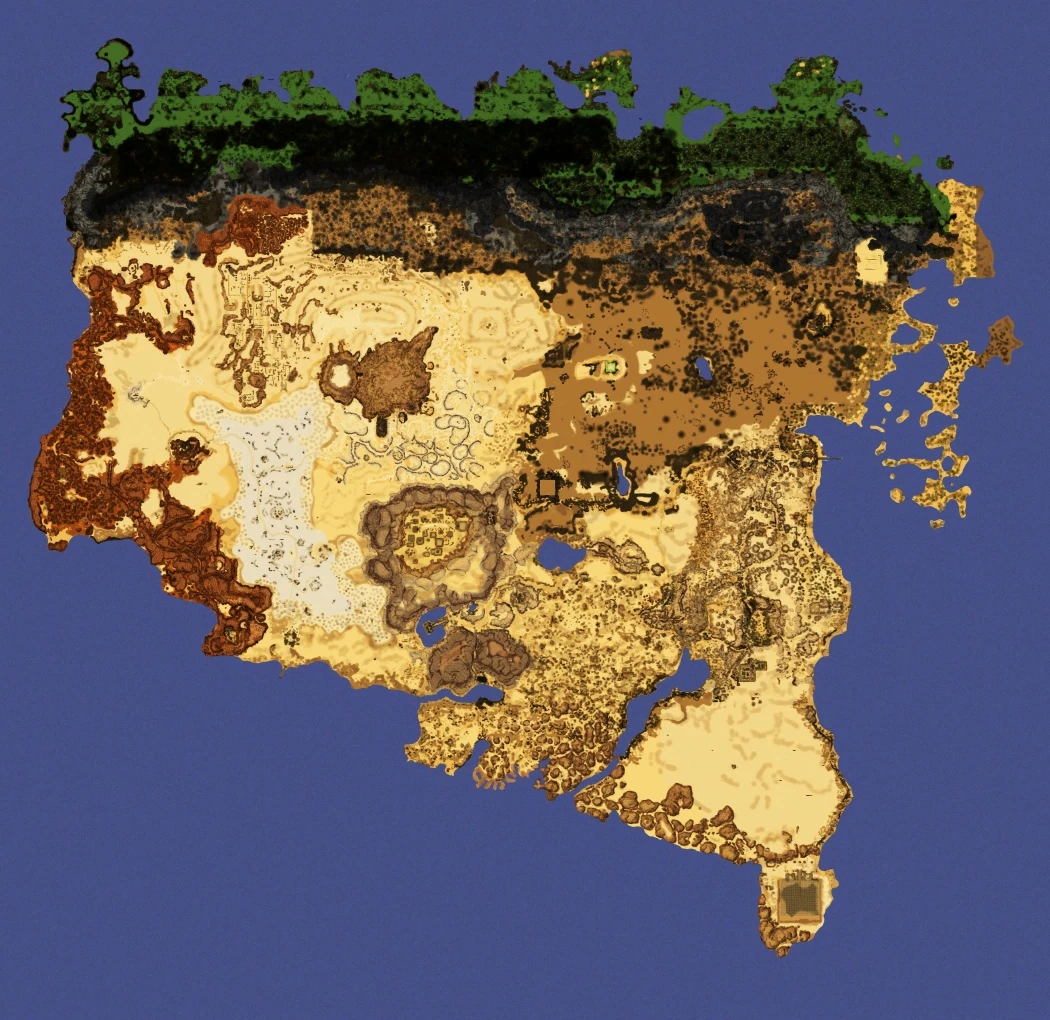
This is an in-game Map for the german Quest mod Order of the Dragon.
Description =========== The order of the dragon is one of the biggest quest mods for oblivion out there. As a big mod, it also includes a BIG worldspace, which, unfortunately, lacks a good in-game map. For this reason I created this addon.
Details ======= Although one might say the map was cryptic for a reason (difficulty), I believe Mephala's realm is too big to get through without any map. This colorful, detailed map will help you orientate much better. It has been created from generated Distant LOD textures AND even more detailed Local Map textures. And the water, I drew it in myself... As I am just a novice at image editing, don't expect 100% accuracy. Also, there is a normal map for extra depth effects.
Install ======= The Downloaded . 7z contains a textures/ folder and a .esp; The textures/ folder contains the map, the .esp is for inserting the map in-game. So, to install this, extract/put/whatever the folder and the .esp in your data/ folder. In your mod manager or the oblivion launcher, check the .esp so it is being loaded by the game. (No pun intended...)
A NOTE for DYNAMIC MAP users: ----------------------------- You can spare the ESP slot and not use it by simply editing the DynamicMap.ini in your data/ini/ folder. Add the following lines at the bottom:
set tnoDM.mod to sv_Construct "Orden des Drachen.esp" set tnoDM.fid to sv_Construct "2639E9" set tnoDM.img to sv_Construct "OdDDESERT.dds" ; set tnoDM.x_offset to 126 ; set tnoDM.y_offset to 301 ; set tnoDM.zoom to 1 set tnoDM.nw_x to -33 set tnoDM.nw_y to 35 set tnoDM.se_x to 36 set tnoDM.se_y to -32 set tnoDM.w to 2100 set tnoDM.h to 2040 SetStage tnoDM 10
Uninstall ========= 1. Start Oblivion Launcher/Mod Manager, click Data Files, uncheck the .esp file(s). 2. Delete/Uninstall the .esp coming with this mod (check the archive to be sure) and the data/textures/menus/DynamicMap/OdDDESERT.dds ; Dynamic Map users should remove the lines added during installation.
/ \look up/ \ | |
Incompatibility =============== Only known incompatibility are OTHER maps for Order of the Dragon. But I think this is the only one at THIS time. So, no conflicts.
Known Issues or Bugs ==================== Don't expect 100% accuracy. More like, 95% accuracy. Or 85%. See it as a bit of a remaining orientation challenge. No, seriously, it's not THAT inaccurate.
History ======= New Release scheme: Major. Minor. Bugfix I change them wehenever I want. Doh. 1. 2. 1, 2014/11/19 - Added the other OotD worldspaces as child WS of the main one, so the map shows up in them instead of the C
📊 Mod Details
- Game
- Oblivion Mods
- Author
- Slangens
- Version
- 1.2.1
- Downloads
- 1,654
- Endorsements
- 119
- Category
- User Interfaces
- Created
- 8/31/2014
- Updated
- 11/19/2014
🔧 How to Install Oblivion Mods
Download from Nexus.
📖 Full step-by-step install guide for Oblivion →
Visit the official mod page for specific installation instructions for this mod.
🎮 Need cheat codes or console commands? Check ur gaming wiki for Oblivion commands, item IDs, and more.
Keep browsing — more Oblivion mods await