Map - Road and Trails
⚪ Last updated 2008⚠️ Install Order · 2 steps
Install in this order, then this mod last — most mods fail to load without their framework and dependencies in place.
Preview
🔍 Analysis
- 👍 5.1% endorsement rate — high engagement, a strong quality signal
- 🏆 #115 of 303 Models And Textures mods in this game by downloads
📋 About This Mod
Map - Roads and Trails A mod for Oblivion by WillieSea v2. 0 - 01/2008
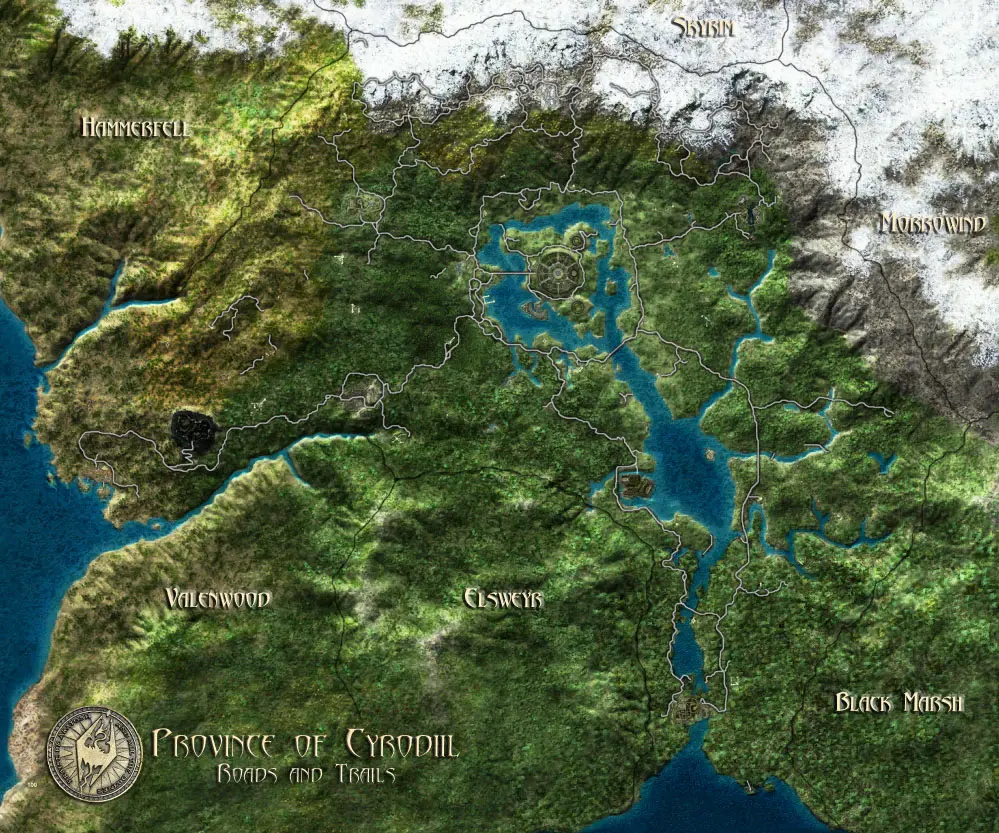
==Description======== All of the roads and trails have been added to the Cyrodiil and Shivering Isles maps. The shivering isles map shows the location of all Obelisks.
==TECH NOTES========= These maps contain No text which would obscure the map's details. Use the in-game map markers to find the names of things. The SI map has been adjusted to accurately fit your cursor location as compared to the vanilla map. All three resolutions of map have been included. Your settings and screen resolution will determine which map is used. The 'Texture Size' setting in your game settings menu will also determine which map is used. (Cyrodiil) @ 1152 x 1024 or above, you will use the 100% map. (Large Texture size) @ 1024 x 768 or below, you will use the 80% map. (Medium Texture size) @ 640 x 480 or below, you will use the 50% map. (Small Texture size) NOTE: There is no 80 map for the Shivering Isles. There is not an ESP file, these are texture 'Replacers' only. If you do not already have a way to invalidate your archive for the maps, you will need to do that.
==Installation====== Copy the texture folder in this archive into your \Oblivion\Data\ folder path. If these folders already exist, merge the folders. If you do not have a \Meshes\ or \Textures\ folder inside your \Data\ folder, then simply copy them inside your \Data\ folder.
==CREDITS============ WillieSea - Retextures. Vality7 & M56 - Base map texture Resource. Bethsoft - For the game and the Construction Set.
==PLAYTESTERS======== WillieSea
==PERMISSIONS======== You may use the map textures however you see fit. If you upload the textures, please give credit to WillieSea and Vality7 in your 'Credits' section.
==Version============ V2. 0 Updates: -The trails are a darker grey color, where the roads are more of a white color. -Darkened the cities walls so they are more defined. -Fixed the roads around Cheydinhal. -On the Shivering Isles map, darkened the obelisk sites so they are not so bright.
v1. 0 * Initial Release.
A new 'Satellite' map view of Cyrodiil and The Shivering Isles with all roads and trails clearly marked. This is a purely cosmetic mod for Oblivion players who want a clearer, more detailed map. With 424 endorsements and 8,390 downloads, it's a well-received texture replacement.
✨ Key Features
📊 Pros & Cons
✅ Pros
- Community-approved with 424 endorsements and 8,390 downloads.
- Makes navigation easier with clearly marked roads and trails.
- Simple texture mod—no gameplay changes, just a better map.
⚠️ Cons
- Last updated in 2008—may not be compatible with newer Oblivion versions or mods.
- Only affects the map view; no other visual or gameplay enhancements.
For Oblivion players who want a clearer, more detailed map without changing gameplay. If you're tired of the vanilla map and want to see roads and trails at a glance, this is for you. Skip if you're looking for gameplay overhauls or modern graphics.
💡 Beginner Tips
- Place the texture files in your Oblivion Data folder, typically at C:\Program Files\Bethesda Softworks\Oblivion\Data.
- If you use a mod manager like Oblivion Mod Manager (OBMM), you can install this mod with a single click.
- Make sure to check for conflicts with other map mods—only one map texture can be active at a time.
📊 Mod Details
- Game
- Oblivion Mods
- Author
- WillieSea
- Version
- 2.0
- Downloads
- 8,390
- Endorsements
- 424
- Category
- Models And Textures
- Created
- 1/20/2008
- Updated
- 1/20/2008
🔧 How to Install Oblivion Mods
Download from Nexus.
📖 Full step-by-step install guide for Oblivion →
Visit the official mod page for specific installation instructions for this mod.
🎮 Need cheat codes or console commands? Check ur gaming wiki for Oblivion commands, item IDs, and more.
Keep browsing — more Oblivion mods await