Less Overpowered Nighteye
⚪ Last updated 2008⚠️ Install Order · 2 steps
Install in this order, then this mod last — most mods fail to load without their framework and dependencies in place.
Preview
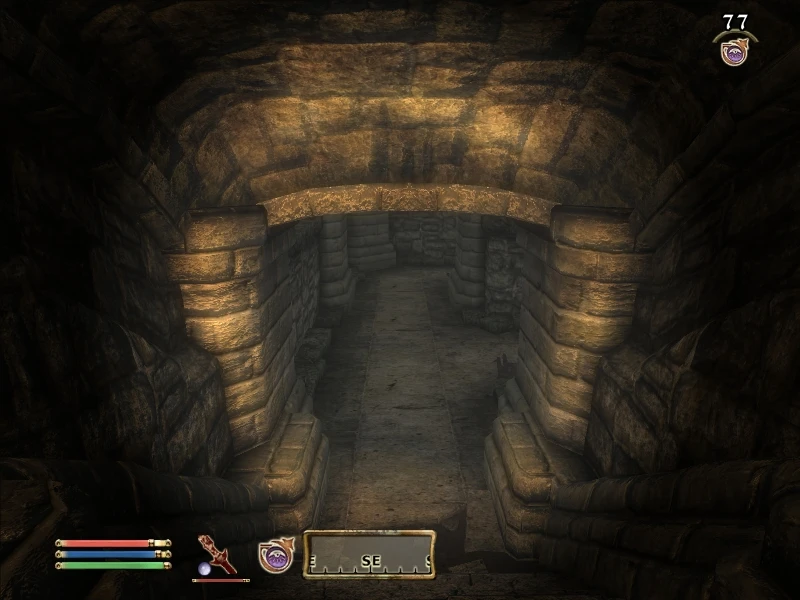
🔍 Analysis
- 👍 3.7% endorsement rate — high engagement, a strong quality signal
- 🏆 #15 of 124 Miscellaneous mods in this game by downloads
📋 About This Mod
Name: Less Overpowered Nighteye Version: 1. 1 Date: 1/24/2008 Category: Gameplay Effects and Changes Requirements: Oblivion Mod Manager (OBMM) Author(s): Zeroed Source: Description =========== This mod replaces the nighteye effect in Oblivion to make it a much weaker (as in less useful) effect. Details ======= This mod was a response to a request for a \'night-eye with a downside\', in particular for restricted visibility when activated. It allows you to make various changes to a base nighteye shader to make a little less \'uber\': You have a choice of 3 base effects upon installing the omod: Bright (bright lights will mean that you can\'t see very well) Dark (just like \'normal\' vision but brighter) Mono (like Bright, but in black and white) You can then choose visibility: Whole (no mask applied to vision) Large (a mask is applied, but you still have a fairly large viewable area) Small (heavily restricted vision) NEW in 1. 1 If you picked a mask, you have a choice of what effect you would like in the dark area: Normal - as in version 1. 0 - a darker version of normal vision. I\'ve tried to make it so that you can still see a little even when vision is masked - especially bright things Black - completely black Blurred - vision outside of visible area is blurred. NEW in version 1. 1 If you picked the \'mono\' shader, you can pick which colour you would like: Blue - a little bit like the default nighteye Green White Finally, you have an option of whether to enable dilation: Enabled (fine detail is less visible - the \'dottiness\') Disabled (like normal) OBMM Install ============ 1. Copy OMOD file to (install folder)\\Oblivion\\obmm\\omod\\ 2. Start Oblivion Mod Manager. 3. Double-click the name of the mod in the right-hand side of the OBMM screen. 4. Choose from the options available to customise your nighteye effect! (icon should turn blue) Uninstall ========= 1. Start Oblivion Mod Manager. 2. Double-click the name of the mod in the right-hand side of the OBMM screen, click Yes. (icon should turn green) Incompatibility =============== No known incompatibilities at present, obviously aside from any mod that changes the nighteye pixel shader. If you are going to patch the game, then deactivate the OMOD first, patch and re-activate it afterwards. If any mods change the effect from the Construction Set, then these may not work as intended. Known Issues or Bugs ==================== Like I say, if you are going to patch the game then deactivate the OMOD first, patch and re-activate it afterwards, otherwise changing shaderfiles has been known to cause graphical anomolies. History ======= 1. 1, 01/02/2007 - Added new masked effects 1. 0, 24/01/2007 - Initial release. Contact ======= You can find me on the official Elder Scrolls forums as \'Zeroed\' You can find me on TESNexus as \'Zeroed\' Credit
A small cosmetic mod that replaces the nighteye shader with a masked vision effect, reducing the overpowered look of the default ability. With 383 endorsements and over 10,000 downloads, it's a niche favorite for players who want a more immersive nighteye experience.
✨ Key Features
📊 Pros & Cons
✅ Pros
- Community-tested with 383 endorsements and 10k+ downloads
- Simple cosmetic tweak that changes the feel of nighteye without altering gameplay
- Multiple shader options give you choice in how the mask looks
⚠️ Cons
- Last updated in 2008 — likely outdated for current game versions and may conflict with modern mods
- Purely cosmetic — if you want actual gameplay balance changes, this won't help
For Oblivion players who find the default nighteye too bright or immersion-breaking and want a subtle visual tweak. Skip if you're looking for gameplay rebalancing or if you play on a modern setup where old mods might cause issues.
💡 Beginner Tips
- Since this is an old mod, check if your game version is compatible before installing — Oblivion's latest patch may break it.
- If you use a mod manager, install manually by dropping the files into your Data folder to avoid overwriting other shader mods.
- Test the shader in a dark area to see if the mask effect is too distracting during gameplay.
📊 Mod Details
- Game
- Oblivion Mods
- Author
- Zeroed
- Version
- 1.1
- Downloads
- 10,218
- Endorsements
- 383
- Category
- Miscellaneous
- Created
- 1/24/2008
- Updated
- 2/1/2008
🔧 How to Install Oblivion Mods
Download from Nexus.
📖 Full step-by-step install guide for Oblivion →
Visit the official mod page for specific installation instructions for this mod.
🎮 Need cheat codes or console commands? Check ur gaming wiki for Oblivion commands, item IDs, and more.
Keep browsing — more Oblivion mods await