Koldorns Improved Lava 2
⚪ Last updated 2008⚠️ Install Order · 2 steps
Install in this order, then this mod last — most mods fail to load without their framework and dependencies in place.
Preview
🔍 Analysis
- 👍 3.7% endorsement rate — high engagement, a strong quality signal
- 🏆 #238 of 303 Models And Textures mods in this game by downloads
📋 About This Mod
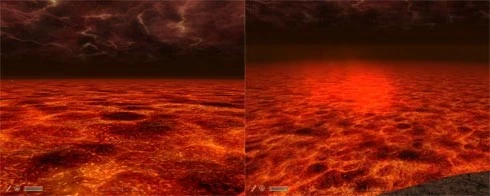
Koldorns Improved Lava 2 v1. 0 ----------------------------- This second version changes the Lava to something completely different than my other Lava retexture. This mod simply replaces the existing lava within the game with something that I feel looks better. It came about as a result of an Oblivion Realm texture replacer im working on and decided to have this as a seperate mod rather than bundled in with the main pack. The ESP contains small but essential tweaks to the state of the lava for better visual effect, rather than the frankly strange original (imho). ESP goes into Data folder and texture file goes into textures/water folder. If your having any problems it may be due to the game not liking new textures, there is a workaround for this using OBMM (Oblivion Mod manager), a very well known programme that can be found at this url http://timeslip.chorrol.com/obmm_download.html Once you have the programme follow these steps: Start OBMM and click on \'Utilities\'. Select \'Archive invalidation\'. Click \'Directly Edit BSAs\'. Check \'Textures\'. Check \'Generate archiveinvalidation entries on hash collision\'. Click the checkbox for autoupdate on exit and/or click Update Now. Close the Archive invalidation popup (click the red X in the upper-left corner). Quit OBMM or click \'Launch Oblivion\'. This should generally sort out any problems to do with textures or meshes. A great place to check out other useful tips for any kind of mod related problem is http://cs.elderscrolls.com/constwiki/index.php/Oblivion_Mods_FAQ Special Note: An amount of pixelation occurs at close angles because of the wave genrator. To disable this you can set the wave amplitude to 0 but this obviously causes there to be no waves whatsoever. Very special thanks to Leprman for the beta test and screens
Koldorns Improved Lava 2 is a simple texture replacement for lava in Oblivion, offering a completely different look from the author's previous lava mod. With 198 endorsements and over 5,300 downloads, it's a niche cosmetic mod for players wanting to refresh the game's volcanic environments.
✨ Key Features
📊 Pros & Cons
✅ Pros
- Community-approved with 198 endorsements and over 5,300 downloads
- Easy to install—just drop the texture files into your Data folder
- Gives Oblivion's lava a fresh look without touching gameplay
⚠️ Cons
- Last updated in 2008—may be incompatible with newer Oblivion versions or mods
- No screenshots or detailed previews provided in the description
- Only affects lava textures, so it's a very narrow visual change
For Oblivion players who want a quick visual refresh of lava areas without overhauling the game. If you're a texture mod collector or enjoy tweaking the game's atmosphere, this is a low-risk addition. Skip if you're looking for gameplay changes or high-res overhauls.
💡 Beginner Tips
- Place the extracted textures into your Oblivion Data folder, overwriting when prompted.
- If you use a mod manager like OBMM or Wrye Bash, you can install it as a package for easy removal.
- Check if you have other lava texture mods installed—this will overwrite them, so decide which look you prefer.
📊 Mod Details
- Game
- Oblivion Mods
- Author
- Koldorn
- Version
- 1.0
- Downloads
- 5,358
- Endorsements
- 198
- Category
- Models And Textures
- Created
- 1/17/2007
- Updated
- 1/8/2008
🔧 How to Install Oblivion Mods
Download from Nexus.
📖 Full step-by-step install guide for Oblivion →
Visit the official mod page for specific installation instructions for this mod.
🎮 Need cheat codes or console commands? Check ur gaming wiki for Oblivion commands, item IDs, and more.
Keep browsing — more Oblivion mods await