Improved Chests
⚪ Last updated 2022⚠️ Install Order · 2 steps
Install in this order, then this mod last — most mods fail to load without their framework and dependencies in place.
Preview
🔍 Analysis
- 👍 0.4% endorsement rate
- 🏆 #72 of 485 Models And Textures mods in this game by downloads
📋 About This Mod
=============================================
Description:
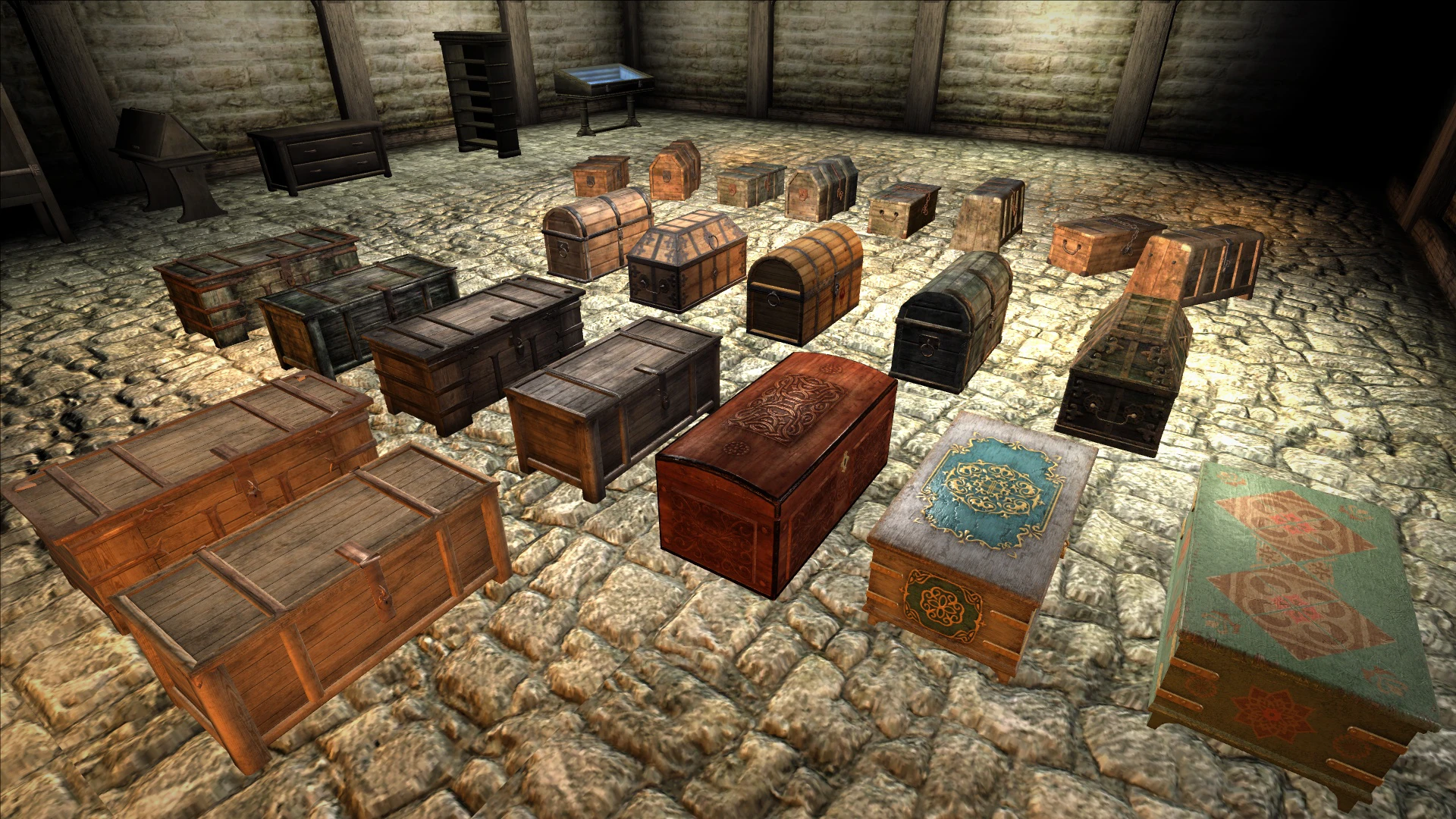
This is a simple mod, what replaces vanilla chests with more detailed ones. Adds several models and sounds of chests for variety. Content and location of chests not changes. All models and textures are made by me.
=============================================
Compatibility:
At the moment, not a single serious conflict of the mod with others has been noticed.
The mod is finally compatible with Oscuro's Oblivion Overhaul! Just pick up an optional file instead of main one and stick to the installation instructions given on this page.
Mod now also compatible with xOBSE version of Harvest Containers! All you need is to install THIS file after you have installed Harvest Containers xOBSE.
If you are using OLD Harvest Containers, you can download the OOO compatible version of Improved Chests, unzip all files except Improved Chests (OOO Compatible).esp from the "Improved Chests (OOO Compatible)" folder to Data folder of your game with overwriting files. This will make Harvest Containers mod using new models instead vanila, but there will be no additional models, what shown on the pictures..
=============================================
INSTALLATION:
You can easily install the mod using any modmanager, OBMM, WB, MO2, Vortex etc..
Here's an example of installation via Wrye Bash:
Launch Wrye Bash, open the Installers tab, drag and drop Improved Chests.zip to the left column. Right-click on the appeared archive and select "Install" from the drop-down menu. After installation, open the "mods" tab and activate Improved Chests.esp. If you are using LOOT, launch it and update your masterlist, if not, raise the mod in Wrye Bash's mod list above mods that somehow changes chests in the game. Enjoy!
Open the downloaded archive, select files from the "Improved Chests" folder and paste them with the replacement in the Data folder of your game. Launch any mod manager and activate Improved Chests.esp. Done.
=============================================
UNINSTALLATION:
Via Wrye Bash:
Run Wrye Bash and disable Improved Chests.esp in the mods tab. Click the "Installers" tab, right click on Improved Chests.zip in the left column and select "Uninstall" from the drop-down menu. After this the zip-archive can be deleted.
Uncheck Improved Chests.esp in your mod manager, go to Data folder of the game, find and delete ESP. Go to meshes/clutter, delete "NewChests" folder. Go to textures/clutter, delete "NewChests" folder. GO to sound/fx/doors folder, delete "drs_chestclose02.wav" and "drs_chestopen02.wav" files. Open the downloaded archive, select meshes folder from OLDChests and paste it with the replacement in the Data folder of your game. Done.
=========================
Improved Chests replaces vanilla chests with more detailed models and adds several new chest models and sounds for variety. It's a straightforward cosmetic mod for players who want more visual and audio diversity in their loot containers. With 841 endorsements and over 207k downloads, it's a popular choice.
✨ Key Features
📊 Pros & Cons
✅ Pros
- Community favorite with 841 endorsements and over 207k downloads.
- Simple cosmetic upgrade that makes chests look and sound better.
- Adds variety so not every chest looks identical.
⚠️ Cons
- Last updated in 2022 — may not be compatible with the latest game version.
- Purely cosmetic — no gameplay changes, so if you want new loot mechanics, look elsewhere.
For players who want a quick visual and audio upgrade to chests without changing gameplay. Great for those who appreciate attention to detail in their game world. Skip if you're looking for gameplay-altering content.
💡 Beginner Tips
- If you're using a mod manager, just download and activate — no extra steps needed.
- Check if the mod requires a specific game version; if you're on a newer patch, test it out.
- Since it's a texture/model replacement, it should be safe to install mid-playthrough, but a backup never hurts.
📊 Mod Details
- Game
- Oblivion Mods
- Author
- Palrom
- Version
- 1.2
- Downloads
- 207,453
- Endorsements
- 841
- Category
- Models And Textures
- Created
- 3/4/2022
- Updated
- 10/29/2022
🧩 Commonly Used Together
Users add these mods to the same collections — a real compatibility signal, not an AI guess.
🔧 How to Install Oblivion Mods
Download from Nexus.
📖 Full step-by-step install guide for Oblivion →
Visit the official mod page for specific installation instructions for this mod.
🎮 Need cheat codes or console commands? Check ur gaming wiki for Oblivion commands, item IDs, and more.
Keep browsing — more Oblivion mods await