Dragon Captions - County Sutch Reborn Master - CSRM
⚪ Last updated 2017⚠️ Install Order · 2 steps
Install in this order, then this mod last — most mods fail to load without their framework and dependencies in place.
Preview
🔍 Analysis
- 👍 1.4% endorsement rate — high engagement, a strong quality signal
- 🏆 #3 of 24 Modders Resources & Tutorials mods in this game by downloads
📋 About This Mod
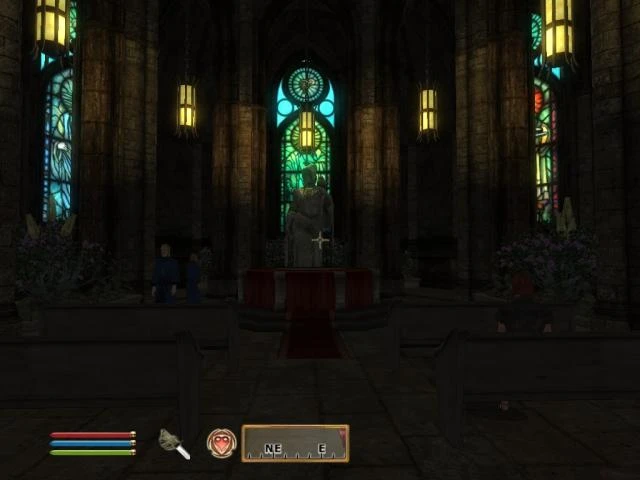
Dragon Captions =============== Name: (DC) County Sutch - Resource Package (CSRM) Version: 2. 0F Date: 08/06/2017 Category: Resource Pack Requirements: None Authors: Biulding3015, and Scythe Source:http://www.tesnexus.com/downloads/file.php?id=35813 Forum: http://www.forums-dragoncaptions.com/
Description =========== This is the New Dragon Captions Resource Device. The DCRP has become old, and impossible to update and maintain. There are FAR to many resources within it that are not important to the DC team. DCRP will continue to be offered to for backwards compatibility with some of the Older DC Mods; and other mod makers that have used the DCRP. CSRM will be for the County Sutch Project (which will be the only mods produced by Dragon Captions from here on out)
Version Control (compatibility) =============== This mod should be completely compatible with DCRP.
How to Start ============ You have a few different options for installing CSRM
Full Download ----------------- Download the latest version denoted with an F (F stands for Full download) Full download is all of the mesh packs and the ESM in a single download instead of having multiple smaller downloads.)
Pieces -------- Download Texture Packs I & II Download Mesh Packs I & II Download 1. 8 ESM
Install ======= 1. Open the zip/7z file 2. Enter the various sub folders until you find the 'meshes, textures, and esp files. 3. Extract all files mentioned above to... (Install folder)\Oblivion\Data\ 4. Start Oblivion Launcher, click 'Data Files', place a check-mark beside the .esm file.
Uninstall ========= 1. Start Oblivion Launcher, click Data Files, un-check the .esm file. 2. Delete the files/folders associated with the mod (there are a lot).
Incompatibility =============== should not have any incompatibilities; being an esm that does not edit vanilla content.
History ======= 06/15/11 Version 1-8: Added the resources for County Seat Pack II is now released 02/??/11 Version 1-5: Added New Haven Resources Part of Pack I 11/26/10 Version 1-0: Initial Release; Pack I Released
Contact ======= Biulding3015- at nexus, beths, DC forums, and Xfire.
Credits ======= Thanks to Bethesda for creating Oblivion. Thanks to TESNexus.com for the one-stop-shop resource for authors and players. Thanks to LHammonds for the Readme Generator this file was based on.
Thanks to all those who contributed resources to the file Thanks to Onra for the Concept of using the esm Thanks to Otellino and Other DC Members for your help
Thanks to Assassin_456 for their Medieval Resources
County Sutch Reborn Master File (CSRM) is a required master file for all County Sutch mods, replacing the older DCRP. It serves as a base resource for modders, with 144 endorsements and nearly 10,000 downloads, last updated in August 2017.
✨ Key Features
📊 Pros & Cons
✅ Pros
- Essential for anyone modding County Sutch — you can't run those mods without it
- Solid community trust with 144 endorsements and nearly 10k downloads
- Simple purpose: it's a master file, so it does exactly what it says
⚠️ Cons
- Last updated in 2017 — might have compatibility issues with newer game versions
- Only useful if you're specifically modding County Sutch; otherwise it's pointless
For modders and players who want to use County Sutch mods — this is a required dependency. Skip if you're not interested in County Sutch content, as it does nothing on its own.
💡 Beginner Tips
- Place the master file in your Data folder and ensure it's active in your load order before any County Sutch mods.
- Check the mod's long description on the Nexus page for detailed instructions, as the summary here is brief.
- Since it's a master file, don't remove it while using County Sutch mods or your save may break.
📊 Mod Details
- Game
- Oblivion Mods
- Author
- Dragon Captions
- Version
- 2.0F
- Downloads
- 9,969
- Endorsements
- 144
- Category
- Modders Resources & Tutorials
- Created
- 11/26/2010
- Updated
- 8/6/2017
🔧 How to Install Oblivion Mods
Download from Nexus.
📖 Full step-by-step install guide for Oblivion →
Visit the official mod page for specific installation instructions for this mod.
🎮 Need cheat codes or console commands? Check ur gaming wiki for Oblivion commands, item IDs, and more.
Keep browsing — more Oblivion mods await