Dark Green Glass Armor
⚪ Last updated 2008⚠️ Install Order · 2 steps
Install in this order, then this mod last — most mods fail to load without their framework and dependencies in place.
Preview
🔍 Analysis
- 👍 3.9% endorsement rate — high engagement, a strong quality signal
- 🏆 #56 of 303 Models And Textures mods in this game by downloads
📋 About This Mod
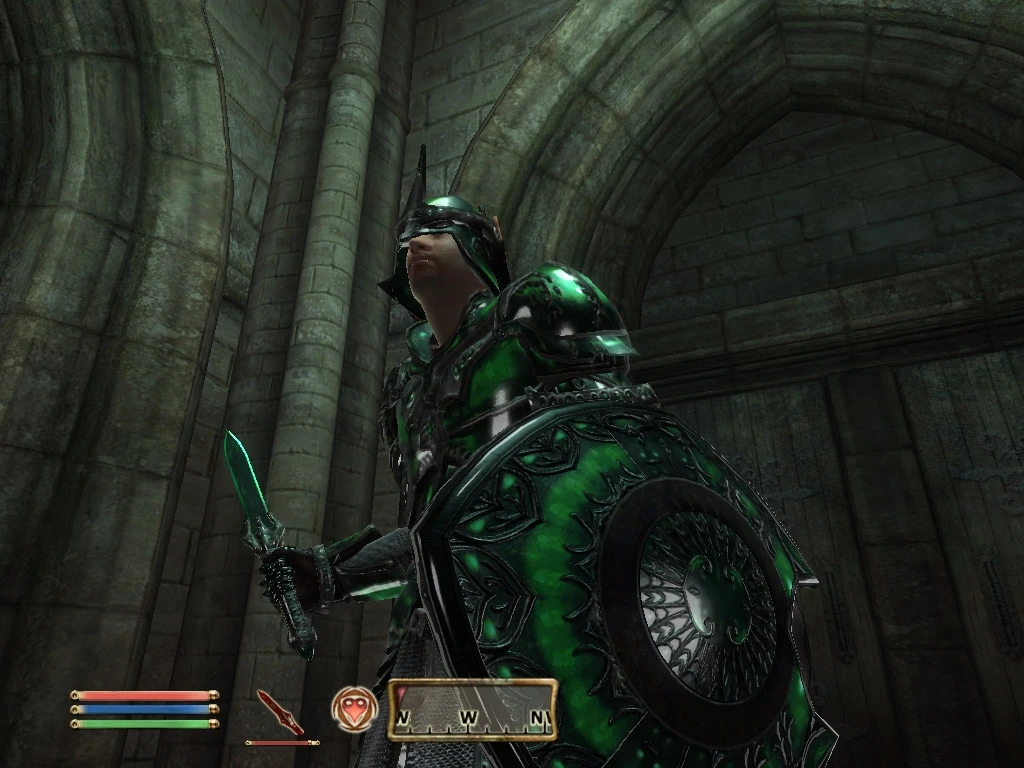
From the moment I set eyes on the glass armour in this game, I hated it. It makes you look like some sort of phosphorescent radioactive space man. I changed the colour of the glass part of the armour, to a more darker green, like Morrowind\'s glass armour, as well as all of the glass weapons, plus the icons to match. The mod will not replace any existing glass armours you have installed (at least it shouldn\'t), since I changed the directory names, with an .esp, so you can disable it if you must (not recommended). To install, simply extract the files included to your Oblivion\\Data\\ folder, then enable the plugin by opening the oblivion launcher, then click \'Datafiles\' and check the \"Darkgreen Glass Armour\" box. ~Ohanzee
This mod recolors the glass armor's glass parts to a darker green, addressing the author's dislike of the original phosphorescent look. It's a simple texture replacement for players who prefer a more subdued aesthetic. With 420 endorsements and over 10,000 downloads, it has a solid following despite its age.
✨ Key Features
📊 Pros & Cons
✅ Pros
- Community-approved with 420 endorsements and over 10k downloads
- Fixes the 'phosphorescent radioactive space man' look for those who hate the original
- Lightweight texture mod that's easy to install
⚠️ Cons
- Last updated in 2008 — may not be compatible with modern game versions or mod setups
- Only affects the glass parts, not the entire armor set
- No screenshots or detailed instructions provided by the author
For Oblivion players who find the default glass armor too bright and want a darker, more grounded look. Skip if you're fine with the original or want more comprehensive armor overhauls.
💡 Beginner Tips
- Place the texture files in your Oblivion Data folder, overwriting the originals — but back up the originals first if you want to revert.
- If you use a mod manager like OBMM or Wrye Bash, you can install this as a package and easily toggle it on/off.
- Check if you have any other glass armor retextures installed — they may conflict, so load order matters.
📊 Mod Details
- Game
- Oblivion Mods
- Author
- Unknown
- Version
- 1.0
- Downloads
- 10,637
- Endorsements
- 420
- Category
- Models And Textures
- Created
- 4/15/2006
- Updated
- 2/24/2008
🔧 How to Install Oblivion Mods
Download from Nexus.
📖 Full step-by-step install guide for Oblivion →
Visit the official mod page for specific installation instructions for this mod.
🎮 Need cheat codes or console commands? Check ur gaming wiki for Oblivion commands, item IDs, and more.
Keep browsing — more Oblivion mods await