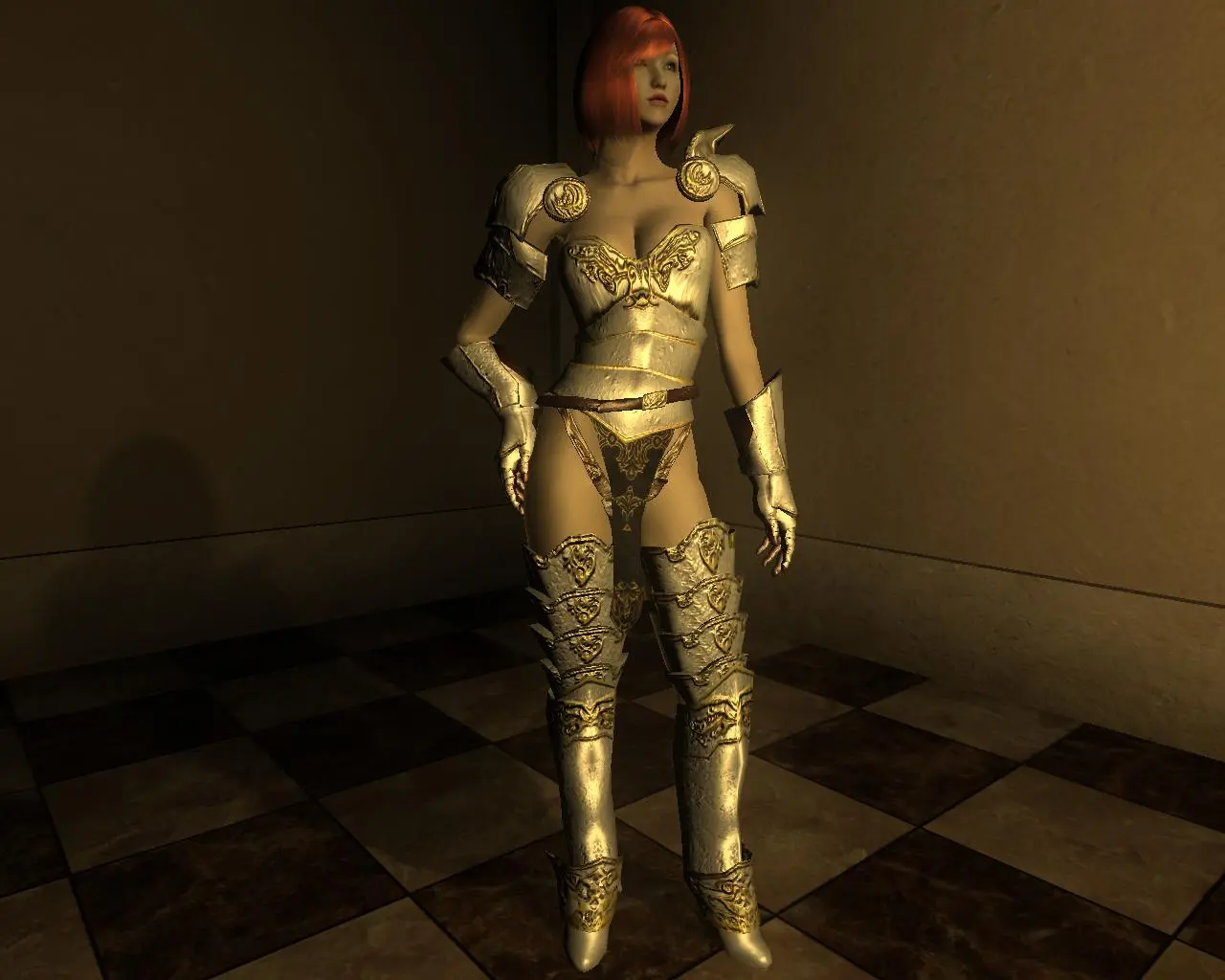
Crimson Eyecandy White for HGEC
⚪ Last updated 2008⚠️ Install Order · 4 steps
Install in this order, then this mod last — most mods fail to load without their framework and dependencies in place.
Preview
🔍 Analysis
- 👍 3.6% endorsement rate — high engagement, a strong quality signal
- 🏆 #85 of 358 Armour mods in this game by downloads
📋 About This Mod
Name: Crimson Eyecandy White for HGEC Version: 1. 0 Date: 8/1/2008 Category: Weapons and Armor Requirements: Oblivion Patch 1. 2. 0. 214, HG Eyecandy Body Recommended: Oblivion Mod Manager Author(s): Slash197 Source: Description =========== Adds a white version of Bisquits\'s Crimson Eyecandy Armor. Location ======== In a chest on the West side of Old Bridge, under the tree closest to the bridge. Install ======= This archive is distributed in what LHammonds calls OMOD-Ready format. It allows you to manually extract and install like most other mods but it also allows you to use Oblivion Mod Manager and import this archive with all the settings pre-configured for an OMOD file. Pick which method you are going to use for installation: Manual Installation - = or = - OBMM Installation Manual Install -------------- 1. Extract this archive to any folder and then copy the contents to Oblivion\'s Data folder. You can ignore or delete the \"omod conversion data\" folder. 2. Start Oblivion Launcher, click Data Files, and enable the .esp file(s). OBMM Install ------------ Create the OMOD (Do this section only once) 1. Copy archive to (install folder)\\Oblivion\\obmm\\omod\\ 2. Start Oblivion Mod Manager. 3. Click the Create button. 4. Click the Add Archive button, find and select the archive, then click Yes. 5. Click the Create omod button, then click OK when it finishes. Install the mod using OBMM 1. Start Oblivion Mod Manager. 2. Double-click the name of the mod in the right-hand side of the OBMM screen. (icon should turn blue) Uninstall ========= Pick which method you are going to use for uninstall based on how you installed it: Manual Uninstall - = or = - OBMM Uninstall Manual Uninstall ---------------- 1. Start Oblivion Launcher, click Data Files, uncheck the .esp file(s). 2. Delete the files/folders associated with the mod. Oblivion\\Data\\Meshes\\Armor\\CrimsonEC White\\ Oblivion\\Data\\Textures\\Armor\\CrimsonEC White\\ Oblivion\\Data\\Textures\\Menus\\Icons\\Chrimson EC White\\ Oblivion\\Data\\Crimson Eyecandy White.esp Oblivion\\Data\\Crimson Eyecandy White Readme.txt OBMM Uninstall -------------- 1. Start Oblivion Mod Manager. 2. Double-click the name of the mod in the right-hand side of the OBMM screen, click Yes. (icon should turn green) Incompatibility =============== There should be no compatibility issues. Every item has a unique ID and name, and the meshes and textures are in unique folders. History ======= 1. 0, 2008/8/1 - Initial release. Contact ======= You can find me on the official Elder Scrolls forums as \'Slash197\' You can find me on the Exnem forums as \'Slash197\' You can send me an email here: brian11688@gmail.com Credits ======= Thanks to Bisquits for creating the original meshes and textures. Thanks to Exnem for creating the base Eyceandy body. Thanks to RAIAR for the HGEC body. Thanks to LHammonds for the Readme Gene
A white recolor of the Crimson Eyecandy armor for HGEC body types, based on Zhu's meshes. Adds a clean white variant of the popular armor set for Oblivion. With 342 endorsements and 9,527 downloads, it's a niche but appreciated cosmetic option for fans of the original.
✨ Key Features
📊 Pros & Cons
✅ Pros
- Community-approved with 342 endorsements and nearly 10k downloads—clearly fills a need.
- Straightforward recolor: if you like the Crimson Eyecandy look but want white, this is exactly that.
- Built on Zhu's HGEC meshes, so it should fit seamlessly if you already use HGEC.
⚠️ Cons
- Last updated in 2008—over a decade old, so compatibility with modern Oblivion setups is uncertain.
- Requires the original Crimson Eyecandy armor and HGEC body mod, which are not included—extra steps for new users.
- Only a color swap; no new textures or mesh improvements, so don't expect anything beyond the white variant.
For Oblivion players who already use HGEC and the Crimson Eyecandy armor but want a white color scheme. If you're a completionist collecting armor recolors, this is a must-have. Skip if you don't use HGEC or want gameplay changes—this is purely cosmetic.
💡 Beginner Tips
- Make sure you have the original Crimson Eyecandy armor installed first, as this mod replaces its textures.
- Use a mod manager like Oblivion Mod Manager (OBMM) to avoid overwriting files manually.
- Check the mod's file structure to ensure it matches your HGEC version (e.g., BBB or non-BBB).
📊 Mod Details
- Game
- Oblivion Mods
- Author
- Slash197
- Version
- 1.0
- Downloads
- 9,527
- Endorsements
- 342
- Category
- Armour
- Created
- 8/1/2008
- Updated
- 8/1/2008
🔧 How to Install Oblivion Mods
Download from Nexus.
📖 Full step-by-step install guide for Oblivion →
Visit the official mod page for specific installation instructions for this mod.
🎮 Need cheat codes or console commands? Check ur gaming wiki for Oblivion commands, item IDs, and more.
Keep browsing — more Oblivion mods await