Clean up
⚪ Last updated 2010⚠️ Install Order · 2 steps
Install in this order, then this mod last — most mods fail to load without their framework and dependencies in place.
Preview
🔍 Analysis
- 👍 3.0% endorsement rate — high engagement, a strong quality signal
- 🏆 #23 of 86 Utilities mods in this game by downloads
📋 About This Mod
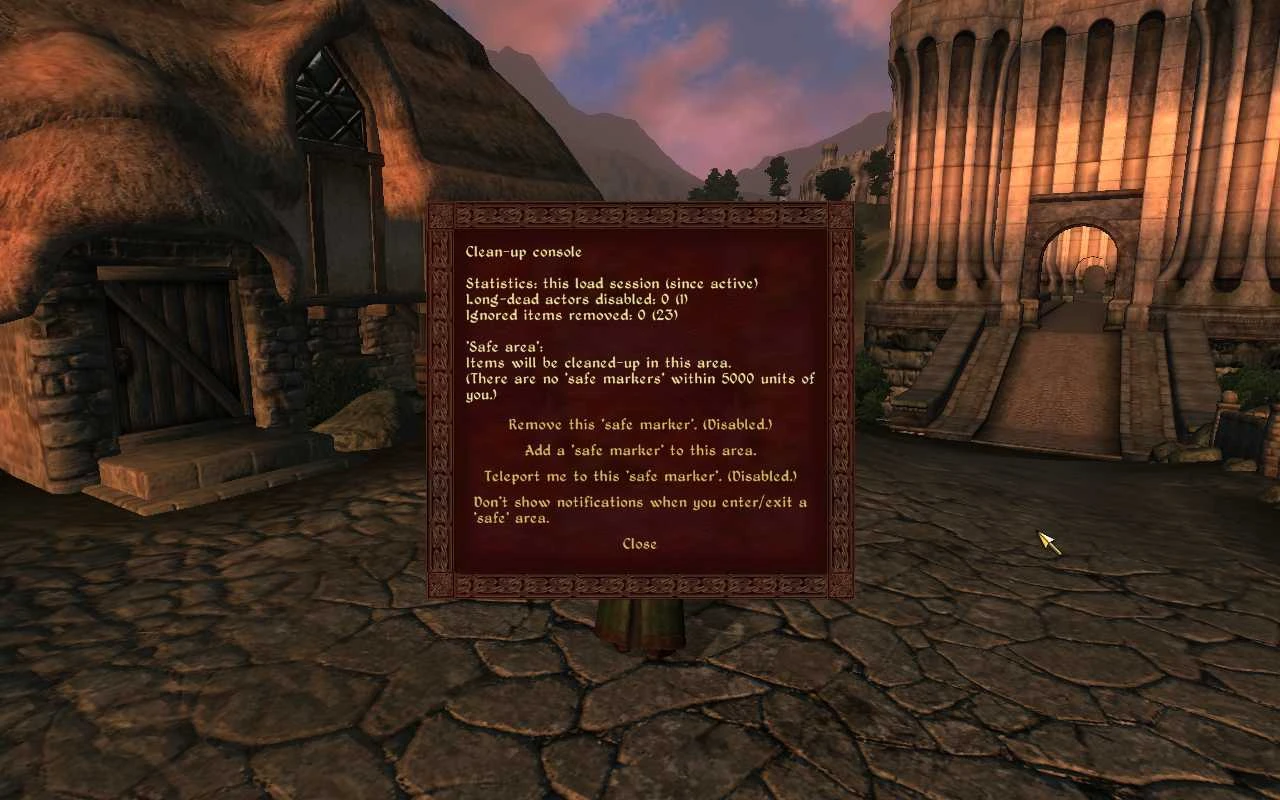
Name: Clean-up Version: 0. 56 Date: 15 December 2010 Category: Miscellaneous Requirements: Oblivion Patch 1. 2. 0. 214, Oblivion Script Extender (OBSE): http://obse.silverlock.org/ Author(s): kuertee Source: http://www.tesnexus.com/downloads/file.php?id=24606 Changes since last update, 0. 55: ================================ 0. 56, 15 December 2010: Bug-fix: The count for the number of items cleaned was never used. So it always reported 0. This is now fixed. The cleaning process, however, always worked. =========== Description =========== Prevents saved-game file-size bloating by cleaning the game of actor and item references that are no longer required. (e.g. inactive references created from dropped items that were picked-up by the player.) Cleans long-dead actors that may have been corrupted somehow. ======= Details ======= The cleaning process used is the game\'s inherent behaviour of removing items that no longer has any \"links\" to the game world. Normally, dead actors and \"dynamically created\" items that were not picked up by the player will be removed from the world, when the cell they are in resets. (Dynamic items are those created at game-time as opposed to those created in the Construction Set. Examples of these items are: those created by PlaceAtMe, those dropped by the Player, those dropped by dying NPCs: e.g. shields, etc.) However, there are cases when these actors and dynamically created items will (for some reason or another) stay in the game world forever. And actors not cleaned up by the game properly will never respawn, causing a \"broken\" game experience. Saved-game bloat is the result of these. And saved-game bloating may be the cause of some game crashes. ====================================== Examples of causes of saved-game bloat ====================================== These are some causes of \"corrupt\" actors and \"dynamically created\" items: 1. Corrupted actor-spawns. Sometimes dead actors retain a \"link\" to the game world preventing the game from removing their entities from the game world. Their spawn entity is therefore not reused to create a new actor. Ultimately, this will decrease the game world\'s population. How these occur is still a mystery. In my game, undead and some goblins were forever dead. It reached a point where I no longer encountered skeletons nor zombies in the wild. 2. Items dropped by the player. These items will forever stay in the game world. These are not corrupt entities per se, but some if not most may be categorised as \"clutter\" and are no longer required by the player. E.g.: dropped ingredients or food, dropped useless clothing, clutter no longer required. ==================== The cleaning process ==================== The mod runs in the background. It scours the player\'s immediate area for dead actors and dynamically-created items. Any dead actors evaluated as being \"no longer required\" will be disabled
Clean up is a utility mod for Oblivion that prevents saved-game file-size bloat by removing unnecessary actor and item references, such as those from dropped items picked up by the player. It also cleans long-dead actors. With over 3,000 endorsements and 108,000 downloads, it's a well-established tool for players experiencing save file growth.
✨ Key Features
📊 Pros & Cons
✅ Pros
- Community favorite with 3,294 endorsements and over 108k downloads—clearly a go-to for save bloat issues.
- Targets a real problem: save file bloat from leftover references, which can cause lag and long load times.
- Simple utility that does one job well—no complex features to fiddle with.
⚠️ Cons
- Last updated in 2010—over a decade old, so it may not be tested with the latest Oblivion patches or mod setups.
- No detailed instructions or compatibility notes provided by the author, so you're on your own for installation.
- Only addresses reference cleanup—doesn't fix other save bloat causes like inventory clutter or script lag.
For Oblivion players who've noticed their save files ballooning in size and want a straightforward fix. Also for modders who install lots of item mods and need to keep saves lean. Skip if you're on a modern setup and haven't encountered save bloat—this is a niche utility.
💡 Beginner Tips
- Since it's an Oblivion mod, make sure you have Oblivion Script Extender (OBSE) installed if the mod requires it—though not stated, many utilities do.
- Run the cleanup before saving in a safe location, like a house or inn, to avoid conflicts with active quests.
- Check the mod's readme or forum posts on Nexus for any known issues with specific quests or mods.
📊 Mod Details
- Game
- Oblivion Mods
- Author
- kuertee
- Version
- 0.56
- Downloads
- 108,007
- Endorsements
- 3,294
- Category
- Utilities
- Created
- 5/23/2009
- Updated
- 12/23/2010
🔧 How to Install Oblivion Mods
Download from Nexus.
📖 Full step-by-step install guide for Oblivion →
Visit the official mod page for specific installation instructions for this mod.
🎮 Need cheat codes or console commands? Check ur gaming wiki for Oblivion commands, item IDs, and more.
Keep browsing — more Oblivion mods await