Project V - A Cinematic and Photorealistic Visual Overhaul for Next Using ReShade
⚪ Last updated 2018⚠️ Install Order · 2 steps
Install in this order, then this mod last — most mods fail to load without their framework and dependencies in place.
🖼️ Gallery (2 images)

🔍 Analysis
- 👍 1.8% endorsement rate — high engagement, a strong quality signal
📋 About This Mod
THIS RESHADE PRESET IS COMPLETELY INFERIOR TO MY NEWER RESHADE COLLECTION IN EVERY WAY. GET MY NEW PRESET HERE: https://www.nexusmods.com/nomanssky/mods/955
Description & Features
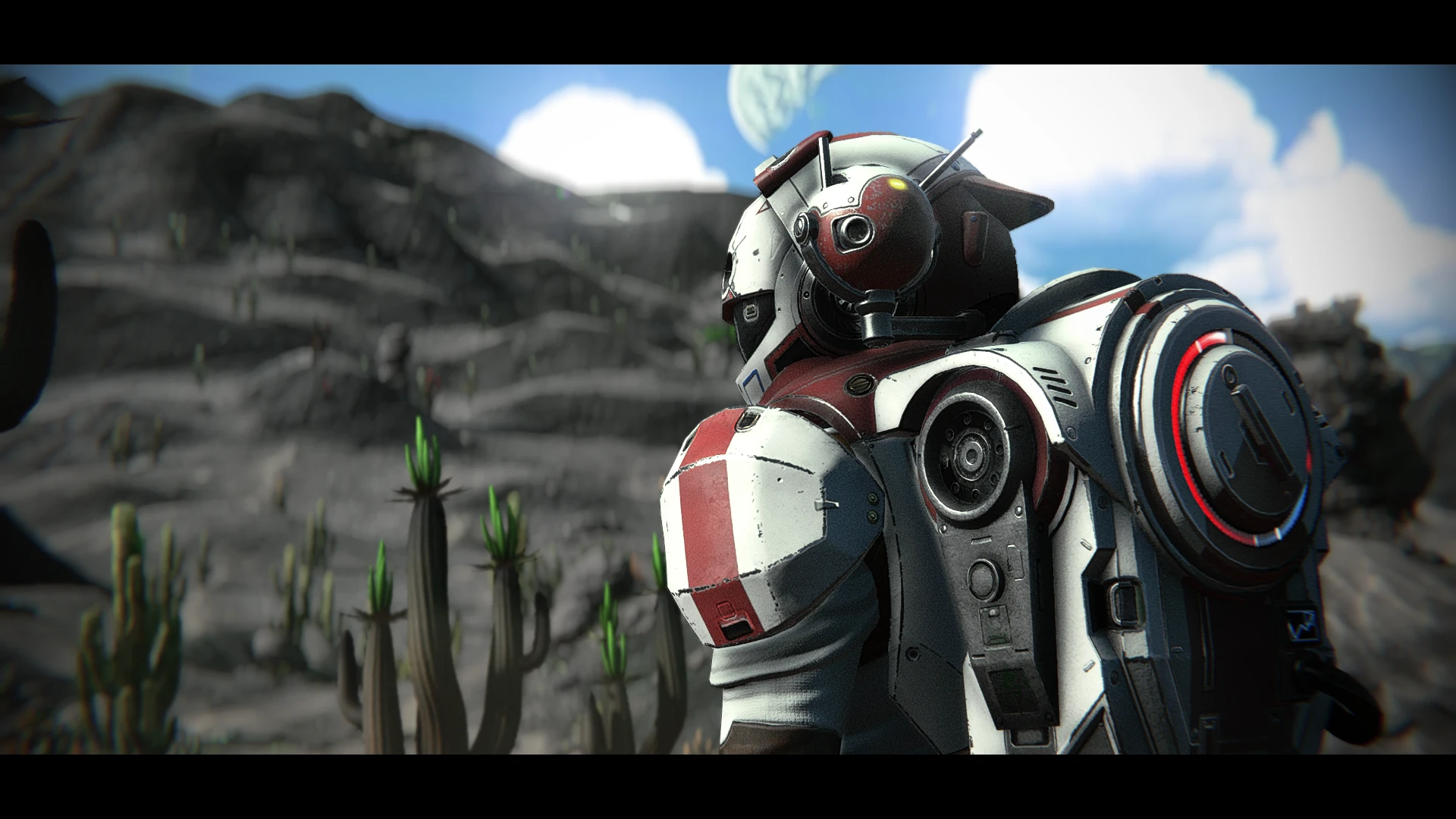
This is a highly-customizable, cinematic, yet realistic-ish ReShade for No Man's Sky Next that I've literally put well-over 100 hours of work into since Next launched. I had many goals with this ReShade, including de-cartoonifying NMS Next to give the game a look that feels more real, gritty, and somber, adding a depth-of-field that would please even Skyrim and Fallout ENB users while finding the right settings to allow quick-and-easy end-user adjustments to DoF strength and closeness to the camera with one slider, adding a host of cinematic effects that, unlike the vanilla scanlines and vignette (imo), leave the user with a look that, at moments, truly emulates photographs or films, and completely eliminating teal skies in favor of rich, blue ones. Before you even ask, "yes," EVERY PART OF THE RESHADE IS OPTIONAL AND CAN BE TURNED OFF WITH HOTKEYS, EVEN THE COLOR CHANGES. To that end, I've included a new vignette that's less harsh and less intrusive than the vanilla one and added tons of other filmic effects like film grain, letterboxing (black bars), chromatic aberration (again less harsh and more filmic than the vanilla one which seemed to only apply to the top of the screen in a very odd way), slight lens warping, and the aforementioned DoF.
I also didn't want to simply desaturate the image to achieve a more gritty look, because one of the coolest things about No Man's Sky Next is how colorful it is. However, the vanilla game's very liberal use of color makes colors, in general, feel less special. So, I spent a TON of time rebalancing every single color in the game to achieve a look that makes colors pop in certain circumstances while also keeping the over-colorful feel of the vanilla game at bay, leading to a more intentional and mysterious feeling when encountering bold colors.
Hotkeys for turning off/on every effect I've added without ever pausing the game are below.
Install Instructions:
*Run your game and ensure NMS is set to borderless mode first. Close your game and proceed. (Note to advance users: Setting the game to borderless-windowed mode is randomly unnecessary for some people, so if you really like fullscreen-exclusive mode for some reason, go ahead and leave it that way, I guess. But if your game CTD's on launch, then try making it borderless without the ReShade files installed then follow the steps in the "Part Two" section again.
1. If you have mods installed already, delete any mod that changes the game's filters. So if you have a mod that forces the game to use the vintage filter, default filter, filmic filter, etc., delete that.
2. Go to your NMS PCBANKS folder, found here, "...\Steam\steamapps\common\No Man's Sky\GAMEDATA\PCBANKS" and delete the file called DISABLEMODS. TXT."
3. If you do not have one already, create a folder in that same PCBANKS folder called "MODS"
4. Download the contents of this mod, containing a zip file "Mercs Here Be Dragons Release 1-0" and open the zip file using winrar or 7zip (I use 7zip, cause it's free and easy).
5. From that zip file, copy only the file "MercRealisticwinterLUT_8012.pak" into the new "MODS" folder you just created in "PCBANKS".
1. Download the latest version of ReShade from here: https://reshade.me/
2. Run the ReShade .exe and Chose your NMS.exe, found here, "... C:\Program Files (x86)\Steam\steamapps\common\No Man's Sky\Binaries"
3. Select the Vulkan for the API
4. Select yes when it ask if you want do download a collection of effects
5. Deselect all but one of the effects, doesn't matter which one (you'll be deleting it in a second)
6. Go to your No Man's Sky binaries folder, where the game's .exe is, go to your "reshade-shaders" folder and delete the "Shaders" and "Textures" folders
7. Go back to the .zip file "Mercs Here Be Dragons Release 1-0" and open the zip file.
8. Copy the files "Here Be Dragons Release 1-0", "opengl32.ini," and the "reshade-shaders" folder into your NMS folder where your game's NMS.exe is, "... C:\Program Files (x86)\Steam\steamapps&#
Project V is a cinematic ReShade preset for No Man's Sky Next, aiming to de-cartoonify the game with realistic, gritty visuals. It includes customizable depth-of-field, film grain, letterboxing, chromatic aberration, and color rebalancing, all toggleable via hotkeys. The author notes it's inferior to their newer preset and directs users to that instead.
✨ Key Features
📊 Pros & Cons
✅ Pros
- Over 100 hours of development shows in the polish—this preset is packed with tweaks
- Fully customizable with hotkeys, so you can turn off any effect you don't like
- Community-trusted with 325 endorsements and nearly 18k downloads
⚠️ Cons
- Author explicitly says this preset is inferior to their newer collection—you're getting a dated version
- Last updated in 2018, so it may not work with current No Man's Sky versions or ReShade releases
- Requires ReShade installation and manual setup, which can be fiddly for newcomers
For No Man's Sky players who want a more cinematic, realistic look without losing the game's colorful charm. If you're into ENB-style depth-of-field and filmic effects, this is a solid choice. Skip if you prefer the vanilla cartoonish aesthetic or want a preset that's actively maintained.
💡 Beginner Tips
- Make sure you install ReShade with the correct API for No Man's Sky (DirectX 11) and select all effect packages during setup.
- Use the in-game ReShade menu to tweak the depth-of-field slider to your liking—it's designed for quick adjustments.
- If you're on a newer game version, test the preset in a safe area first; compatibility issues may cause visual glitches.
📊 Mod Details
- Game
- No Mans Sky Mods
- Author
- TheMercsAssassin
- Version
- 1.3
- Downloads
- 17,827
- Endorsements
- 325
- Category
- ReShade Presets
- Created
- 8/10/2018
- Updated
- 8/22/2018
🔧 How to Install No Man\ Mods
Create /MODS/ folder in /GAMEDATA/PCBANKS/. Delete DISABLEMODS.TXT.
📖 Full step-by-step install guide for No Man\ →
Visit the official mod page for specific installation instructions for this mod.
🎮 Need cheat codes or console commands? Check ur gaming wiki for No Man\ commands, item IDs, and more.
Keep browsing — more No Man\ mods await