Joew's No Man's Sky Mod Manager
⚪ Last updated 2018⚠️ Install Order · 2 steps
Install in this order, then this mod last — most mods fail to load without their framework and dependencies in place.
Preview
🔍 Analysis
- 👍 6.4% endorsement rate — high engagement, a strong quality signal
- 🏆 #11 of 18 Utilities mods in this game by downloads
📋 About This Mod
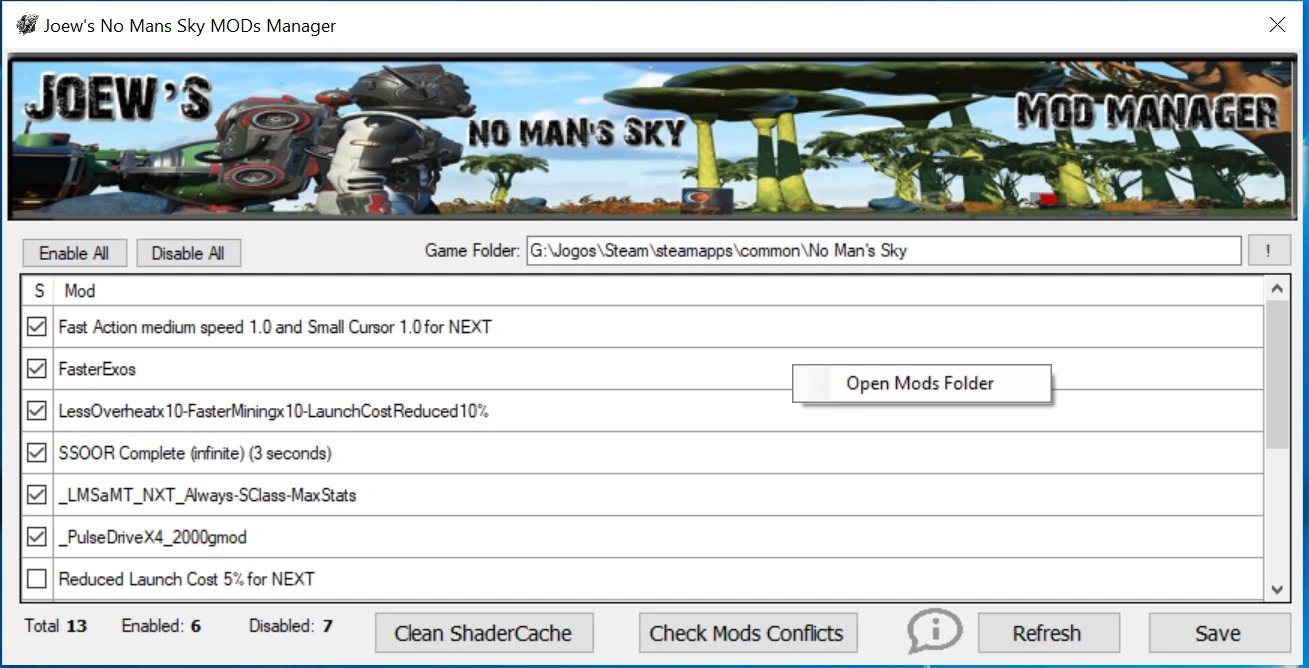
I made this program to help you easily manage your mods for No Man's Sky
Features:
- Enable and Disable Mods
- Open Mods Folder (for easy extract your mods)
- Check Mods Conflicts (version 2. 0+)
- Clean SHADERCACHE folder. (version 2. 4+)
Requirements:
- . NET FRAMEWORK 4. 6. 1
- Tested with Steam version, but should work with GOG too.
Instructions:
- Set the Game Folder Path. Steam is: ...\Steam\steamapps\common\No Man's Sky
- Click Save button to save changes.
- Before Save, make sure NMS game isn't running.
- Click on Refresh button after unzip new mods to your mod's folder while Mod Manager is openned or to undo all changes you made.
- Mouse right click inside mod list area to open mods folder
- To Check Conflicts click on the button at centered bottom and wait the analyzes finish ;)
With version 2. 0 it now checks mods conflicts.
At the time it only check the conflicts and tell you which files. So you can see all the files are conflicting and can take some action: disables all and enables just one. You can see the mod and file so u can try go to mod's authors and ask them to merge the mods that u want :D or you can do anything else that u want.
Its a bit slower with many mods, sorry. But its because mod manager have to extract all mods and check all files. Not my fault anyway, but on next version ill try optimize it.
Virus Scan:
Joew's No Man's Sky Mod Manager is a utility that simplifies mod management for No Man's Sky, offering enable/disable toggles, conflict detection, and shader cache cleaning. It requires .NET Framework 4.6.1 and is compatible with Steam and GOG versions. With 483 endorsements and 7,562 downloads, it remains a community staple despite being last updated in 2018.
✨ Key Features
📊 Pros & Cons
✅ Pros
- Community-approved with 483 endorsements and over 7,500 downloads.
- Conflict detection is a lifesaver for modding NMS—no more guessing which mods clash.
- Shader cache cleaning is a handy built-in feature that saves you from manual deletion.
⚠️ Cons
- Last updated in 2018—may not be compatible with the latest No Man's Sky updates.
- Performance is slow with many mods, as the author admits, due to extracting and checking all files.
- Requires manual setup of the game folder path, which might confuse less technical users.
For No Man's Sky modders who juggle multiple mods and want a simple way to enable/disable them without digging through folders. Also for those who need conflict detection to avoid crashes. Skip if you only use a couple of mods or prefer manual management.
💡 Beginner Tips
- Set the game folder path to your Steam directory (e.g., ...\Steam\steamapps\common\No Man's Sky) and click Save before using the manager.
- Always refresh the mod list after adding new mods to the folder to see them appear.
- Right-click inside the mod list to quickly open the mods folder for manual extraction.
📊 Mod Details
- Game
- No Mans Sky Mods
- Author
- joewalabel
- Version
- 2.3
- Downloads
- 7,562
- Endorsements
- 483
- Category
- Utilities
- Created
- 8/10/2018
- Updated
- 8/27/2018
🔧 How to Install No Man\ Mods
Create /MODS/ folder in /GAMEDATA/PCBANKS/. Delete DISABLEMODS.TXT.
📖 Full step-by-step install guide for No Man\ →
Visit the official mod page for specific installation instructions for this mod.
🎮 Need cheat codes or console commands? Check ur gaming wiki for No Man\ commands, item IDs, and more.
Keep browsing — more No Man\ mods await