Colorless Inventories 8.0
🟠 Updated over a year ago⚠️ Install Order · 1 step
Install in this order, then this mod last — most mods fail to load without their framework and dependencies in place.
Preview
🔍 Analysis
- 👍 2.9% endorsement rate — high engagement, a strong quality signal
- 🏆 #23 of 33 Overhauls mods in this game by downloads
📋 About This Mod
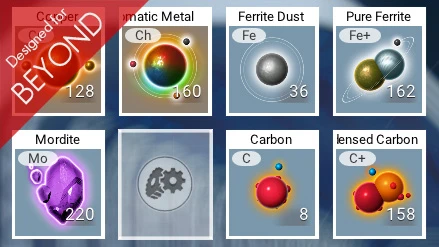
Colorless Inventory reworks almost all icon background colors.
My goals with this mod were :
- reduce harlequin effect when looking at my inventories
- faster spot what icon I'm looking for
- makes colors relevant
- feel some progression in loot and craft
I work on this mod since Atlas Rises and back then, color was mostly item type based.
But NEXT/Visions/Abyss reshuffled the cards, bringing lots of new items, changing item uses and even removing some (heridium, iridium...) so I finaly opted for value based colors.
So here are the colors used for valuable items :
- grey/blue : all standard resources (<3000 units), including energy cells of all types and junk items
- slightly bronze : refined resources (>3000 units), rare resources
- beige : basic craftable items (<60 000 units)
- gold yellow : advanced craftable items (<600 000 units)
- royal blue : highly advanced craftable items (<5 000 000 units)
- purple : high end craftable items (15 600 000 units)
And additional colors used for specific items :
- dark green : race items like gek relic, vy'keen daggers
- very light grey : non craftable standard tradable items
- dark grey : all utilities like portable technologies, atlas pass, hacking chip, ammunitions...
- blue sky : gases
- blue : frigate items
I'm not sure screenshots do justice to the mod as it is better relevant when you play with the items directly in game.
All in all, I hope you will get some nice time with this mod.
New : v8. 0 has been updated for 6. 01 game version.
Compatibility :
- CHECK IF THIS MOD IS COMPATIBLE WITH LATEST GAME VERSION
- CHECK IF THIS MOD NEEDS TO BE MERGED WITH ANOTHER OF MY MODS
- An AMUMSS (5. 0 or higher) .lua script is provided as this mod can't be used along any other mod editing the following files
METADATA\REALITY\TABLES\NMS_REALITY_GCPRODUCTTABLE. MBIN
METADATA\REALITY\TABLES\NMS_REALITY_GCSUBSTANCETABLE. MBIN
Colorless Inventories 8.0 is a small overhaul mod by Lo2k that reworks icon background colors in the game. With 353 endorsements and over 12,000 downloads, it's a niche but popular choice for players seeking a cleaner, more uniform inventory look. Last updated in August 2025, it remains relevant for current game versions.
✨ Key Features
📊 Pros & Cons
✅ Pros
- Solid community backing with 353 endorsements and 12k downloads.
- Simple, focused change—no bloat, just cleaner inventory visuals.
- Recently updated, so it's likely compatible with the current game version.
⚠️ Cons
- Description is minimal—no details on which icons or exact color changes.
- No install instructions or compatibility notes provided by the author.
- Niche appeal: only affects icon backgrounds, not gameplay or UI layout.
For players who find the default inventory icon colors distracting or inconsistent and want a subtle visual cleanup. Skip if you're looking for gameplay changes or a full UI overhaul—this is purely cosmetic.
💡 Beginner Tips
- Since it's a simple visual mod, you can install it manually by dropping files into the game's mod folder.
- Check the mod's file structure to ensure you're placing files in the correct directory—usually a 'Mods' folder.
- If you use a mod manager, let it handle the installation to avoid conflicts with other UI mods.
📊 Mod Details
- Game
- No Mans Sky Mods
- Author
- Lo2k
- Version
- 8.0
- Downloads
- 12,226
- Endorsements
- 353
- Category
- Overhauls
- Created
- 9/15/2019
- Updated
- 8/29/2025
🔧 How to Install No Man\ Mods
Create /MODS/ folder in /GAMEDATA/PCBANKS/. Delete DISABLEMODS.TXT.
📖 Full step-by-step install guide for No Man\ →
Visit the official mod page for specific installation instructions for this mod.
🎮 Need cheat codes or console commands? Check ur gaming wiki for No Man\ commands, item IDs, and more.
Keep browsing — more No Man\ mods await