Vanilla HD HUD
⚪ Last updated 2017⚠️ Install Order · 5 steps
Install in this order, then this mod last — most mods fail to load without their framework and dependencies in place.
Preview
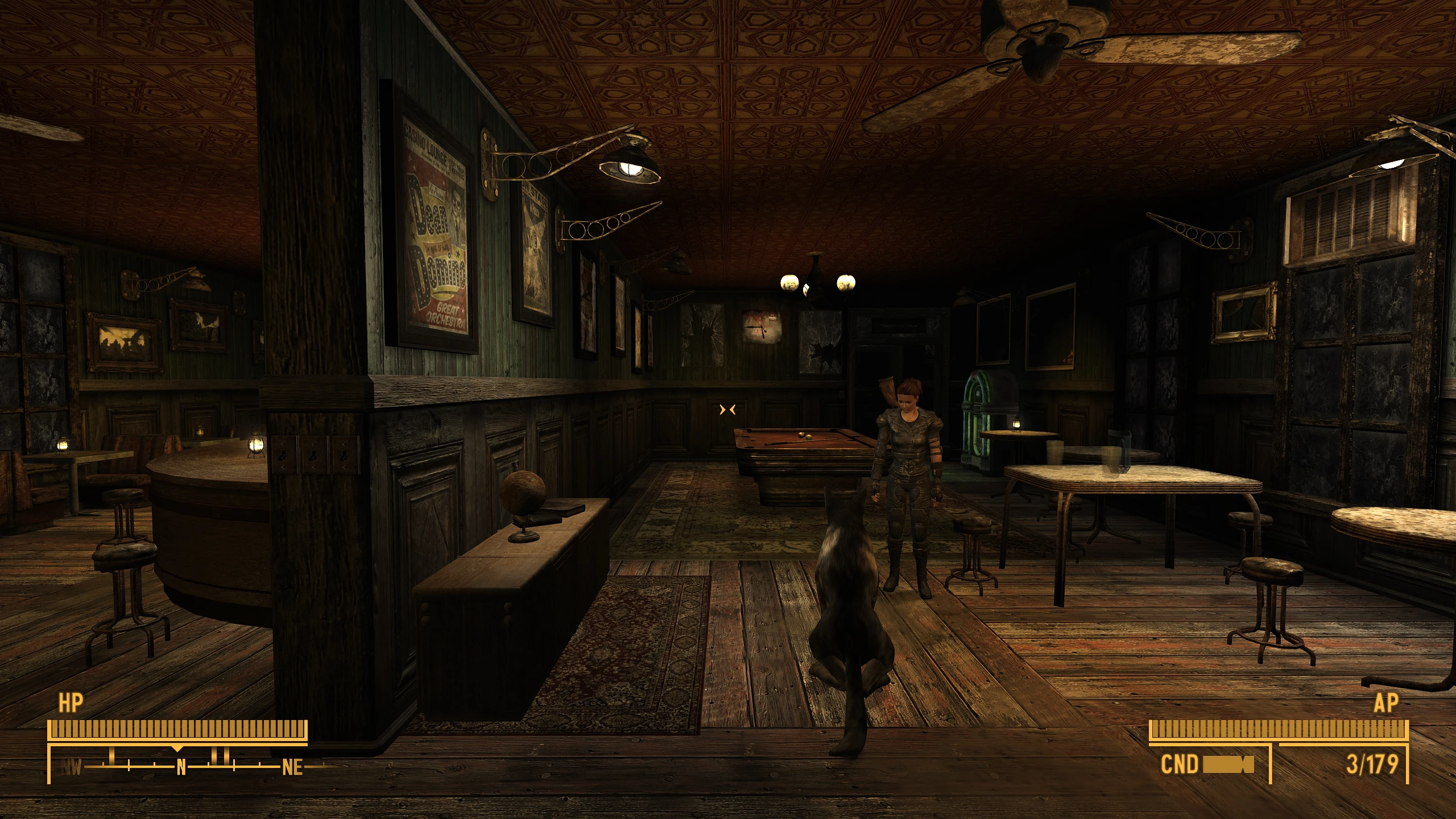
🔍 Analysis
- 👍 5.0% endorsement rate — high engagement, a strong quality signal
- 🏆 #2 of 103 User Interfaces mods in this game by downloads
📋 About This Mod
Description:
Retextures the HUD and some of the UI while maintaining the vanilla "style". I tried not to change much of the original design, though what I've changed I did it to achieve a cleaner and less intrusive HUD. Please check the comparison screenshots for more details.
Main Files:
-
[]Vanilla HD HUD
Patches:
- [
[]Vanilla HD HUD - Alternative Crosshair & Activation Prompt
[]Vanilla HD HUD - Alternative Crosshair & Activation Prompt (Green Mouse)
[]Minimalistic Crosshairs
[]Minimalistic Crosshairs (Green Mouse)
[]Minimalistic Crosshairs - Dot
[]Minimalistic Crosshairs - Dot (Green Mouse)
[]Vanilla HUD Remastered (4K)
[]Vanilla HUD Remastered (4K) (Green Mouse)
[]Hardcore Compass (Vanilla UI Plus)
All patches include an OPTIONAL version that changes the mouse color from Amber to Green.
Notes:
-
[]Vanilla HD HUD - Alternative Crosshair & Activation Prompt
Changes the crosshair to slightly bigger version of the Minimalistic Crosshairs one and the activation prompt to a similar / smaller version of the one found on Fallout 4.
-
[]Minimalistic Crosshairs:
Merges both mods (including the dot version) into one.
- [
Merges both mods into one by only using this mod's HUD, compass icons, xp and radiation triangles and the tick bar instead of mine, while still allowing the use of some of the UI.
I only support one crosshair and activation prompt in this patch, the one found on the Vanilla HD HUD - Alternative Crosshair & Activation Prompt.
-
[]Minimalistic Crosshairs:
Vanilla HD HUD retextures the HUD and UI elements while preserving the original vanilla style, aiming for a cleaner and less intrusive interface. With 650 endorsements and 12,895 downloads, it's a popular choice for Skyrim players who want improved visuals without straying from the game's default aesthetic.
✨ Key Features
📊 Pros & Cons
✅ Pros
- Community-approved with 650 endorsements and 12,895 downloads
- Preserves the original vanilla look, so it won't clash with other mods
- Cleaner HUD improves readability without being distracting
⚠️ Cons
- Last updated in 2017, so it may not be compatible with the latest Skyrim Special Edition or Anniversary Edition updates
- Only retextures HUD/UI, so no functional changes or new features
For Skyrim players who want a sharper, cleaner HUD without changing the game's iconic style. Perfect for vanilla purists or those using light mod lists. Skip if you're looking for a complete UI overhaul or gameplay changes.
💡 Beginner Tips
- Since this mod only replaces textures, you can install it manually by dropping the files into your Data folder, or use a mod manager for easier uninstallation.
- Check the comparison images on the mod page to see exactly what changes before installing.
- If you're using Skyrim Special Edition, verify compatibility with your game version, as the mod hasn't been updated since 2017.
📊 Mod Details
- Game
- New Vegas Mods
- Author
- CUtePOiSOnPT
- Version
- 1.6
- Downloads
- 12,895
- Endorsements
- 650
- Category
- User Interfaces
- Created
- 4/3/2017
- Updated
- 11/10/2017
🔧 How to Install New Vegas Mods
Download from Nexus.
📖 Full step-by-step install guide for New Vegas →
Visit the official mod page for specific installation instructions for this mod.
🎮 Need cheat codes or console commands? Check ur gaming wiki for New Vegas commands, item IDs, and more.
Keep browsing — more New Vegas mods await