Dynamic Quantity Prompt NVSE
⚪ Last updated 2018⚠️ Install Order · 7 steps
Install in this order, then this mod last — most mods fail to load without their framework and dependencies in place.
Preview
🔍 Analysis
- 👍 5.5% endorsement rate — high engagement, a strong quality signal
- 🏆 #24 of 103 User Interfaces mods in this game by downloads
📋 About This Mod
As of JIP LN NVSE Plugin version 54. 80, ALL functionality is now included in the JIP LN plugin as optional patches or code fixes in its ini file! This mod is no longer needed.
The Ctrl/Shift functionality is toggled on in the jip_nvse.ini by changing bQttSelectShortKeys=1 (this was added in JIP LN version 54. 40)
The mousewheel scrolling in quantity menu is integrated into the plugin without needing an option (this was added in JIP LN version 54. 80)
===============
===============
**********************
Requires NVSE 5. 1b4 or higher:
http://nvse.silverlock.org/
Also requires JIP LN NVSE Plugin 54. 00 or higher:
https://www.nexusmods.com/newvegas/mods/58277/
*********************
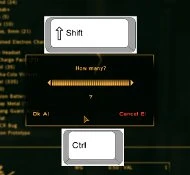
- []Ctrl-clicking a stack of items will take / drop / buy / sell one item,
[]Shift-clicking a stack of items will take / drop / buy / sell the whole stack.
[]The cursor position will be reset to the last position automatically after the transfer of items.
[]Scrollwheel works on Quantity and Sleep / Wait prompts.
About efficiency:
- []Event handlers are used throughout for maximum efficiency.
How does it work?
- []Event Handlers are installed and/or removed dynamically when Barter/Container/Quanity menus are open.
[
]Scripts SetOptionalPatch bQttSelectShortKeys 1[]While in a quantity/wait mode, scrollwheel will "tap" the left or right keys.
===============
Compatibility:
===============
No compatibility issues.
===============
Bugs/Issues:
===============
No known issues so far, please let us know if you find any.
===============
===============
-
[]2. 1 (13/11/2018) - Most of it was gutted; JIP LN plugin can do the shift/ctrl with an ini option, which this mod forces on by script with SetOptionalPatch bQttSelectShortKeys 1. The only remaining bit is for the scrollwheel to work on quantity windows.
[]2. 0 (17/3/2018) - Fully eventified
[]1. 1 (29/9/2017) - Updated to use JIP function when shift-clicking. This maintains compatibility with any mods or XML edits that change the quantity menu 'accept' PC hotkey to something other than "A".
- 1. 0 (6/9/2011) - Initial Release
===============
===============
Thanks to Bethesda/Obsidian for creating Fallout NV.
Thanks to ianpatt/scruggswuggsytheferret/behippo for NVSE.
===============
Tools Used:
===============
-
[]2. 1 (13/11/2018) - Most of it was gutted; JIP LN plugin can do the shift/ctrl with an ini option, which this mod forces on by script with SetOptionalPatch bQttSelectShortKeys 1. The only remaining bit is for the scrollwheel to work on quantity windows.
- []Event Handlers are installed and/or removed dynamically when Barter/Container/Quanity menus are open.
- []Event handlers are used throughout for maximum efficiency.
Dynamic Quantity Prompt NVSE is a UI utility for Fallout: New Vegas that enhances item transfer and quantity prompts. It adds ctrl-click to take one item, shift-click to take the whole stack, and restores cursor position after transfers. It also enables scrollwheel support on Quantity and Sleep/Wait prompts. Requires NVSE 5.1b4+ and JIP LN.
✨ Key Features
📊 Pros & Cons
✅ Pros
- Streamlines inventory management with intuitive ctrl/shift-click shortcuts.
- Quality-of-life improvement for frequent traders and looters.
- Community-trusted with 551 endorsements and over 10k downloads.
⚠️ Cons
- Requires NVSE and JIP LN, adding setup complexity for new modders.
- Last updated in 2018 — may have compatibility issues with newer game patches or mods.
- No detailed documentation or troubleshooting provided in the description.
For Fallout: New Vegas players who spend a lot of time managing inventory and want faster item transfers. Also for those who find the default quantity prompt clunky and want scrollwheel support. Skip if you're not using NVSE or JIP LN, or if you prefer a more comprehensive UI overhaul.
💡 Beginner Tips
- Make sure you have the latest NVSE and JIP LN installed before adding this mod, as it won't work without them.
- Use a mod manager like Mod Organizer 2 to keep track of your plugins and avoid conflicts.
- Test the ctrl/shift-click behavior in your inventory to get used to the new shortcuts.
📊 Mod Details
- Game
- New Vegas Mods
- Author
- pintocat - Roy Batty
- Version
- 2.2-deprecated
- Downloads
- 10,093
- Endorsements
- 551
- Category
- User Interfaces
- Created
- 6/9/2011
- Updated
- 12/31/2018
🔧 How to Install New Vegas Mods
Download from Nexus.
📖 Full step-by-step install guide for New Vegas →
Visit the official mod page for specific installation instructions for this mod.
🎮 Need cheat codes or console commands? Check ur gaming wiki for New Vegas commands, item IDs, and more.
Keep browsing — more New Vegas mods await