Thin HUD - JIP Companions Command and Control
⚪ Last updated 2015⚠️ Install Order · 6 steps
1🛠️ NVSE — New Vegas Script Extender Download ↗
2🛠️ 4GB Patcher — FNV 4GB Patcher Download ↗
3🔧 NVAC — New Vegas Anti Crash Download ↗
4🧩 JIP LN — JIP LN NVSE Plugin Download ↗
5🔧 YUP — Yukichigai Unofficial Patch Download ↗
6📦 JIP Companions Command and Control Find it →
Install in this order, then this mod last — most mods fail to load without their framework and dependencies in place.
Preview
🔍 Analysis
- 👍 5.0% endorsement rate — high engagement, a strong quality signal
- 🏆 #6 of 74 User Interfaces mods in this game by downloads
📋 About This Mod
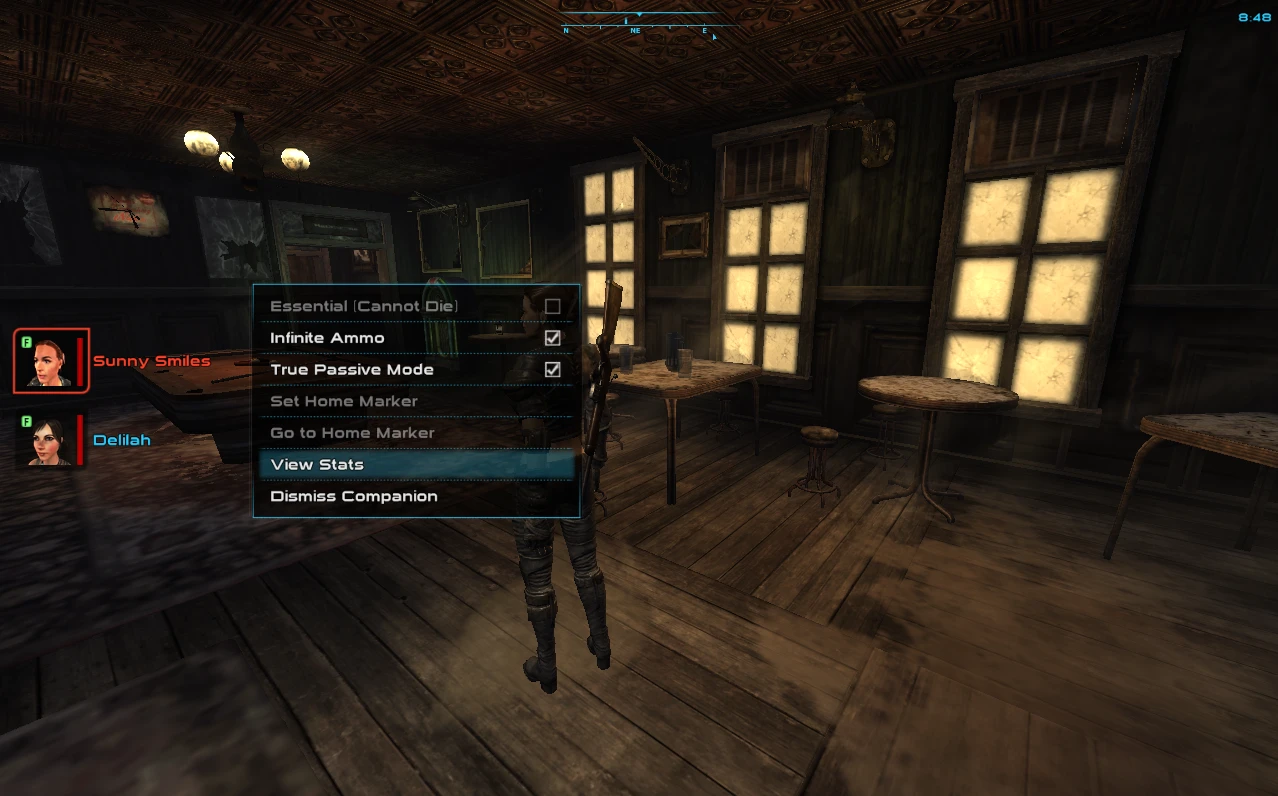
Alternative display of JIP Companions Command and Control
🤖 AI-enhanced — based on mod data
Thin HUD is a compact alternative display for the JIP Companions Command and Control mod, offering a streamlined interface for managing companions. It has 254 endorsements and over 5,000 downloads, last updated in 2015. Suitable for players who prefer a less intrusive HUD.
✨ Key Features
Provides an alternative, thinner HUD display for JIP Companions Command and Control.
Designed to reduce screen clutter while managing companions.
Compatible with the JIP Companions Command and Control mod.
📊 Pros & Cons
✅ Pros
- Community-approved with 254 endorsements and over 5,000 downloads.
- Streamlines companion management with a less intrusive interface.
- Lightweight and focused—does exactly what it says.
⚠️ Cons
- Last updated in 2015—may have compatibility issues with newer game versions.
- Requires JIP Companions Command and Control as a dependency, which isn't included.
🎯 Is This For You?
For Fallout: New Vegas players who use JIP Companions Command and Control and want a cleaner, more compact HUD for managing companions. Skip if you don't use that mod or prefer the default interface.
For Fallout: New Vegas players who use JIP Companions Command and Control and want a cleaner, more compact HUD for managing companions. Skip if you don't use that mod or prefer the default interface.
📦 Install:Easy· Under 1 minute
💡 Beginner Tips
- Make sure you have JIP Companions Command and Control installed first, as this mod is just a visual replacement.
- Use a mod manager like Nexus Mod Manager or Mod Organizer 2 to easily install and uninstall the mod.
- If you encounter issues, check the mod's comments section for user-reported compatibility notes.
📊 Mod Details
- Game
- New Vegas Mods
- Author
- Aogar
- Version
- 1.0
- Downloads
- 5,038
- Endorsements
- 254
- Category
- User Interfaces
- Created
- 7/11/2015
- Updated
- 7/11/2015
🔧 How to Install New Vegas Mods
Download from Nexus.
📖 Full step-by-step install guide for New Vegas →
Visit the official mod page for specific installation instructions for this mod.
🎮 Need cheat codes or console commands? Check ur gaming wiki for New Vegas commands, item IDs, and more.
Keep browsing — more New Vegas mods await