Shiloh DS - Clean Pipboy Screen
⚪ Last updated 2010⚠️ Install Order · 5 steps
Install in this order, then this mod last — most mods fail to load without their framework and dependencies in place.
Preview
🔍 Analysis
- 👍 4.4% endorsement rate — high engagement, a strong quality signal
- 🏆 #93 of 173 User Interfaces mods in this game by downloads
📋 About This Mod
Ya know, mama always told me noting screams two cap whore from the Atomic Wrangler quicker than a dirty pipboy screen. You always seem to forget these kinds of things after being shot in the head. Luckily as I was perched on the roof of the Prospector Saloon, taking care of the good folk of Goodsprings for my good pal Joe Cobb, that little gem came back to me.
When the dust settled, I hopped down and tore off a piece of that god awful dress Miss Trudy was wearing. Well let me tell ya, that pipboy screen started shinning right up! I figured I would show y\'all how to do the same. Minus the all the carnage mind you ... unless you really want to, I\'m off to Primm next!
________________________________________________________________________________________________
Other Shiloh:DS Mods:
Announcements:
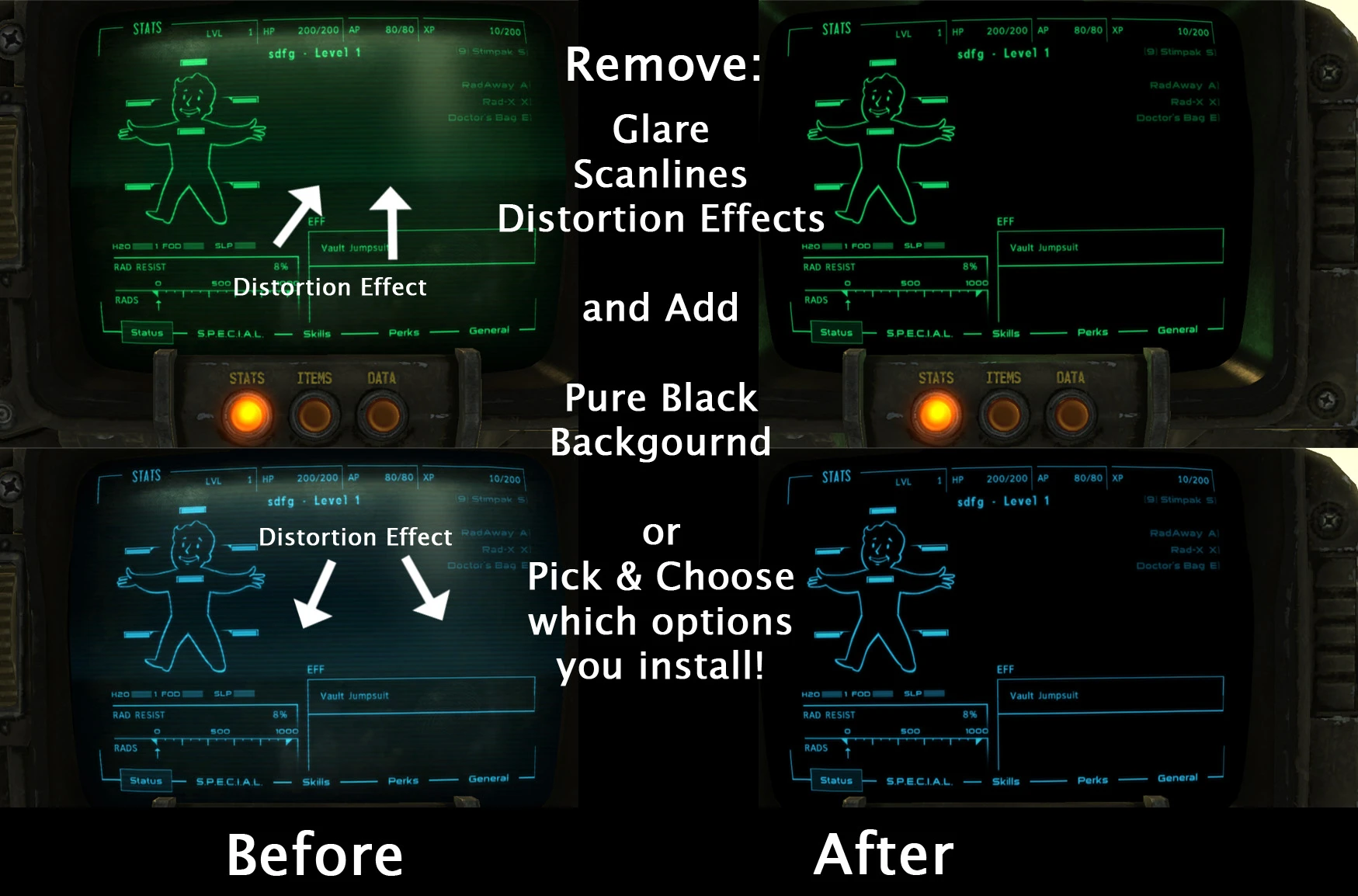
DS:HQ Official Forums Launched The Desert Succubus Headquarters has officially launched. This community is to support all of my mods, both present and future. I will no longer be actively checking the comment threads on Nexus. If you need technical help, need to report a bug, have an idea for a new feature, want to partake in live events, or just want to chat. DS:HQ is where you want to be. DS:HQ Notification of Usage / Permissions Policy Changes The permissions / usage policy for all of my mods has changed. Please check the usage section below or the Credits and permissions link on the sidebar. For ease of checking this is the new policy:Shiloh DS - Clean Pipboy Screen removes screen glare, scan lines, distortion effects, and map tinting from the Pip-Boy in Fallout 3, and lets you adjust map glow intensity. A popular UI tweak with 7,851 endorsements, last updated in 2010.
✨ Key Features
📊 Pros & Cons
✅ Pros
- Huge community trust: 7,851 endorsements and 178k downloads.
- Does exactly what it says: cleans up the Pip-Boy for a clearer view.
- Simple UI tweak that improves readability without changing gameplay.
⚠️ Cons
- Last updated in 2010 — may not be compatible with modern Fallout 3 setups or mods.
- Only affects the Pip-Boy screen; doesn't touch other UI elements.
For Fallout 3 players who find the Pip-Boy's visual effects distracting and want a cleaner interface. Skip if you're after gameplay changes or if you're playing Fallout: New Vegas — this is Fallout 3 only.
💡 Beginner Tips
- Since it's an old mod, check if you're using any Pip-Boy retextures or UI overhauls that might conflict.
- If you're using a mod manager like FOMM, install via that to keep track of files.
- Test in-game after installing to see the difference; you can adjust map glow via the mod's settings if included.
📊 Mod Details
- Game
- New Vegas Mods
- Author
- Voidlust75
- Version
- 1.4
- Downloads
- 178,235
- Endorsements
- 7,851
- Category
- User Interfaces
- Created
- 11/2/2010
- Updated
- 12/3/2010
🔧 How to Install New Vegas Mods
Download from Nexus.
📖 Full step-by-step install guide for New Vegas →
Visit the official mod page for specific installation instructions for this mod.
🎮 Need cheat codes or console commands? Check ur gaming wiki for New Vegas commands, item IDs, and more.
Keep browsing — more New Vegas mods await