PipWare UI New Vegas Edition
⚪ Last updated 2014⚠️ Install Order · 5 steps
Install in this order, then this mod last — most mods fail to load without their framework and dependencies in place.
Preview
🔍 Analysis
- 👍 4.3% endorsement rate — high engagement, a strong quality signal
- 🏆 #35 of 98 User Interfaces mods in this game by downloads
📋 About This Mod
PipWare UI - New Vegas Edition
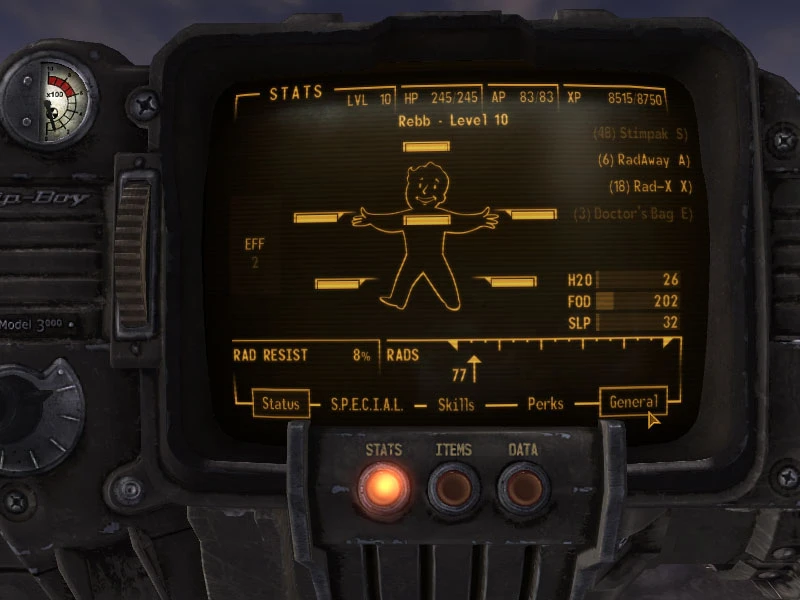
Scope of this UI Mod is to iron out some interface annoyances while not trying to change the original look of the game too much.
Features
- []based on PipWare UI for Fallout3, with some extra enhancements ( http://www.fallout3nexus.com/downloads/file.php?id=86 )[/] []Combines the Condition, Radiation, Hunger, Thirst and Sleep Pages of the PipBoy Status Window[/] []Status Effects are accessible by hovering over the EFF Button[/] []Vertical Scrollbar Markers are now easier to click and drag, no more trying to hit a really thin Area[/] []Fixes and Improvements to the Companion Wheel[/] []More Space for various Displays, such as Dialogs, Bartering, Containers, Crafting[/] []MouseWheel Scrolling can be set to either scroll 1 Line ( default Fallout3 Behaviour ) or 1 Page ( enabled by default ). To set your preferred MouseWheel behaviour, change the respective Value inside the "config_pipware.xml" File, which resides in the "Data/menus" folder.[/]
UnInstallation Remove the Files that were in the Archive from your "Data" Directory
ChangeLog
[ v1. 3 ] Nov 19 2014 - Split DPS/DAM and DT/DR displays ( thanks to Bottletopman on NexusMods ! )
[ v1. 2c ] Oct 31 2010 - Small change that allows dialog-item font and item-size to be adjusted via the config-file
[ v1. 2 ] Oct 30 2010 - Status Pages now support GamePad Mode - Slightly smaller Font in Dialogs - Dialogs now have a minimum height, which should make list-cutoff of very few dialog options happen less often - Minor cosmetic fixes
[ v1. 1b ] Oct 24 2010 - Minor adjustments to the PipBoy Menus
[ v1. 1a ] Oct 23 2010 - Fix : Mousewheel-Scrolling Quest-Notes no longer inverted
[ v1. 1 ] Oct 22 2010 - Companion-Wheel Fixes and Improvements : - Now properly detects the angles of each slice ! - Now Supports HotKeys for Quick Access to : Exit(E), Inventory(I), and Wait-State(W) - Improved the Status Page, HardCore Mode Meters are now easier to read - EFF Button flickering fixed ( hopefully )
[ v1. 0 ] Oct 22 2010 - Initial Release
Known Issues In GamePad-Mode, it's possible to scroll to "invisible" Menu Items on the Stats-Screen. This is due to hardcoded behaviour of the game. Just scroll up again to get back to the visible ones.
To the people looking for ideas/snippets for their own UI Mods, or for suggesting to other UI Modders : Have some respect and decency, give proper credit if you end up getting "heavily insp
PipWare UI New Vegas Edition enhances Fallout: New Vegas's interface with improved player status viewing, companion wheel upgrades, and additional elements in dialog, bartering, and crafting menus. A well-received UI overhaul with 1,541 endorsements, last updated in 2014, ideal for players seeking a more informative HUD.
✨ Key Features
📊 Pros & Cons
✅ Pros
- Community favorite with 1,541 endorsements and 36k downloads
- Improves readability of player stats at a glance
- Enhances companion wheel and menu interactions
⚠️ Cons
- Last updated in 2014, may have compatibility issues with newer mods or game patches
- UI overhauls can conflict with other interface mods, so check load order
For Fallout: New Vegas players who want a cleaner, more informative HUD without overhauling the entire interface. Ideal for those who frequently check player status and use companion commands. Skip if you prefer vanilla UI or use heavy UI overhauls that might conflict.
💡 Beginner Tips
- Use a mod manager like Nexus Mod Manager or Mod Organizer 2 to install and manage this mod easily.
- If you use other UI mods, place PipWare UI lower in your load order to ensure its changes take priority.
- Check the mod's comments section on Nexus for user-reported compatibility notes with popular mods like Project Nevada.
📊 Mod Details
- Game
- New Vegas Mods
- Author
- rebb
- Version
- 1.3
- Downloads
- 36,048
- Endorsements
- 1,541
- Category
- User Interfaces
- Created
- 10/22/2010
- Updated
- 11/19/2014
🔧 How to Install New Vegas Mods
Download from Nexus.
📖 Full step-by-step install guide for New Vegas →
Visit the official mod page for specific installation instructions for this mod.
🎮 Need cheat codes or console commands? Check ur gaming wiki for New Vegas commands, item IDs, and more.
Keep browsing — more New Vegas mods await