Mojave Nights - a moon and stars replacer
⚪ Last updated 2011⚠️ Install Order · 5 steps
Install in this order, then this mod last — most mods fail to load without their framework and dependencies in place.
Preview
🔍 Analysis
- 👍 2.9% endorsement rate — high engagement, a strong quality signal
- 🏆 #237 of 621 Models and Textures mods in this game by downloads
📋 About This Mod
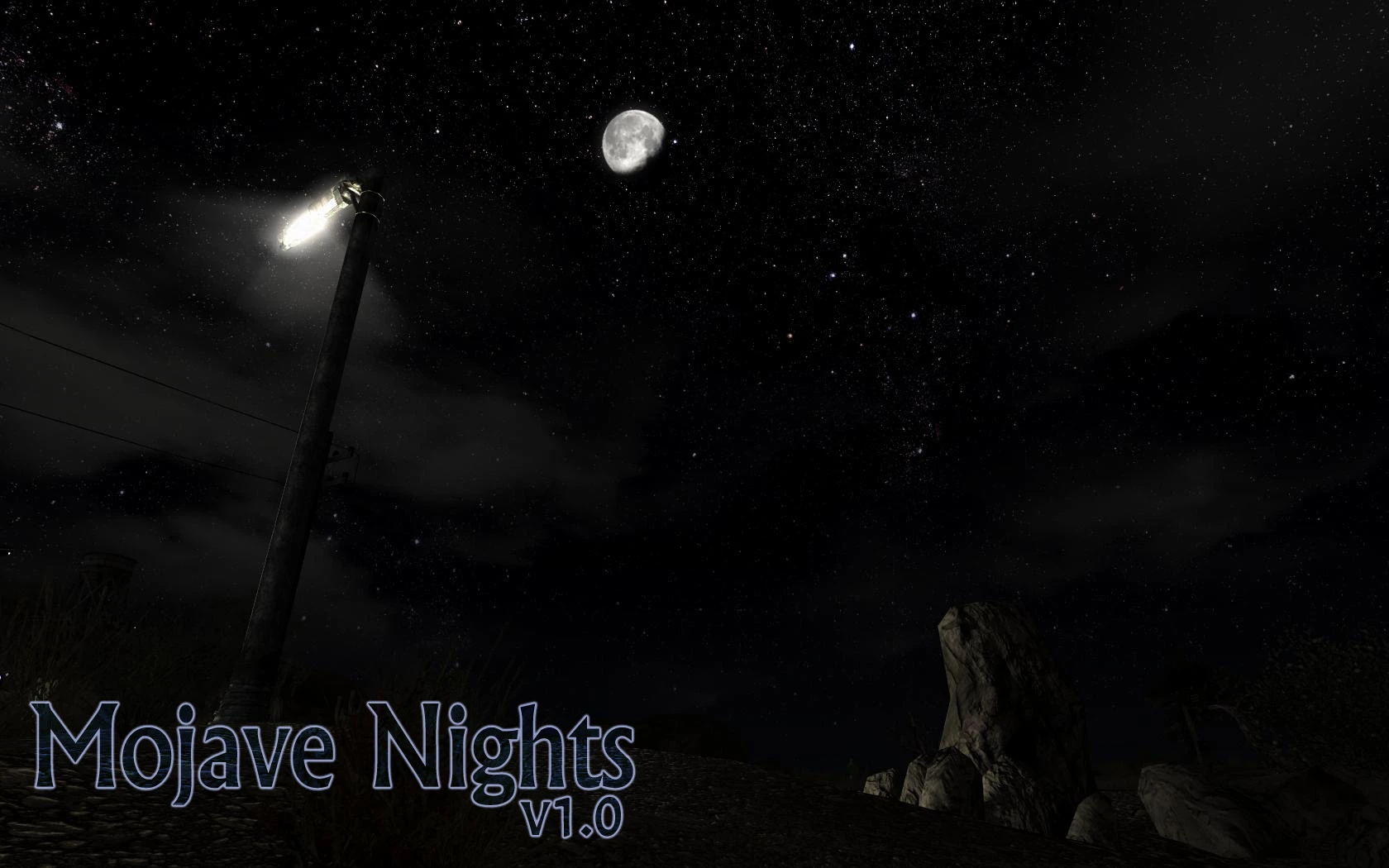
== INTRODUCTION == A while ago I created a simple night sky replacement mod for Fallout 3 (Enhanced Night Sky) using real starfield photography as a base. I recently revamped it for a New Vegas release, but not content with that I\'ve complemented it with an ultra-detailed moon texture replacement, and also a plugin which shrinks the moon down to a more realistic size. Like the night sky replacement, I looked for available high-quality images of the moon, and you may notice that it\'s no longer a plain round disc - the moon now conforms to its accurate, craggy outline. The border between light and dark during the various phases is also derived from actual photographs, right down to the shadowed cratering. The the result is Mojave Nights, a combination for complete night-time realism. Enjoy! == DESCRIPTION == There are three main features to this mod: - High-resolution replacement texture for the night sky (ie, the stars.) - High-resolution replacement texture for the moon. - Small plugin which reduces the size of the moon to 80% of normal (a more realistic size.) All components can be used independently of each other, or in combination with other night sky and/or moon replacement mods (the latest files will over-write the older ones.) Also available for download is an alternative set of textures for the moon with a lower, more subtle glow. UPDATE: I\'ve now added a moon resizer pack with various different moon sizes. Pick one of the .esp plugins from the pack to replace the main \"Mojave Nights.esp\" file (you only need one .esp to be active.) Options included are: 50%, 60%, 70%, 90%, 120%, 140%, 160%, 180%, 200%, 300%, 400%, and 500%. UPDATE #2: Added a second alternative moon texture pack, this time with a much more pronounced glow. In most cases this will be far too bright, so I can\'t really provide a reliable preview screenshot, but if you\'re using a mod combination where the regular Mojave Nights moon is too dim, try this pack instead! UPDATE #3: After much work (almost three times as much as it took to make the mod itself) I\'ve finally created a complete FOMOD installer for the mod! Includes all options for moon resizing and alternative textures, with matching preview screens. Installation could not be any easier now. :P == COMPATIBILITY == This mod should work with any other mod that doesn\'t modify the moon or star textures. If you\'ve already installed a mod with such textures, simply over-write those files with my mod. Using the included plugin is completely optional, but highly recommended for the desired effect. == FOMOD INSTALLATION == Open the FOMOD file with Fallout Mod Manager and activate. Select the options for moon size, moon glow intensity, and whether or not to install the Enhanced Night Sky star textures, and then click Install. == MANUAL INSTALLATION == 1. Unzip the \"textures\" f
Mojave Nights is a visual overhaul for Fallout: New Vegas that replaces the night sky and moon with highly detailed, realistic textures. It combines the Enhanced Night Sky mod with a new moon replacement, offering a complete night-time experience. With nearly 10,000 endorsements and a FOMOD installer, it's a popular choice for players seeking improved desert night visuals.
✨ Key Features
📊 Pros & Cons
✅ Pros
- Huge community trust with 9,888 endorsements and 342k downloads
- One-stop night sky overhaul—stars and moon in one mod
- FOMOD installer makes setup a breeze
⚠️ Cons
- Last updated in 2011—may have compatibility issues with newer game versions or mods
- Purely cosmetic—no gameplay changes
For Fallout: New Vegas players who want a more realistic and immersive night sky without changing gameplay. Ideal for those who enjoy visual overhauls and want to enhance the desert atmosphere. Skip if you're looking for gameplay tweaks or if you prefer a more stylized look.
💡 Beginner Tips
- Use a mod manager like Nexus Mod Manager or Mod Organizer 2 to install the FOMOD package—it will guide you through options.
- Load order matters: place Mojave Nights after other texture mods to ensure it overrides them.
- If you encounter visual glitches, try reinstalling with different FOMOD options to match your other mods.
📊 Mod Details
- Game
- New Vegas Mods
- Author
- CptJoker
- Version
- 1.0
- Downloads
- 342,408
- Endorsements
- 9,888
- Category
- Models and Textures
- Created
- 10/13/2011
- Updated
- 10/21/2011
🔧 How to Install New Vegas Mods
Download from Nexus.
📖 Full step-by-step install guide for New Vegas →
Visit the official mod page for specific installation instructions for this mod.
🎮 Need cheat codes or console commands? Check ur gaming wiki for New Vegas commands, item IDs, and more.
Keep browsing — more New Vegas mods await