LevelUpNoLock
⚪ Last updated 2010⚠️ Install Order · 5 steps
Install in this order, then this mod last — most mods fail to load without their framework and dependencies in place.
Preview
🔍 Analysis
- 👍 4.7% endorsement rate — high engagement, a strong quality signal
- 🏆 #132 of 173 User Interfaces mods in this game by downloads
📋 About This Mod
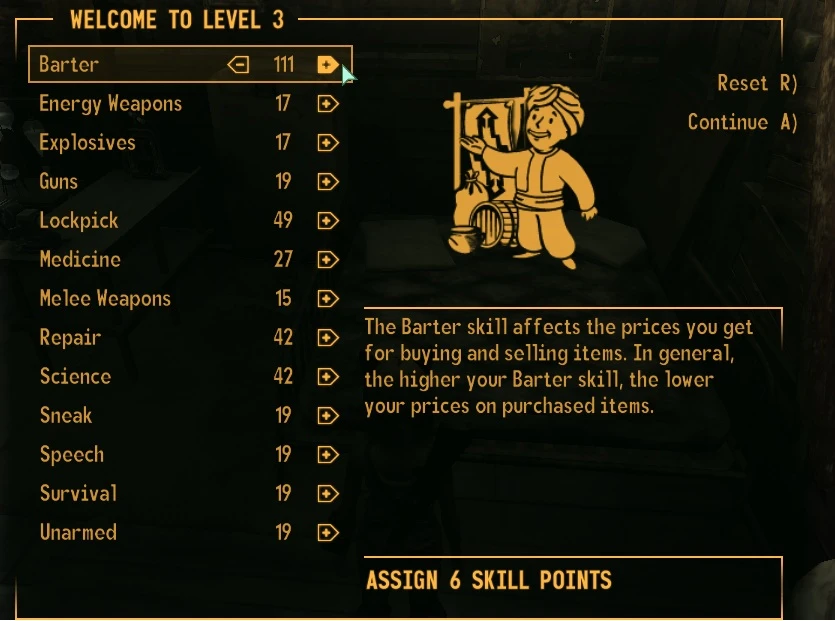
1. Make the \"Continue\" and \"Done\" buttons always can be used when level up. 2. Make max skill point to 255, see below for another mod. 3. If your skill\'s points is passed 100, only 100 would be shown in levelup menu, you can type \"player.getav XXXX\" to know the true value of that skill, like \"player.getav Barter\". Other mods ------------------------------------ For best results,using these mods with levelupnolock: Level Cap 100(Remove level cap from 30 to 100.) http://www.newvegasnexus.com/downloads/file.php?id=34782 Boosted Skill Effects(Gain skill effect above 100) http://www.newvegasnexus.com/downloads/file.php?id=35708 Instal ------------------------------------ Extract file, put the levelup_menu.xml file to Fallout New Vegas\\Data\\Menus\\ Create the Menus folder if not existed Uninstall ----------------------------------- Just delete the file
LevelUpNoLock is a small UI mod for Oblivion that removes the level-up confirmation lock, letting you click 'Continue' and 'Done' whenever you want. It also raises the skill point cap to 255. With 4,747 endorsements and over 100k downloads, it's a proven quality-of-life tweak for players who find the default leveling flow restrictive.
✨ Key Features
📊 Pros & Cons
✅ Pros
- Community favorite with 4,747 endorsements and over 100k downloads—clearly a trusted mod.
- Removes an annoying restriction that forces you to allocate points before continuing.
- Tiny mod, easy to install and forget about—does exactly what it says.
⚠️ Cons
- Last updated in 2010—might have compatibility issues with newer Oblivion patches or mods.
- Only affects the level-up UI, so if you're looking for deeper leveling overhauls, this won't cut it.
- No documentation on how it interacts with other UI mods—could conflict with custom menus.
For Oblivion players who hate being forced to spend skill points immediately and want a smoother leveling flow. Also great for modders who want to test high-level builds without the point cap. Skip if you want a full leveling overhaul—this is a pure QoL tweak.
💡 Beginner Tips
- Since it's a simple esp/plugin, just drop it into your Data folder and activate it in the launcher.
- If you use a mod manager like OBMM or Wrye Bash, install it through that to keep your load order clean.
- Test it on a save right before leveling up to see the effect immediately.
📊 Mod Details
- Game
- New Vegas Mods
- Author
- kurapica
- Version
- 1.0
- Downloads
- 101,927
- Endorsements
- 4,747
- Category
- User Interfaces
- Created
- 10/27/2010
- Updated
- 10/27/2010
🔧 How to Install New Vegas Mods
Download from Nexus.
📖 Full step-by-step install guide for New Vegas →
Visit the official mod page for specific installation instructions for this mod.
🎮 Need cheat codes or console commands? Check ur gaming wiki for New Vegas commands, item IDs, and more.
Keep browsing — more New Vegas mods await