Kobu - Better Binoculars
⚪ Last updated 2010⚠️ Install Order · 5 steps
Install in this order, then this mod last — most mods fail to load without their framework and dependencies in place.
Preview
🔍 Analysis
- 👍 4.2% endorsement rate — high engagement, a strong quality signal
- 🏆 #101 of 102 Miscellaneous mods in this game by downloads
📋 About This Mod
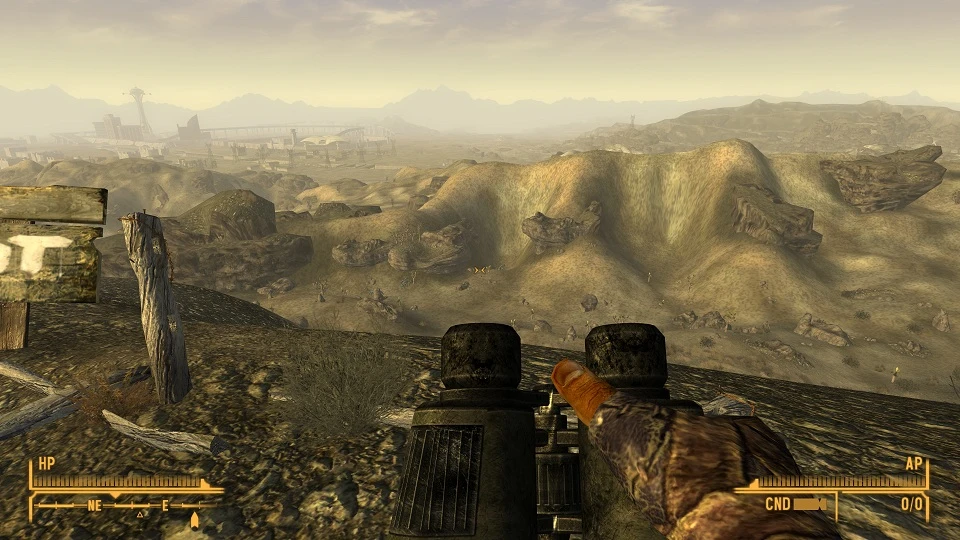
Better Binoculars 2. 1 by Kobu For use with Fallout New Vegas My other mods you may enjoy: Sortable Crafting Backpack Faction Karma Fix New Game Quick Start And Better Rebuild Free Wild Wasteland Trait ########################################## Overview ########################################## The purpose of this mod is to make the binoculars worth carrying around. It increases the magnification level to be greater than any other scope in the game. It also gives a more realistic field of view. Don\'t believe me? Go try out a pair of binoculars and come back. I\'ll wait. Back already? See what I meant? The \"binocular\" shape is something they do in cartoons. It\'s not realistic. I did my best here. If someone who actually knows what they are doing wants to make an even more realistic overlay with the correct blurring, I\'d be happy to incorporate it. I\'ve included a \"binocular\" overlay too if anyone simply must use one. Both overlays are partially cut off to give you a larger field of view. ########################################## Version Info ########################################## 2. 1 Re-replaces the binoculars.nif so the deluxescope texture is not overridden. ########################################## Installation ########################################## 1. Copy the contents of the included Data folder to your New Vegas Data folder. If you are using the steam version, you can find you data folder at \"C:\\Program Files (x86)\\Steam\\steamapps\\common\\fallout new vegas\\Data\" or a similar location. 2. Open FalloutPrefs.ini in your \"MyGames\\FalloutNV\" folder. Add this line to the section: fScopeScissorAmount=0 If you don\'t follow this step, you will get opaque bars on the left and right of your zoom screen. If you are still getting the opaque bars, check to make sure your change is still saved. If you have trouble, try making the change in Fallout.ini. You can also try Fallout_default.ini in your \"C:\\Program Files (x86)\\Steam\\steamapps\\common\\fallout new vegas\" folder. Make sure to make a backup of Fallout_default.ini before editing it. 3. Launch the game and go to Data Files. Check the box for \"Better Binoculars High.esp\". Load your game. Say \"Yes\" to the dialogue box and enjoy your better binoculars. If anything goes wrong, double check where you have placed the included files. ########################################## Zoom Options ########################################## Replace \"Better Binoculars High.esp\" with one of the ESP files in the Optional Zoom Levels Folder. Only enable one of these files. For those GECK inclined, these are the Sight FOV values: Max - 6 High - 12 Medium - 18 Low - 24 ########################################## More \"Binocular\" Shape ########################################## To get a more cartoonish binocular shape, use the contents of the \"Binocular Shape\" folder
Kobu's Better Binoculars enhances the default binoculars in Fallout: New Vegas with improved zoom, configurable zoom levels, optional lens blur removal, and a refined binocular-shaped overlay. A lightweight quality-of-life mod for players who want more control over their scouting tool.
✨ Key Features
📊 Pros & Cons
✅ Pros
- Community favorite with 2,807 endorsements and over 66k downloads
- Gives you control over zoom levels and lens blur, so you can tailor the view to your preference
- Simple quality-of-life tweak that makes scouting more comfortable
⚠️ Cons
- Last updated in 2010, so it may have compatibility issues with newer game patches or mods
- Only affects the binoculars—if you wanted a full scouting overhaul, this isn't it
For Fallout: New Vegas players who use binoculars often and want a clearer, more customizable view. Skip if you're looking for gameplay changes or if you rarely touch the binoculars.
💡 Beginner Tips
- If you're using a mod manager like Vortex or Mod Organizer 2, just drag and drop the mod and it'll handle the rest.
- Test the different zoom levels in-game to find what feels best for your playstyle.
- If you notice any visual glitches, try disabling other UI mods that might conflict with the overlay.
📊 Mod Details
- Game
- New Vegas Mods
- Author
- Kobu
- Version
- 2.1
- Downloads
- 66,063
- Endorsements
- 2,807
- Category
- Miscellaneous
- Created
- 10/19/2010
- Updated
- 10/25/2010
🔧 How to Install New Vegas Mods
Download from Nexus.
📖 Full step-by-step install guide for New Vegas →
Visit the official mod page for specific installation instructions for this mod.
🎮 Need cheat codes or console commands? Check ur gaming wiki for New Vegas commands, item IDs, and more.
Keep browsing — more New Vegas mods await