KeyBoy - UI Hotkeys Manager (M for Map)
⚪ Last updated 2017⚠️ Install Order · 5 steps
Install in this order, then this mod last — most mods fail to load without their framework and dependencies in place.
Preview
🔍 Analysis
- 👍 3.2% endorsement rate — high engagement, a strong quality signal
- 🏆 #39 of 98 User Interfaces mods in this game by downloads
📋 About This Mod
--------------------------------------------------------------------------------------------------------------------------
Description
Provides keyboard and hotkeys support for Pipboy and game menus (Barter, Dialog, Quantity, etc):
• WASD navigation for all game-menus and PipBoy. (Left/Right/Up/Down hotkeys)
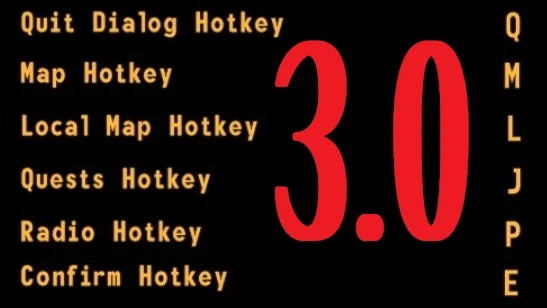
• Hotkeys: M for World Map, J for Quests, P for Radio, N for Local Map. (this is Language-based feature)
• 1-9 for choosing dialog answers.
• 1-9 keys for Message-windows/Terminals.
• A/D for switching item-filters in barter/container/repice menus. (Menu Hotkeys).
• A/D for switching Pipboy's Stats/Items/Data pages. (Page Hotkeys)
• Every provided keybind/hotkey is customizable via MCM. (Mod Configuration Menu)
• Leave Conversation (Quit Dialog) - hotkey for last dialog answer (usually it is "back out"). (Quit Dialog hotkey)
• (new 3. 0+) Remap/rebind menu keybinds just ingame via MCM (Mod Configuration Menu). (example)
• Companion Wheel hotkeys (Companion Wheel).
• Hotkey "E" (Confirm hotkey) for confirming: skips dialogs, confirms/selects/uses for every game-menu.
• Hotkey "E" (Confirm hotkey) confirms the 1 and only answer option for Message-windows/Terminals/Dialogs (with no need to select it).
• Quantity regulation with A/D and LShift/Space in Quantity menu (Menu and Page Hotkeys).
• Quit Dialog hotkey also works for Message-windows - chooses the highest answer (usually it is "leave it").
• (new 3. 0+) Adjust hotkeys delay (when hold) via MCM. (example) (How fast will be scrolling, when, for example, "down" button held.)
• Language-based feature supports English, Russian, German (not tested), Italian. (Feel free to request.)
--------------------------------------------------------------------------------------------------------------------------
Compability
with every UI: original (vanilla) / VUI+ / DarnUI / Revelation / etc.
no more need for optional files for key remaps.
it is just one .esp file with its own script.
--------------------------------------------------------------------------------------------------------------------------
Installation KeyBoy
1) Requirment NVSE (New Vegas Script Extender) v5. 0+
2) Requirment JIP LN NVSE Plugin
KeyBoy is a UI hotkeys manager that lets you press M to open the map, use WASD and 1-9 to navigate game menus, and assign other hotkeys. It's a lightweight utility for players who want faster menu access without mouse clicks. With over 1,000 endorsements, it's a proven QoL improvement.
✨ Key Features
📊 Pros & Cons
✅ Pros
- Community approved with 1,088 endorsements and 34k downloads.
- Saves time by letting you hit M for map instead of clicking through menus.
- Simple, focused tool—does one thing and does it well.
⚠️ Cons
- Last updated in 2017—might not work with newer game patches.
- No detailed instructions or feature list beyond the basics.
- Limited to UI hotkeys; no gameplay or combat enhancements.
For players who hate clicking through menus and want keyboard shortcuts for map and navigation. Perfect for speedrunners or anyone who values efficiency. Skip if you're looking for gameplay overhauls—this is purely a UI convenience mod.
💡 Beginner Tips
- Check if your game version is compatible with the mod's 2017 update before installing.
- Test the hotkeys in the main menu first to ensure they don't conflict with other mods.
- If you use a mod manager, let it handle the installation to avoid file placement errors.
📊 Mod Details
- Game
- New Vegas Mods
- Author
- 1as1
- Version
- 3.3
- Downloads
- 34,098
- Endorsements
- 1,088
- Category
- User Interfaces
- Created
- 10/8/2016
- Updated
- 10/30/2017
🔧 How to Install New Vegas Mods
Download from Nexus.
📖 Full step-by-step install guide for New Vegas →
Visit the official mod page for specific installation instructions for this mod.
🎮 Need cheat codes or console commands? Check ur gaming wiki for New Vegas commands, item IDs, and more.
Keep browsing — more New Vegas mods await