HD Desk Fan
⚪ Last updated 2018⚠️ Install Order · 5 steps
1🛠️ NVSE — New Vegas Script Extender Download ↗
2🛠️ 4GB Patcher — FNV 4GB Patcher Download ↗
3🔧 NVAC — New Vegas Anti Crash Download ↗
4🧩 JIP LN — JIP LN NVSE Plugin Download ↗
5🔧 YUP — Yukichigai Unofficial Patch Download ↗
Install in this order, then this mod last — most mods fail to load without their framework and dependencies in place.
Preview
🔍 Analysis
- 👍 0.8% endorsement rate
- 🏆 #480 of 621 Models and Textures mods in this game by downloads
📋 About This Mod
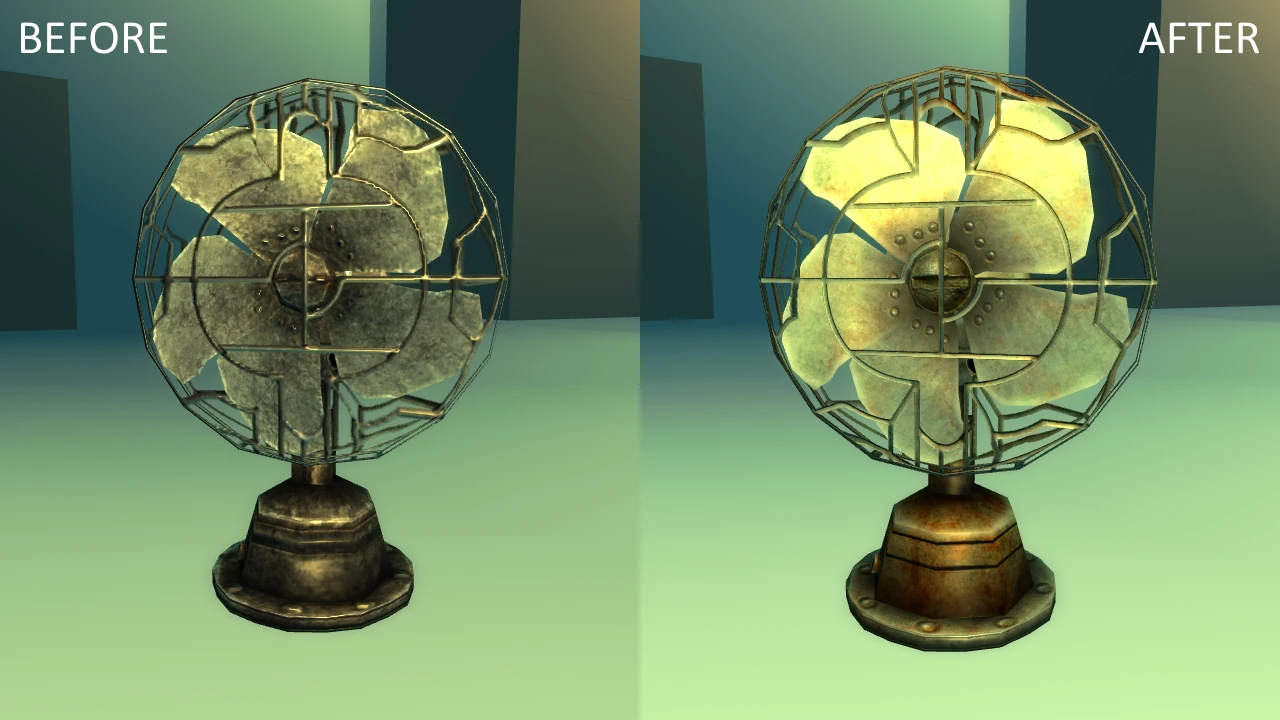
Hi-res textures for the desk fan.
🤖 AI-enhanced — based on mod data
A compact texture upgrade for the desk fan in Fallout 4, replacing the default low-res textures with hi-res versions. It's a simple, focused cosmetic mod with over 1,000 endorsements and 129,000 downloads, making it a popular choice for players who want better-looking props without extra features.
✨ Key Features
Replaces the desk fan's textures with hi-res versions.
Simple cosmetic enhancement with no gameplay changes.
Over 1,000 endorsements and 129,000 downloads indicate community approval.
📊 Pros & Cons
✅ Pros
- Community-approved (1,033 endorsements) and widely downloaded (129,411 downloads) – clearly a fan favorite.
- Does exactly what it says: gives the desk fan a crisp, hi-res look that fits right into a modded wasteland.
- Lightweight and focused – no bloat, just a texture swap that won't tax your system.
⚠️ Cons
- Last updated in 2018 – might not be compatible with the latest Fallout 4 patches or DLC, so test before relying on it.
- Only affects the desk fan – if you're looking for a broader texture overhaul, this won't cover other props.
🎯 Is This For You?
For Fallout 4 players who notice the little details and want their settlements and interiors to look sharper without overhauling everything. If you're a modder who loves prop-level polish, this is a no-brainer. Skip if you want gameplay changes – this is purely cosmetic.
For Fallout 4 players who notice the little details and want their settlements and interiors to look sharper without overhauling everything. If you're a modder who loves prop-level polish, this is a no-brainer. Skip if you want gameplay changes – this is purely cosmetic.
📦 Install:Easy· Under 1 minute
💡 Beginner Tips
- Since it's a texture replacer, just drop the files into your Data folder or use a mod manager – no load order worries.
- If you're on PC, make sure you have Archive Invalidation enabled (or use a mod manager that handles it) to see the new textures in-game.
- Pair it with other hi-res prop mods for a consistent look across your settlements.
📊 Mod Details
- Game
- New Vegas Mods
- Author
- deleted999565
- Version
- V1
- Downloads
- 129,411
- Endorsements
- 1,033
- Category
- Models and Textures
- Created
- 2/14/2018
- Updated
- 2/19/2018
🔧 How to Install New Vegas Mods
Download from Nexus.
📖 Full step-by-step install guide for New Vegas →
Visit the official mod page for specific installation instructions for this mod.
🎮 Need cheat codes or console commands? Check ur gaming wiki for New Vegas commands, item IDs, and more.
Keep browsing — more New Vegas mods await