GameCompanion - Fake Fullscreen Alt Tab Fix Gamma Screenshots and more
⚪ Last updated 2013⚠️ Install Order · 5 steps
Install in this order, then this mod last — most mods fail to load without their framework and dependencies in place.
Preview
🔍 Analysis
- 👍 4.2% endorsement rate — high engagement, a strong quality signal
- 🏆 #49 of 57 Utilities mods in this game by downloads
📋 About This Mod
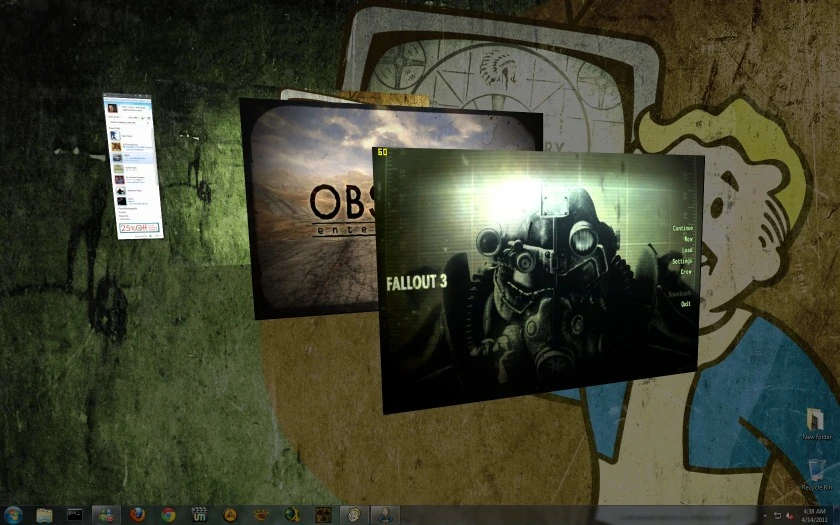
This program is a tool for improving game performance and experience, adding also nice features, look the facebook page for more info: https://www.facebook.com/GameCompanion Some Features: Better Performance Less to none Game crashes Alt Tab Fix Borderless Fake Fullscreen Exclusive Virtual Fullscreen/Window Downsample/SuperSample AA Hotkeys for Sound, Gamma Screenshots Graphics purist will love the new Downsample option! See it in action: tbjxgCPreIw Added on 2. 4: Virtual Fullscreen modes GPU accelerated Downsample/Supersample (You can render the game bigger that your screen resolution to improve image quality) AlwaysOnTop option for FFMode Holding escape now release the mouse from any game Auto resolution change for low end systems New Installer Known issues 2. 4: Oblivion does not support multimedia controls, like sound hotkeys, use alt+tab or winkey (if activated) or hold escape, to release the mouse, make the sound changes, and click the game again VF Mode is bound to the primary display for FakeFullscreen, but VF Windows can be moved to another monitor (but not set to Virtual Fullscren, the game will come back to the primary display), FFMode can be used in any display. Fixed 2. 4: FFMode now is completely borderless Black bar at the bottom of some games Alt+Tab aero double tab fixed Ignore Real Fullscreem games Screenshot previews update in real time Reactivate Win key Gamma on exit is restored only if it was changed Mouse is only restored if it was hidden other small fixes and tweaks New version 2. 2 (11-Aug-2013) v2. 2 Fixes GC crash in some systems, small tweaks New Version 2. 1 (4-Aug-2013) Installer-GUI-a lot of fixes and new improvements, I will be making a FAQ out of the questions I get. This Tool improves performance and remove microstuttering in most cases FPS numbers can vary, use your senses to see the look and feel GameCompanion Fake Fullscreen, Alt Tab Fix Gamma Contrast, Screenshots, Volume, Fixes, and more Mirrors: http://fallout3.nexusmods.com/mods/16478/ http://newvegas.nexusmods.com/mods/42956/ http://oblivion.nexusmods.com/mods/39550/ http://skyrim.nexusmods.com/mods/39594/ Compatible with a lot of games, you can add you own examples: Options for different resolution needs, Downsample/Supersample AA (Mode +) auto-change resolution for low end systems Virtual Zoom for games in lower resolution that the desktop (Mode #) Configurable shortcuts via GUI: Lots of fixes for know issues/games, some of them configurable: Find the program in the windows Tray Area: FF MODE = Fake Fullscreen Mode Windowed VF MODE = Exclusive Virtual Fullscreen (it allows to be windowed and fullscreen at will, realizable windows, also downsample/supersample, or zoom to fullscreen without changing resolution lower resolution games) It looks exactly like fullscreen, but is has all the advantage
GameCompanion is a utility mod that enhances the gaming experience by providing fake fullscreen alt-tab fixes, gamma and contrast adjustments, screenshot capabilities, volume control, and various stability and performance improvements across many games. With over 5,000 endorsements and 126,000 downloads, it's a popular tool for players seeking a smoother, more customizable experience.
✨ Key Features
📊 Pros & Cons
✅ Pros
- Community-approved with 5,261 endorsements and 126,083 downloads—clearly a trusted utility.
- All-in-one tool: alt-tab fix, gamma, screenshots, volume, and performance tweaks in one package.
- Works across many games, so you don't need separate mods for each title.
⚠️ Cons
- Last updated in 2013—over a decade old, so it may not work with modern games or current OS versions.
- No detailed documentation or per-game compatibility list provided, so you'll have to test it yourself.
- Potential conflicts with other utility mods or overlays (like Discord or GeForce Experience) are not addressed.
For PC gamers who frequently alt-tab out of fullscreen games and want a quick fix without tweaking settings manually. Also for players who want a simple way to adjust gamma, take screenshots, or control volume in-game. Skip if you play only modern titles—this mod's age might cause issues.
💡 Beginner Tips
- Since it's an older utility, run it as administrator to avoid permission issues on Windows 10/11.
- Test the alt-tab fix with your most-played game first to ensure compatibility before relying on it.
- If you use an overlay like GeForce Experience, disable it temporarily to avoid conflicts with the screenshot feature.
📊 Mod Details
- Game
- New Vegas Mods
- Author
- BUDA20
- Version
- 2.4
- Downloads
- 126,083
- Endorsements
- 5,261
- Category
- Utilities
- Created
- 7/22/2011
- Updated
- 10/13/2013
🔧 How to Install New Vegas Mods
Download from Nexus.
📖 Full step-by-step install guide for New Vegas →
Visit the official mod page for specific installation instructions for this mod.
🎮 Need cheat codes or console commands? Check ur gaming wiki for New Vegas commands, item IDs, and more.
Keep browsing — more New Vegas mods await