FreeCamera
⚪ Last updated 2015⚠️ Install Order · 5 steps
Install in this order, then this mod last — most mods fail to load without their framework and dependencies in place.
Preview
🔍 Analysis
- 👍 4.8% endorsement rate — high engagement, a strong quality signal
- 🏆 #38 of 38 Utilities mods in this game by downloads
📋 About This Mod
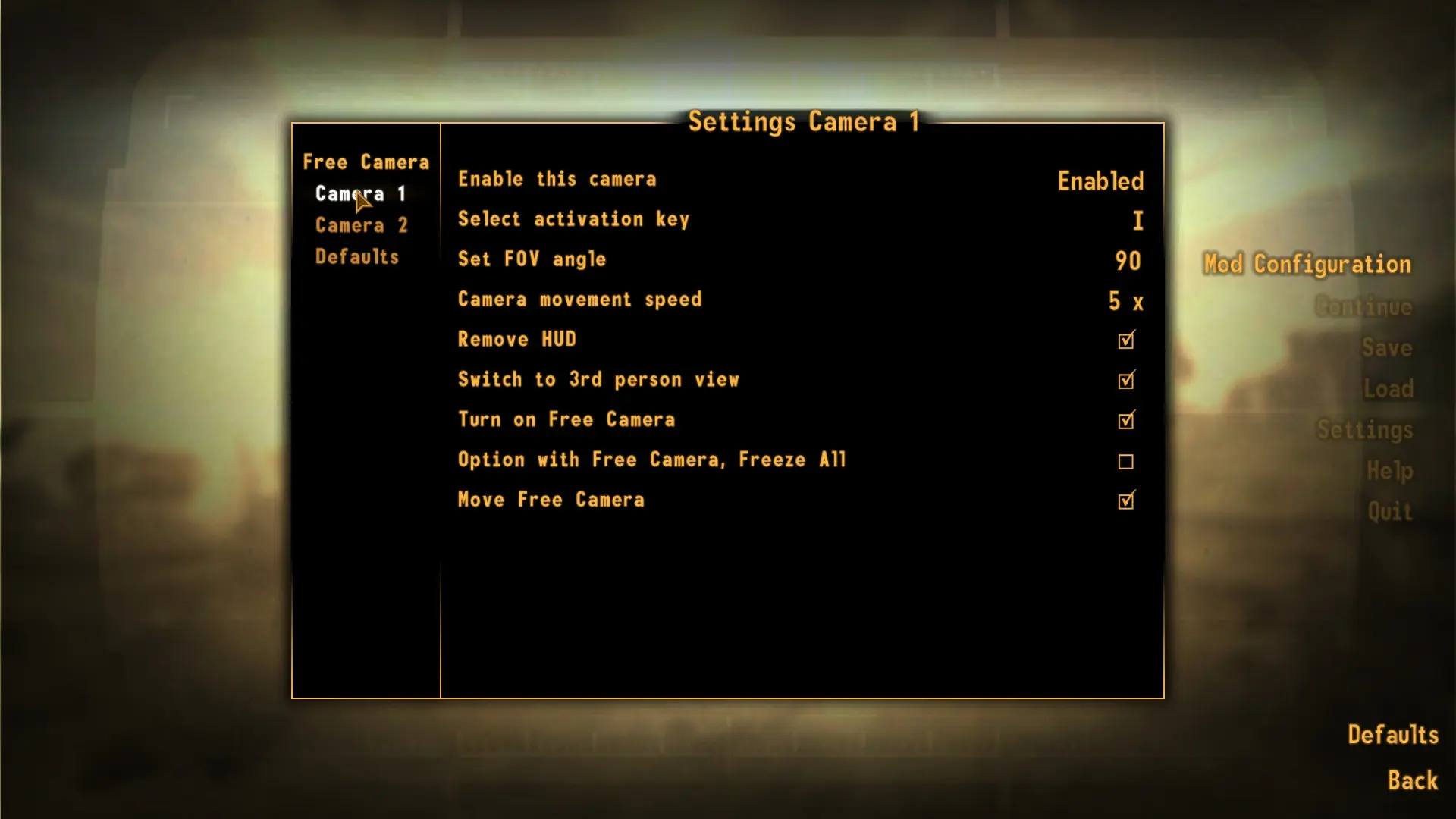
With the MCM menu you set up how the switch from game to screen shot mode will be done, with even one optional camera you can have two different setups available just a fingertip away.
This mod adds a free camera but also a second one disabled at default. One hit on key will do all the TFC, TM, FOV and 1st/3rd person settings, a second hit will revert everything to normal without you having to mess with console commands. Default key is I and O for the second camera very easily to change for your personal settings in MCM.
You MUST have NVSE at least version 4. 2b3 running or it will break since there are new functions in NVSE this mod needs. This MOD will test if you have needed NVSE version working and poke you to death if you have not. To make a nice and clean interface to select all settings The Mod Configuration Menu mod (MCM) is used, you must have MCM installed to play this mod. If MCM is not installed this mod will continuously tell you need that working in game.
All this checking is not to be rude or something, but running this mod and not have the needed mods installed is pointless, and since the mod will try to call for functions none existing it will break the game internally when running the scripts and I'm not sure about the result of that. FONV is already picky to start with and slam it with missing functions I presume is a really bad idea.
This mod should work with current mod handlers like FOMM, NMM or Mod Organizer since there is no install scripts used.
I consider it now as good as possible with current commands available. If NVSE in the future include more Get_xx functions for console commands used in free camera mode, I would then try to update and implement those in this mod to even more be certain to change to camera and return to game with right parameters set.
Details ============= I have used a lot of disciplines like MCM for nice configuration menus. Saving mod configurations in a modconfig.ini file and not it game. And a little different approach to kick in actions using a reverse strategy for quest levels in the major script. Also some scripts to check if a user really have all requirements installed and working. I hope it could be useful for others and help you get a grasp of all of the ways one could create mods.
Currently one can not read back what FOV (Field of View) you use in your game (vanilla default is 75 from game), but since most people use widescreen monitors that is not so good. To make it easy to get what you prefers to play with the FreeCamera Default menu give you the option to set FOV to anything else then 75.
Saving game when in free camera mode is not recommended since a load of that game save will miss status of current camera settings used, test it on your own risk, but be warned.
Install =
FreeCamera is a utility mod for Skyrim that adds a free camera mode for taking screenshots, with an MCM menu to customize the switch from gameplay to screenshot mode. It includes an optional second camera setup, giving players two different configurations accessible at a fingertip. This mod is for screenshot enthusiasts who want more control over their in-game photography.
✨ Key Features
📊 Pros & Cons
✅ Pros
- Community-trusted with 636 endorsements and over 13k downloads.
- MCM integration means you can tweak the camera switch to your liking without leaving the game.
- Having a second camera setup is handy for switching between different angles or compositions on the fly.
⚠️ Cons
- Last updated in 2015 — might not play nice with the latest Skyrim versions or SKSE updates.
- It's purely a screenshot tool — if you're looking for gameplay changes, this isn't it.
For Skyrim screenshot enthusiasts who want a flexible free camera for capturing the perfect shot. If you're into modded screenshots or machinima, this gives you more control. Skip if you want gameplay features — this is purely for photography.
💡 Beginner Tips
- Make sure you have SKSE and SkyUI installed, as the MCM menu requires them.
- Check the mod's forum posts for any compatibility notes with your Skyrim version.
- Use the MCM to bind the camera toggle to an easy-to-reach key for quick access during gameplay.
📊 Mod Details
- Game
- New Vegas Mods
- Author
- Nimboss
- Version
- 1.2
- Downloads
- 13,188
- Endorsements
- 636
- Category
- Utilities
- Created
- 8/11/2014
- Updated
- 7/7/2015
🧩 Commonly Used Together
Users add these mods to the same collections — a real compatibility signal, not an AI guess.
🔧 How to Install New Vegas Mods
Download from Nexus.
📖 Full step-by-step install guide for New Vegas →
Visit the official mod page for specific installation instructions for this mod.
🎮 Need cheat codes or console commands? Check ur gaming wiki for New Vegas commands, item IDs, and more.
Keep browsing — more New Vegas mods await