Dufflebag Retexture
⚪ Last updated 2018⚠️ Install Order · 5 steps
Install in this order, then this mod last — most mods fail to load without their framework and dependencies in place.
Preview
🔍 Analysis
- 👍 1.2% endorsement rate — high engagement, a strong quality signal
- 🏆 #614 of 621 Models and Textures mods in this game by downloads
📋 About This Mod
Obsolete, try the new Dufflebag Retexture Redux!
https://www.nexusmods.com/newvegas/mods/69072/
However, there may be a texture here you prefer than was not redux'd.
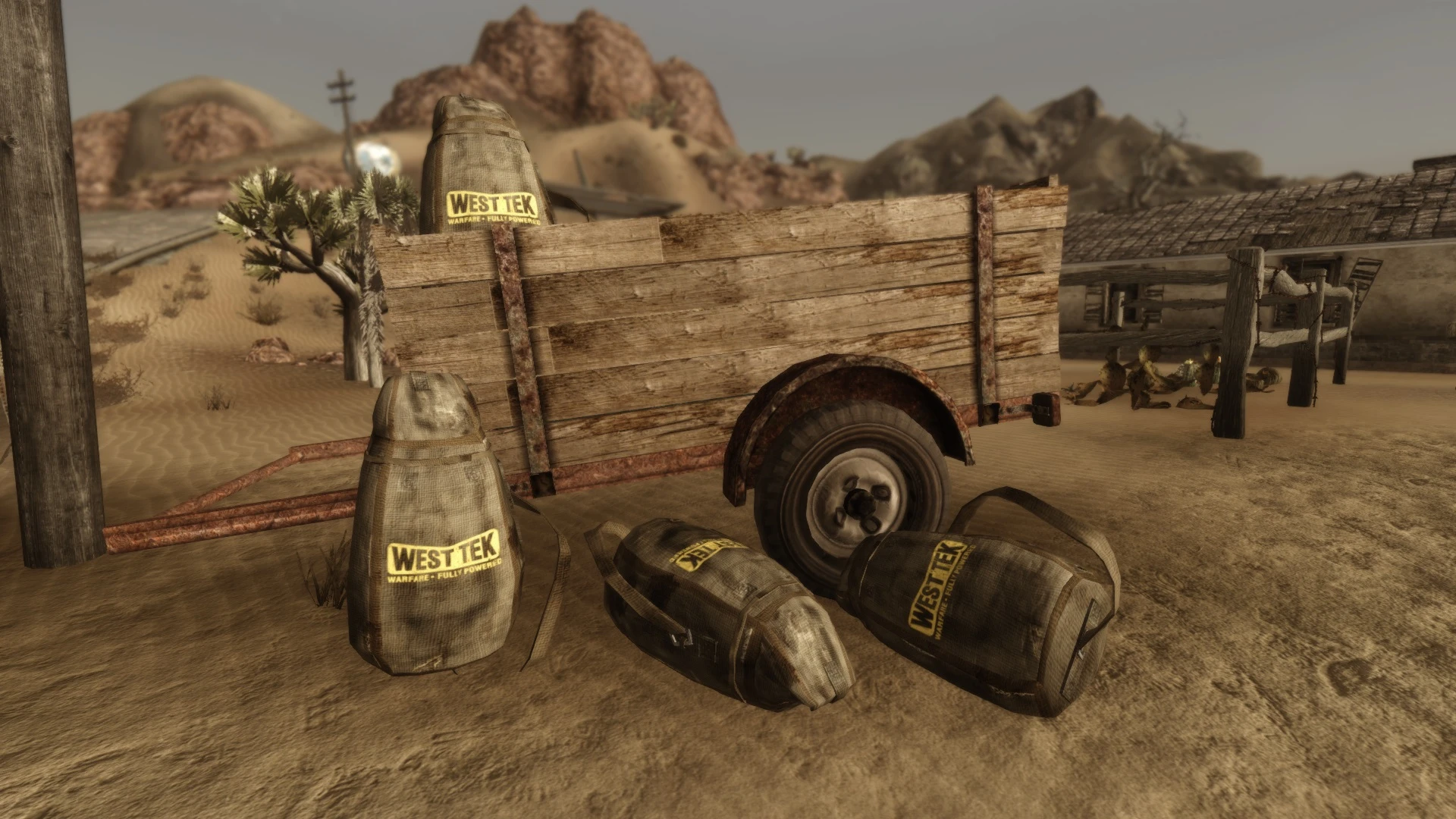
Retexture of the Dufflebag with various options to choose from.
This mod retextures the containers known as Dufflebags found throughout the Wasteland.
This affects all Dufflebags found in the base game including ones present in Dead Money, Old World Blues and Lonesome Road as they make use of the same texture.
However, Honest Hearts has a unique texture for its Dufflebags known as Survivalist Hidden Caches thus I was able to give it a standalone retexture.
So any option plus the Survivalist may be used together at the same time.
Options include -
-
[]Depot
[
]Packrat[]Plain
[]Vault
[]Warboy
[]Survivalist (Honest Hearts DLC only)
[]'Canvas' West Tek (either vertical or horizontal, inspired by jim_uk and his mod)
Manually download the file you want and to install it, drop the contents into your Fallout New Vegas folder.
To uninstall the retexture just delete the dufflebag_d and dufflebag_n files.
-
[]If the mod is too 'shiny' in game with your visual setup, try deleting the _n file.
[
]Survivalist only option requires Honest Hearts DLC. - I do not claim to own nor have created the original Dufflebag texture (Bethesda/Obsidian) or the symbol/texture options which were found freely available online.Thank you for downloading, I hope that my mod added to your Wasteland experience - even if only very slightly.
Discover my other mods available on the Nexus!
-
[]If the mod is too 'shiny' in game with your visual setup, try deleting the _n file.
A compact retexture mod for the Dufflebag in Fallout 4, offering visual variety for a common wasteland item. With 774 endorsements and over 66k downloads, it's a popular choice for players wanting to customize their gear's appearance. Last updated in 2018, it remains a simple cosmetic enhancement.
✨ Key Features
📊 Pros & Cons
✅ Pros
- Community-approved with 774 endorsements and 66k downloads—clearly a fan favorite.
- Lightweight and purely cosmetic, so it won't affect performance or gameplay.
- Gives your Dufflebag a fresh look without needing a ton of extra mods.
⚠️ Cons
- Last updated in 2018—might not be compatible with the latest game patches or DLC.
- Only affects the Dufflebag, so if you're looking for broader texture overhauls, this is too niche.
For Fallout 4 players who want a quick visual tweak to a common item without overhauling the whole game. If you're into settlement building or survival runs where the Dufflebag is a staple, this adds a bit of variety. Skip if you want gameplay changes or a full texture pack.
💡 Beginner Tips
- Use a mod manager like Vortex or NMM to install and manage this mod easily.
- Check the mod's images or comments to see the retexture options before installing.
- If you're on PC, make sure to enable mods in your Fallout 4 settings.
📊 Mod Details
- Game
- New Vegas Mods
- Author
- Sebastjin
- Version
- 1.0
- Downloads
- 66,417
- Endorsements
- 774
- Category
- Models and Textures
- Created
- 4/8/2017
- Updated
- 12/2/2018
🔧 How to Install New Vegas Mods
Download from Nexus.
📖 Full step-by-step install guide for New Vegas →
Visit the official mod page for specific installation instructions for this mod.
🎮 Need cheat codes or console commands? Check ur gaming wiki for New Vegas commands, item IDs, and more.
Keep browsing — more New Vegas mods await