DFB - Dynamic Crosshair
⚪ Last updated 2011⚠️ Install Order · 5 steps
Install in this order, then this mod last — most mods fail to load without their framework and dependencies in place.
Preview
🔍 Analysis
- 👍 3.8% endorsement rate — high engagement, a strong quality signal
- 🏆 #41 of 98 User Interfaces mods in this game by downloads
📋 About This Mod
=====================
= Dynamic Crosshair =
=====================
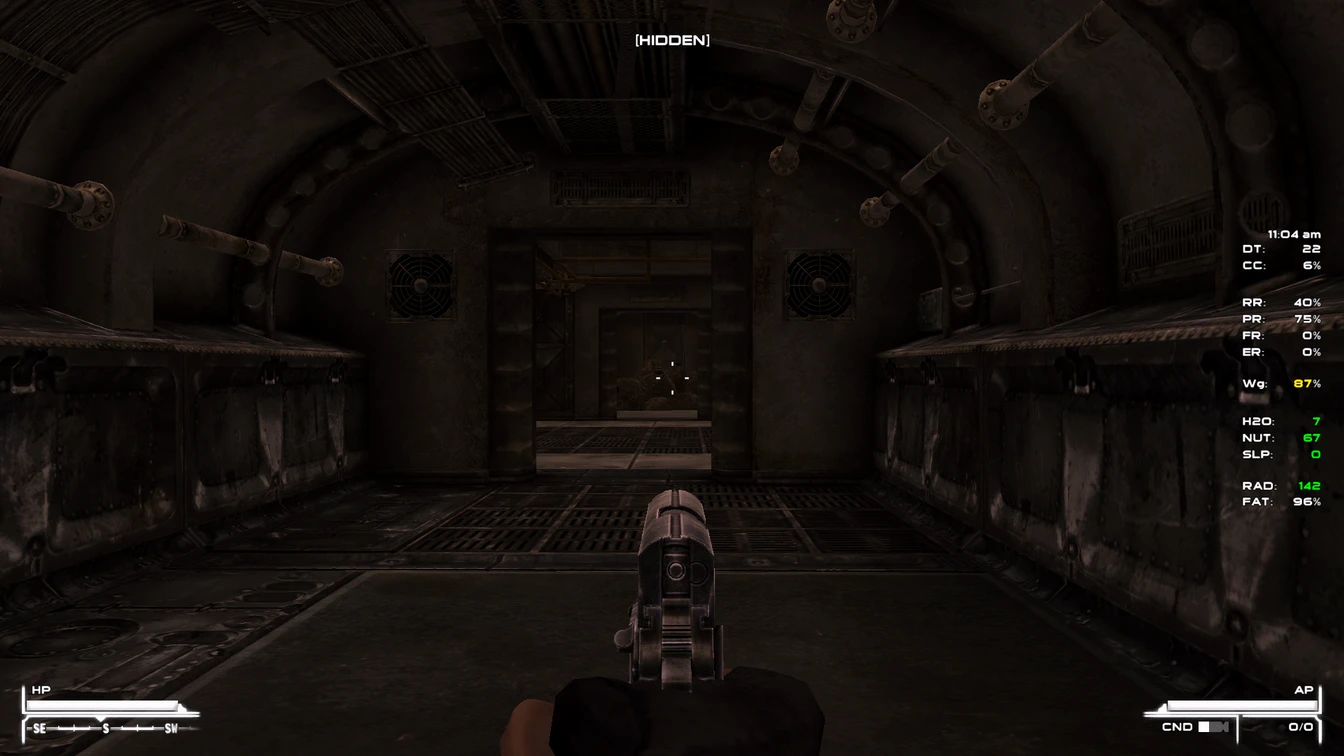
A ripped version of Project Nevada\'s Crosshair addition.
This plugin adds a dynamically changing crosshair that takes into consideration: Weapon spread, crippled arms, perks and more. It also returns to normal when you holster your weapon(s).
This is more or less for users who do not want to use Project Nevada
=========
= Notes =
=========
This cannot be used along with Project Nevada mod, ( or other crosshair editing mods, excluding retextures. ). This is just a stand alone version from Project Nevada.
This edits the hud_main_menu.xml file. If you use other HUD mods, you may have to edit other files.
Primary Needs uses includes_HUDMainMenu.xml and can be used to also add the crosshair. This is NOT a total newbie friendly mod.
You need to know how to:
-Edit a XML file
-Rename files
-Common sense
================
= Installation =
================
If you use other HUD mods, make sure to take note of the files!
1) Check your data folder for a file in the folder named .
+ If one exists, add this to the end of the file:
DFB - Dynamic Crosshair is a UI mod for Fallout: New Vegas that changes the crosshair based on weapon spread, crippled arms, and perks, returning to normal when holstered. With 1,245 endorsements and 33,162 downloads, it's a popular quality-of-life enhancement for players seeking better feedback on accuracy.
✨ Key Features
📊 Pros & Cons
✅ Pros
- Community favorite with 1,245 endorsements and 33k downloads
- Adds meaningful gameplay feedback without changing mechanics
- Lightweight UI tweak that enhances immersion
⚠️ Cons
- Last updated in 2011 — may have compatibility issues with newer mods or game patches
- Requires Fallout: New Vegas and may conflict with other crosshair mods
For Fallout: New Vegas players who want a more informative crosshair that reflects weapon handling and character conditions. Ideal for those who value immersion and tactical feedback. Skip if you prefer a static crosshair or use a different crosshair overhaul.
💡 Beginner Tips
- Place the .esp file in your Fallout: New Vegas Data folder and enable it in the launcher or mod manager.
- If you use other UI mods, check load order to avoid conflicts—put this after them.
- Test with a crippled arm or high spread weapon to see the dynamic effect.
📊 Mod Details
- Game
- New Vegas Mods
- Author
- Darkfirebird
- Version
- 1.0
- Downloads
- 33,162
- Endorsements
- 1,245
- Category
- User Interfaces
- Created
- 8/21/2011
- Updated
- 8/21/2011
🔧 How to Install New Vegas Mods
Download from Nexus.
📖 Full step-by-step install guide for New Vegas →
Visit the official mod page for specific installation instructions for this mod.
🎮 Need cheat codes or console commands? Check ur gaming wiki for New Vegas commands, item IDs, and more.
Keep browsing — more New Vegas mods await