cellHUD
⚪ Last updated 2013⚠️ Install Order · 6 steps
Install in this order, then this mod last — most mods fail to load without their framework and dependencies in place.
Preview
🔍 Analysis
- 👍 2.0% endorsement rate — high engagement, a strong quality signal
- 🏆 #155 of 173 User Interfaces mods in this game by downloads
📋 About This Mod
* THIS MOD NEEDS A PROPER INSTALLATION OF DARNUI PLEASE READ THE DESCRIPTION TO AVOID PAIN
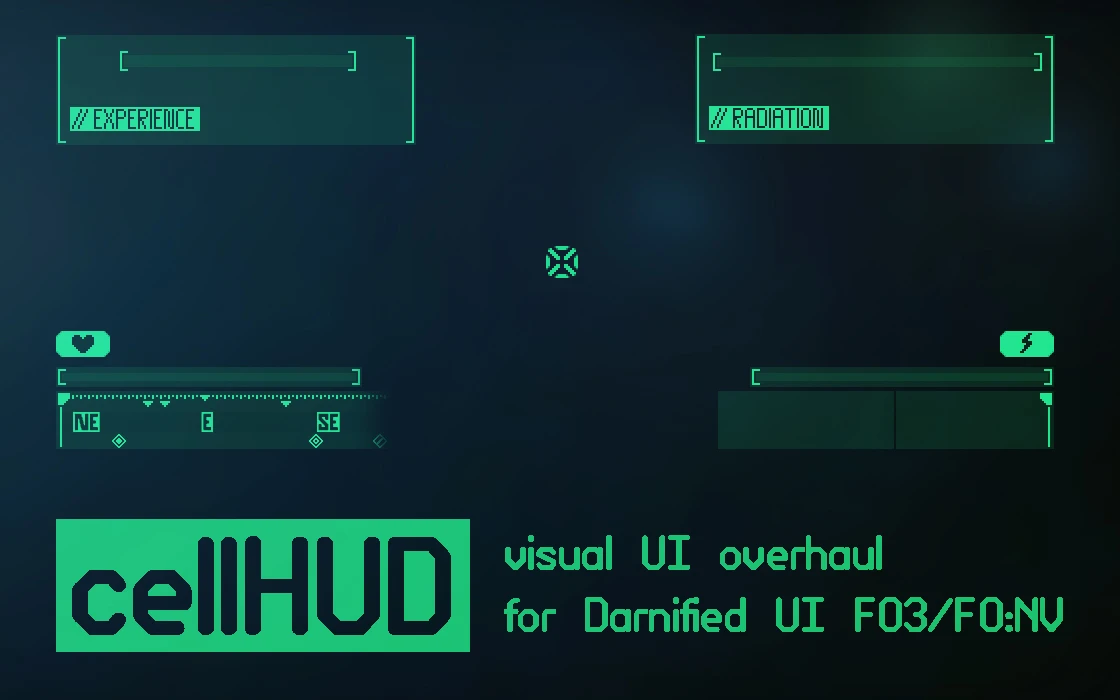
cellHUD is a clean and modern HUD retexture meant for use with DarnUI. Check it out if you'd like a clearer interface. Now with a new alternate version or something. Also new alternative bars. Check it out if you actually still play this game.
Requires the latest version DarNified UI, found here:
http://forums.bethsoft.com/topic/1135390-wipzbeta-darnified-ui-nv/
To make the DarnUI installation complete, you have to replace the fonts section of the Fallout.ini and the FalloutPrefs.ini with the following in My Documents/My Games/FalloutNV (remember to backup!) :
sFontFile_1=TexturesFontsDarN_FranKleinBold_14.fnt sFontFile_2=TexturesFontsDarN_FranKleinBold_16.fnt sFontFile_3=TexturesFontsGlow_Monofonto_Medium.fnt sFontFile_4=TexturesFontsDarN_Sui_Generis_Otl_10.fnt sFontFile_5=TexturesFontsFixedsys_Comp_uniform_width.fnt sFontFile_6=TexturesFontsDarN_Sui_Generis_Otl_13.fnt sFontFile_7=TexturesFontsDarN_Libel_Suit_Otl_24.fnt sFontFile_8=TexturesFontsGlow_Futura_Caps_Large.fnt sFontFile_9=TexturesFontsNVFont_Test.fnt
You should also set them to read-only to make sure the game does not default back to the old fonts. Do the same for Fallout_Default.ini in the game directory if you are a chump who uses the launcher.
Troubleshooting FAQ (56K WARNING!):
cellHUD is a clean, modern HUD modification designed for DarNUI, offering a sleek interface overhaul. With 1,818 endorsements and 89,611 downloads, it's a popular choice for Oblivion players seeking a minimalist UI. Last updated in 2013, it remains a stable option for classic setups.
✨ Key Features
📊 Pros & Cons
✅ Pros
- Community favorite with 1,818 endorsements and nearly 90k downloads.
- Delivers a sleek, modern look that cleans up the default UI.
- Designed specifically for DarNUI, so it integrates smoothly if you're already using that overhaul.
⚠️ Cons
- Last updated in 2013 — may not be compatible with newer mods or patches.
- Requires DarNUI as a base, so it's not a standalone HUD replacement.
For Oblivion players who already use DarNUI and want a cleaner, more modern HUD look. If you're after a full UI overhaul or don't use DarNUI, this isn't for you.
💡 Beginner Tips
- Make sure DarNUI is installed first, as cellHUD is built on top of it.
- Check your load order to ensure cellHUD loads after DarNUI to avoid conflicts.
- If you're using a mod manager, preview the files before installing to see what gets overwritten.
📊 Mod Details
- Game
- New Vegas Mods
- Author
- Celeres
- Version
- 1.1
- Downloads
- 89,611
- Endorsements
- 1,818
- Category
- User Interfaces
- Created
- 5/27/2012
- Updated
- 12/15/2013
🔧 How to Install New Vegas Mods
Download from Nexus.
📖 Full step-by-step install guide for New Vegas →
Visit the official mod page for specific installation instructions for this mod.
🎮 Need cheat codes or console commands? Check ur gaming wiki for New Vegas commands, item IDs, and more.
Keep browsing — more New Vegas mods await