Aid Quick Menu
⚪ Last updated 2021⚠️ Install Order · 5 steps
Install in this order, then this mod last — most mods fail to load without their framework and dependencies in place.
Preview
🔍 Analysis
- 👍 4.0% endorsement rate — high engagement, a strong quality signal
- 🏆 #48 of 103 User Interfaces mods in this game by downloads
📋 About This Mod
~ Aid Quick Menu ~
If you're like me your playthroughs typically end up with you just hoarding a whole bunch of chems because you just always forget to use them!..
.. Or it feels like such a pain to bring up the pip-boy in the middle of combat, clicking and scrolling through all that useless junk you're carrying, to finally be able to consume some glorious Psycho!.. or Berry Mentats (for freshness).
Well.. this newly obsessive need of mine to actually try and use more chems during my playtrhoughs drove me to.. MAKE A MOD FOR IT!
~ So what is it? ~
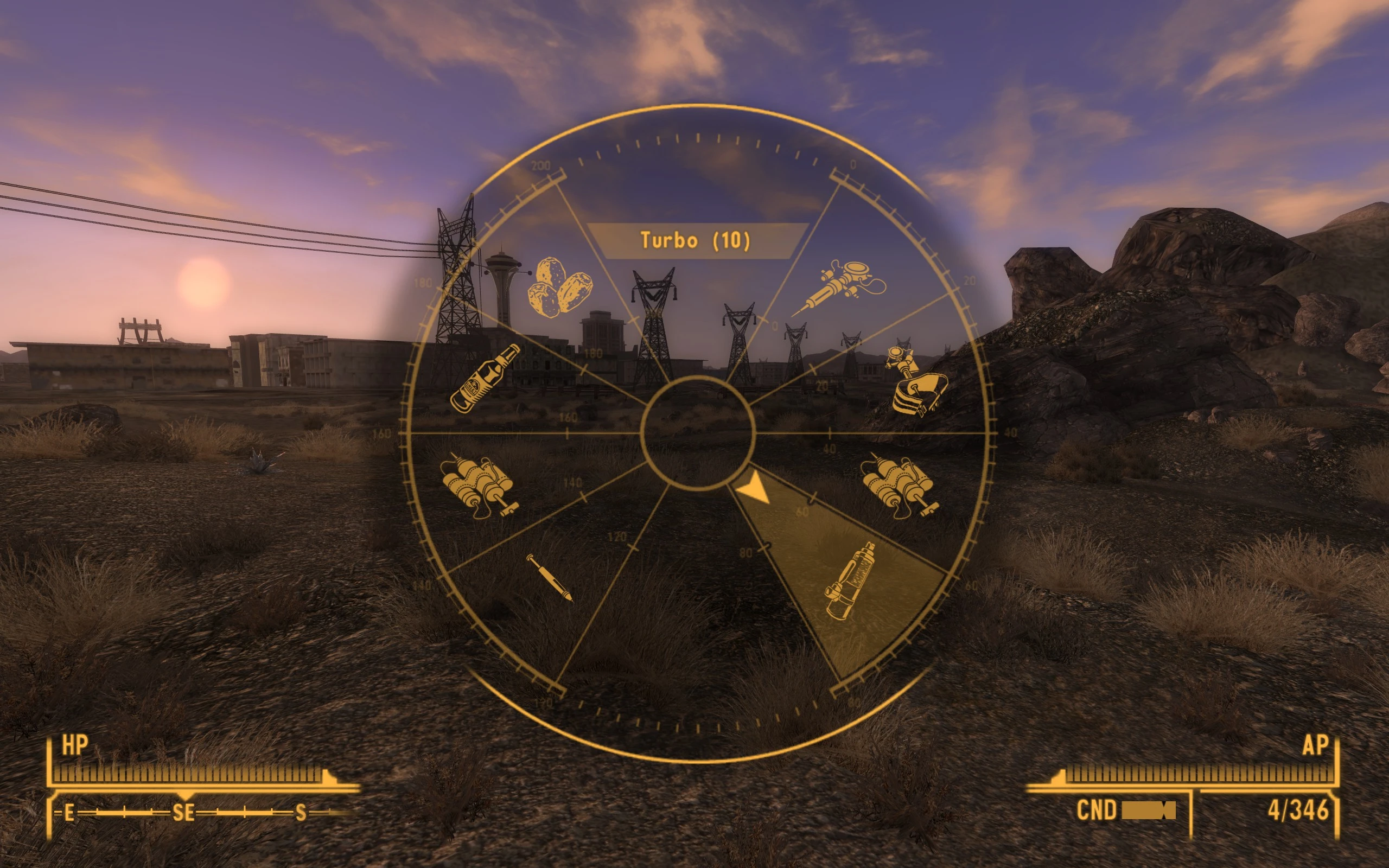
The mod consists of a menu you can display easily during normal gameplay to quickly choose and consume all your favorite ingestibles from your inventory, as an alternative to bringing up your pip-boy or using some of your limited normal item hotkeys.
I made the mod because I tend to use up all the normal hotkeys for weapons, so there usually isn't much room for aid items, especially not several different types of chems or stealth boys and doctor's bags (or food and water, if you play on hardcore).
So with an entire quick menu specifically for ingestibles you will have a lot more flexibility to use a wider variety of aid items quickly and easily :)
Now go and get addicted to all the chems!!
Psycho injection sounds
"LETS GOOO!!"
~ Last remarks ~
I have tinkered a lot with the GECK before but this is my first "official" mod so issues may ensue, however feel free to post any problems (or annoyances) you have with the mod and I may try and fix them.
It was a great learning experience and I hope you like the mod :)
Update: Thank you for all the downloads and endorsements :) (I didn't know it would be strangely satisfying to see those numbers go up every so often :P).
I really just made the mod for my own personal use, but I'm glad people also find my little mod useful!
Feel free to post any feedback you might have in the comments, I'd love to hear what you think and if something is annoying you or causing a problem with the mod! If so I hope I can help :)
Update 08/2021: I am a bit busy dealing with other things in my life at the moment so it might take a while before I can reply to your comments. Sorry in advance :)
~ "HOW TO USE!?", you say? ~
By default the menu is activated by holding the "c" key! (hotkey can be changed in the mod's INI file)
[]If you hold the "c" key while in the "Aid" section of your pip-boy, you can then press any of the number keys (up to and including 8) and the item you are currently hovering over will be assigned to that hotkey!
[]If you hold
Aid Quick Menu adds a real-time wheel menu to Fallout 4, letting you use chems, food, and healing items without opening the Pip-Boy. With 318 endorsements and 8,019 downloads, it's a popular QoL mod for players who want faster access to aid items during combat.
✨ Key Features
📊 Pros & Cons
✅ Pros
- Streamlines gameplay—no more pausing to dig through your Pip-Boy mid-fight.
- Solid community backing with 318 endorsements and 8k downloads.
- Lightweight UI mod that doesn't overhaul the whole interface.
⚠️ Cons
- Last updated in 2021—might have compatibility issues with newer game patches or DLC.
- No detailed instructions or compatibility notes provided by the author.
- Wheel menu may conflict with other UI mods that alter the same interface elements.
For Fallout 4 players who hate pausing to eat or heal and want a smoother combat flow. Perfect for survival mode enthusiasts who need quick access to chems and food. Skip if you prefer the traditional Pip-Boy menu or use heavy UI overhaul mods.
💡 Beginner Tips
- If you use other UI mods, test Aid Quick Menu in a new save to avoid conflicts.
- Check the mod's load order—place it after other UI overhauls to ensure the wheel appears correctly.
- Bind the wheel to a convenient key for quick access during combat.
📊 Mod Details
- Game
- New Vegas Mods
- Author
- CPCN
- Version
- 1.7
- Downloads
- 8,019
- Endorsements
- 318
- Category
- User Interfaces
- Created
- 12/8/2020
- Updated
- 8/9/2021
🧩 Commonly Used Together
Users add these mods to the same collections — a real compatibility signal, not an AI guess.
🔧 How to Install New Vegas Mods
Download from Nexus.
📖 Full step-by-step install guide for New Vegas →
Visit the official mod page for specific installation instructions for this mod.
🎮 Need cheat codes or console commands? Check ur gaming wiki for New Vegas commands, item IDs, and more.
Keep browsing — more New Vegas mods await