ZackUtils - Debug Tool and OMW Lua Resource
🟠 Updated over a year ago⚠️ Install Order · 2 steps
Install in this order, then this mod last — most mods fail to load without their framework and dependencies in place.
Preview
🔍 Analysis
- 🏆 #46 of 55 Modders Resources and Tutorials mods in this game by downloads
📋 About This Mod
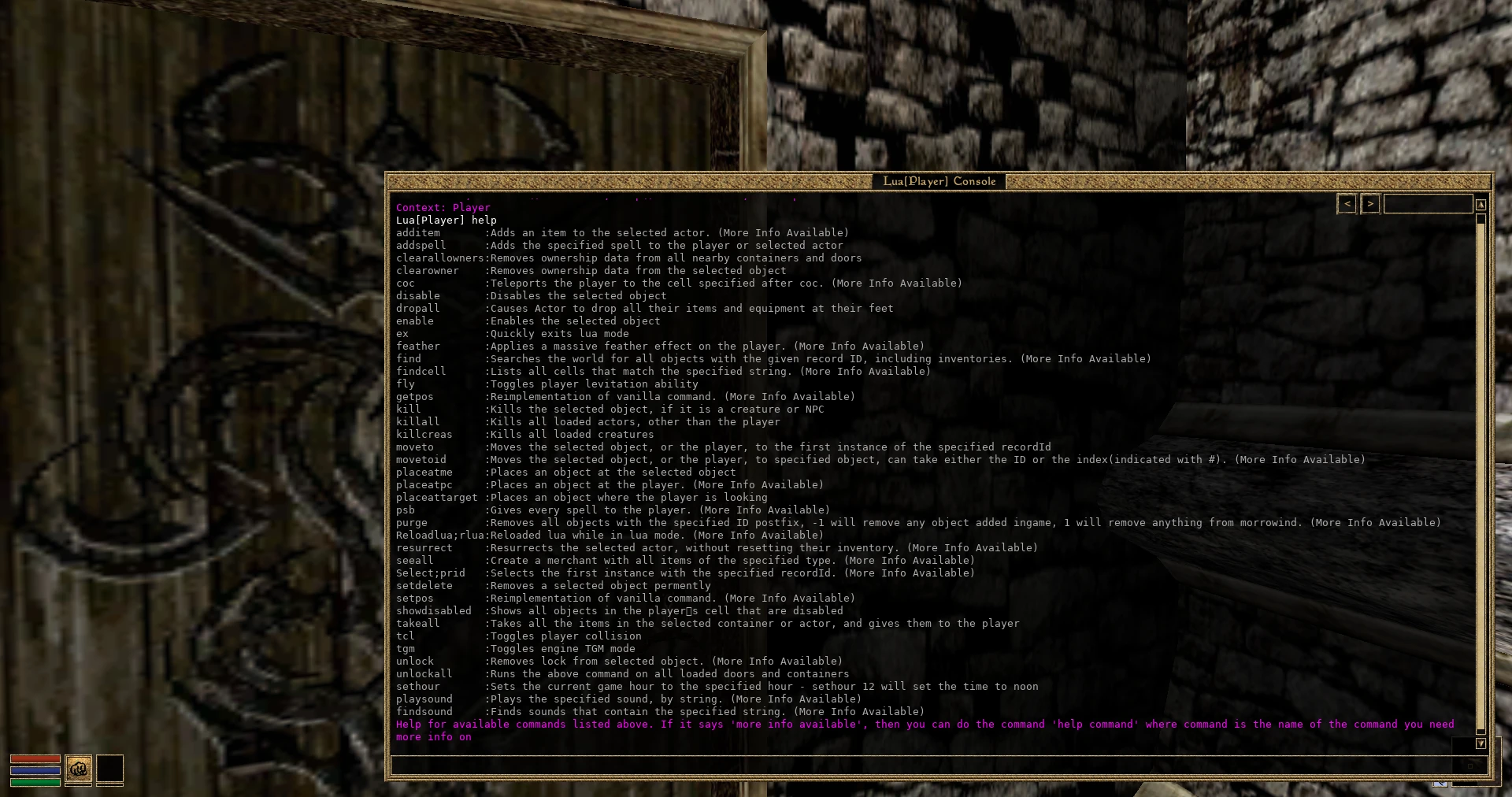
This adds features to OpenMW(Development build) that try to make testing easier, including new console commands.
ZackUtils is a library of functions meant to make modding in OpenMW lua a little easier.
The idea for ZackUtils is not for it to be a dependency, or to be included in mods. This can cause compatibility issues.
You're free to include ZackUtils itself in your mod, but please rename the interface, and the events. Otherwise, you can cause duplicate event running.
The better thing to do would be to copy the functions from these files to your own script or interface, which you're free to do.
Zackutils Debug is included in this mod/repo. It's meant to make making and debugging mods a lot easier, and make testing quicker.
It allows most useful vanilla console commands to be used while in Lua mode, with enhancements.
For example, coc can be used in the normal way, 'coc "balmora, guild of mages"', or you can enter "coc balmora, g", and it will teleport you to the first match for that string, which happens to be the guild of mages. This somewhat makes up for the fact that tab-autocorrect does not work in lua mode.
Another useful addition to coc is the "findcell" command. If you wanted to find all cells named "guild of mages", you could enter the command "findcell guild of mages", and it will list every cell that contains that text. It will also list the index in the list, which you can use in coc now. So, if the caldera guild of mages is number 21 in that list, you would enter coc 21.
This only works after you run the findcell command, of course.
Another very useful feature is the ability to run the "reloadlua" command while in lua mode. If you do so, it will of course reload lua, and return you to the context you were in before. Any functions or variables you set will no longer be set of course.
While in lua mode, there are some new functions added by default to your console's default context.
zu can be used to access the zackUtils interface, in player or global mode.
runConsoleCommand, or rcc, can be used to run a console command, with just a string as a parameter, which would be the console command you'd run.
setSelected will set the console's selected object, but also pass it along to be used by the rcc function above. Takes an object as a parameter.
The settings menu has some more features, that empower your testing experience.
On the main settings page, you can cause actors that attack you to have their AI disabled. This can make you spend less time fighting random alits when you mean to be testing something else.
You can disable item ownership, so anytime you enter a new cell, all ownership data is removed from items, allowing you to take what you need.
You can disable actor AI entirely, or just disable actors in general.
Now, the real power comes in the next settings page, the "ZackUtils Debug -
📊 Mod Details
- Game
- Morrowind Mods
- Author
- SkyHasACat
- Version
- 1.1
- Downloads
- 157
- Endorsements
- 16
- Category
- Modders Resources and Tutorials
- Created
- 5/29/2023
- Updated
- 11/26/2024
🔧 How to Install Morrowind Mods
Download from Nexus.
📖 Full step-by-step install guide for Morrowind →
Visit the official mod page for specific installation instructions for this mod.
🎮 Need cheat codes or console commands? Check ur gaming wiki for Morrowind commands, item IDs, and more.
Keep browsing — more Morrowind mods await