Various Mesh Fixes
⚪ Last updated 2024⚠️ Install Order · 2 steps
Install in this order, then this mod last — most mods fail to load without their framework and dependencies in place.
Preview
🔍 Analysis
- 👍 0.2% endorsement rate
- 🏆 #61 of 544 Models and Textures mods in this game by downloads
📋 About This Mod
Various Mesh Fixes
Here you can find fixes for some issues that I have found. Install by dropping the meshes folder into your Morrowind/Data Files folder.
Note that these fixes are included in Morrowind Rebirth.
Down below are the current fixes along with a small description of each fix, plus a changelog if any changes have been made,
Correct Chests
v 1. 0 - Fixed UV issues with contain_chest10 and contain_chest11.
Correct Stronghold Meshes
v 1. 0 - Fixed some issues with the dunmer stronghold meshes (interior). More specificly it will fix incorrect texture paths in meshes where "dirtroad.tga" is used instead if "boulder.tga".
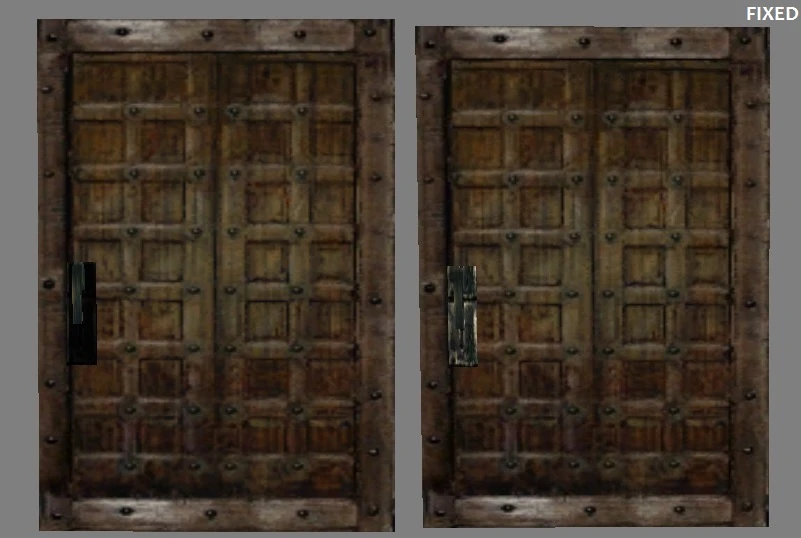
Correct Vertex Shading (in_c_door_wood_square)
v 1. 0 - Removed black vertex shading from the door handle (in_c_door_wood_square), making the handle texture fully visible.
Correct Imperial Skywalk and Building
v 1. 0 - Fixed bad UV and added a new texture for the wood panel.
Correct Chitin Pauldron
v 1. 0 - Fixed incorrect texture path in the chitin pauldron mesh (TX_A_Chitin_Shield_round. BMP instead of TX_A_UA_Chitin_pauldron. BMP).
v 1. 1 - Additional UV fix by Melchior Dahrk
Correct Telvanni Interior Doors
v 1. 0 - Removed and replaced a handle texture attached to two Telvanni doors, with one that doesn't appear streched.
Correct Imperial Tower
v 1. 0 - Fixed bad UV by replacing the appointed texture. A proper UV-fix would be better, but I think it's an improvement.
Correct Templar Cuirass
v 1. 0 - Fixed bad UV where the belt buckle texture didn't cover the entire surface of the belt buckle model, leaving black areas without a texture. Some personal edits were also made, making the belt red insted of beige. The latter isn't really purist friendly, but thought I'd upload it anyway.
Correct Telvanni Pillar
v 1. 0 - Fixed bad UV which caused streched textures.
Various Mesh Fixes by johanrosen addresses several mesh issues found by the author. With 299 endorsements and 128,009 downloads, it's a popular utility mod for players experiencing visual glitches. Last updated August 2024, it remains relevant for current game versions.
✨ Key Features
📊 Pros & Cons
✅ Pros
- Community-trusted with 299 endorsements and over 128k downloads
- Regularly updated (August 2024) so likely works with current game version
- Simple purpose: fixes visual mesh problems without adding extra content
⚠️ Cons
- Description is vague—doesn't specify which meshes are fixed
- No installation instructions provided by the author
- May require manual placement in game folders, which could be confusing for beginners
For players who've noticed visual glitches or broken meshes in the game and want a straightforward fix. If you're experiencing odd geometry or texture issues, this mod is worth trying. Skip if you're looking for major overhauls—this is a targeted utility mod.
💡 Beginner Tips
- Check the mod's comments section for user reports on which specific meshes are fixed
- If you use a mod manager, try installing through it for easier uninstallation
- Make sure to match the mod's file structure to your game's directory to avoid overwriting essential files
📊 Mod Details
- Game
- Morrowind Mods
- Author
- johanrosen
- Version
- 1.1
- Downloads
- 128,009
- Endorsements
- 299
- Category
- Models and Textures
- Created
- 6/23/2014
- Updated
- 8/22/2024
🔧 How to Install Morrowind Mods
Download from Nexus.
📖 Full step-by-step install guide for Morrowind →
Visit the official mod page for specific installation instructions for this mod.
🎮 Need cheat codes or console commands? Check ur gaming wiki for Morrowind commands, item IDs, and more.
Keep browsing — more Morrowind mods await