Morrowind Script syntax for Vim and Sublime Text
⚪ Last updated 2019⚠️ Install Order · 2 steps
Install in this order, then this mod last — most mods fail to load without their framework and dependencies in place.
Preview
🔍 Analysis
- 🏆 #38 of 55 Modders Resources and Tutorials mods in this game by downloads
📋 About This Mod
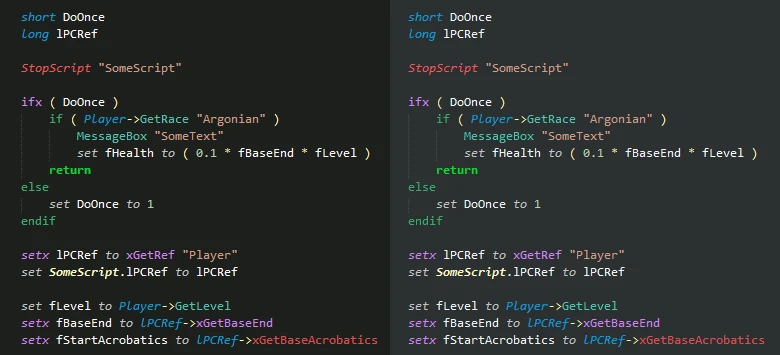
Syntax highlighting, color schemes and autocomplete for editing Morrowind scripts in Sublime Text. Now for Vim too!
Morrowind script syntax for Vim and Sublime Text
Features:
- syntax higlighting
- 4 color schemes (VS Dark, Obsidian, Obsidian Light, Obsidian Dark)
- autocompletions
- autoindentation
- commands: new script, browse documentation (local, online)
- documentation popup for MWSE/MGE-XE functions
- symbols support
ChangeLog
v1. 3: changed documentation hotkey, improved New Script command, full autocomplete must be called explicitly with `ctrl+space`
Usage
Vim: extract in your vimfiles/pack/__/start/ directory
Extract the `MWScript` folder in the packages folder (usually `~\AppData\Roaming\Sublime Text 3\Packages\MWScript`).
Load a script or start a new one, and assign the MWScript syntax. `te3` extension is automatically assigned to the syntax.
Syntax higlighting
All functions from MWSE/MGE + alpha/MGE-XE are supported.
Colors are: regular functions, MWSE/MGE, MWSE alpha/MGE-XE. Invalid operators are red.
Color schemes
After you assign the syntax MWScript to a file, open `Preferences -> Settings - Syntax Specific` and add one of the following:
"color_scheme": "Packages/MWScript/MWScript (VS Dark).hidden-tmTheme",
"color_scheme": "Packages/MWScript/MWScript (Obsidian).hidden-tmTheme",
"color_scheme": "Packages/MWScript/MWScript (Obsidian Dark).hidden-tmTheme",
"color_scheme": "Packages/MWScript/MWScript (Obsidian Light).hidden-tmTheme",
This is needed for syntax highlighting.
Autocompletions with fields
Normal autocomplete uses these special triggers:
PP: Player->
SX: setx to
EI: elseif ( )
IX: ifx ( )
MM: MessageBox ""
AA/RR: AddSpell/RemoveSpell
Full functions autocomplete list can be triggered with `ctrl+space`.
Documentation popup
Press `Alt+d, Alt+d` to display it. If called on non-MWSE/MGE-XE functions, it will search the Elder Scrolls online wiki.
Palette Commands
- New script: a basic template. Assigned file path is relative to the currently edited file
📊 Mod Details
- Game
- Morrowind Mods
- Author
- mg979
- Version
- 1.2
- Downloads
- 182
- Endorsements
- 12
- Category
- Modders Resources and Tutorials
- Created
- 11/13/2017
- Updated
- 6/27/2019
🔧 How to Install Morrowind Mods
Download from Nexus.
📖 Full step-by-step install guide for Morrowind →
Visit the official mod page for specific installation instructions for this mod.
🎮 Need cheat codes or console commands? Check ur gaming wiki for Morrowind commands, item IDs, and more.
Keep browsing — more Morrowind mods await