Mehrunes Mike UI (MMUI)
🟠 Updated over a year ago⚠️ Install Order · 2 steps
Install in this order, then this mod last — most mods fail to load without their framework and dependencies in place.
Preview
🔍 Analysis
- 🏆 #36 of 82 User Interface mods in this game by downloads
📋 About This Mod
MMUI is a user interface mod for OpenMW, designed to enhance the visual and functional aspects of the game's interface. It is intended to be used in conjunction with OpenNevermind, a mod by Petr Mikheev that turns OpenMW into an engine for
Mehrunes Mike UI (MMUI) for OpenNevermind
OVERVIEW
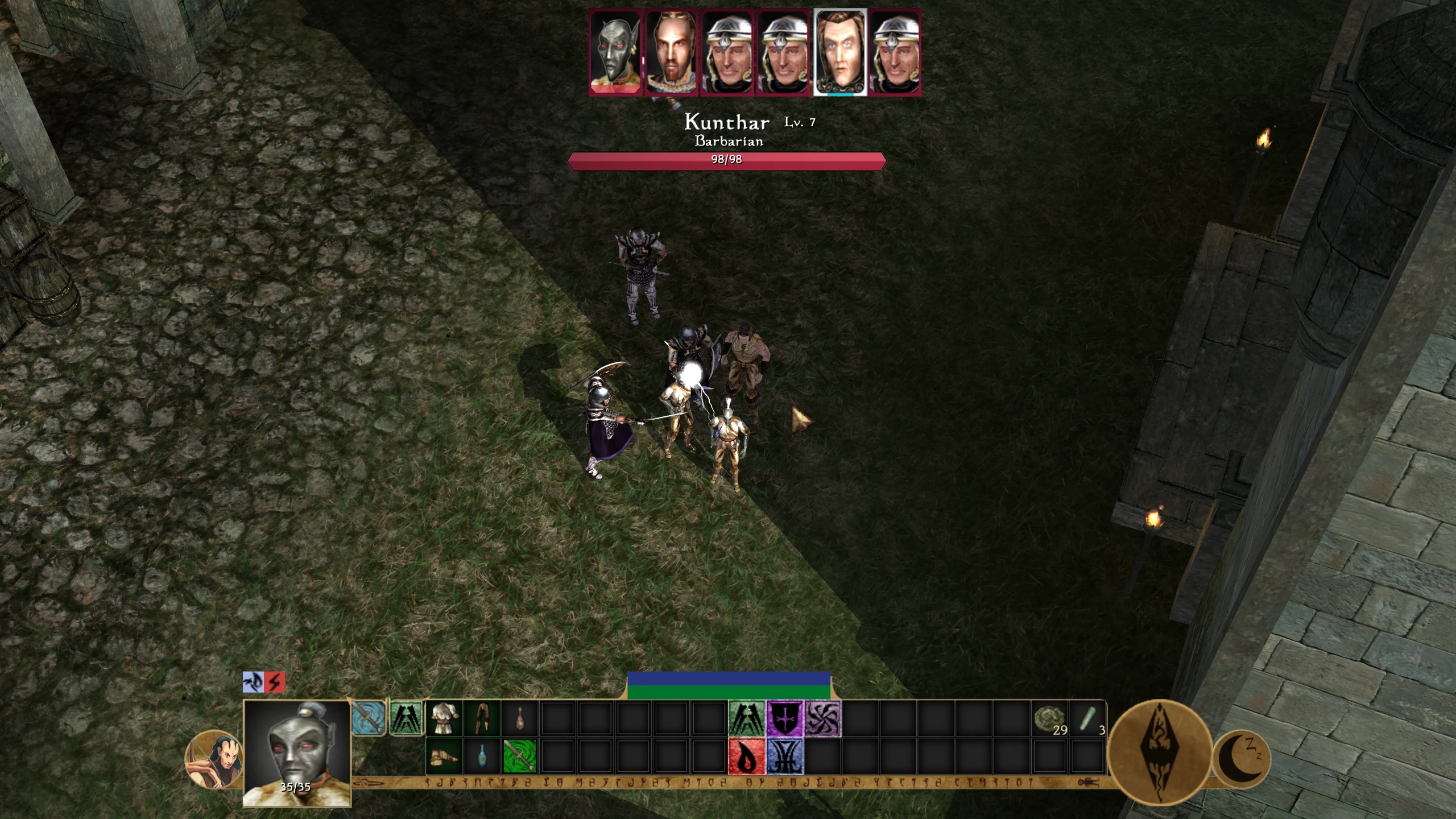
This mod introduces a user interface overhaul for OpenMW. It is designed to enhance the player experience by implementing a contemporary action bar system, inspired by games such as Baldur's Gate 3, and providing an improved display for critical combat information.
FEATURES
I. Integrated Action Bar
-
[] Dynamic Player Portrait & Health Indicator: Displays a portrait of the player character (only compatible with default Morrowind faces). This portrait visually represents the player's current health status by progressively filling with red as health diminishes.
[
] Status Effect Icons: Active status effects afflicting the player are clearly indicated by icons positioned directly above the player portrait.[] Class Representation Icon: An icon corresponding to the player's chosen predefined class is displayed. Characters utilizing custom classes will be assigned a randomized icon.
[] Item Quick-Access Slots: Users can assign items (with right click) directly from their inventory to designated slots on the action bar, allowing for rapid deployment.
[] Spell & Power Assignment Slots: The right-hand section of the action bar provides dedicated slots for the assignment (with right click) and immediate casting (with left click) of spells and powers.
[] Intervention/Recall Utility Button: A specialized button allows for swift cycling (with right-click) between Almsivi Intervention, Divine Intervention, and Recall spells, facilitating rapid tactical repositioning or escape.
[] Rest Functionality Button: A conveniently located button at the terminus of the action bar provides direct access to the game's rest menu.
II. Enhanced Enemy Combat Display (Top of Screen)
-
[] Dynamic Enemy Portraits: During combat engagements, portraits of targeted enemy actors are displayed at the top of the user interface with a focus portrait border.
[] Visual Health Feedback: These enemy portraits dynamically respond to damage received, gradually filling with red coloration as the actor's health decreases, providing an immediate visual assessment of their condition, even when out of focus.
III. Contextual Actor Information (On Cursor Hover)
-
[]When the user hovers the cursor over an actor (NPCs, creatures), the following information is presented:
[] A distinct Health Bar.
[] The actor's Name.
[] The actor's designated Class.
[] The actor's current Level.
Works well with TrueType fonts for OpenMW.
REQUIREMENTS
[*] OpenMW (0.
-
[]When the user hovers the cursor over an actor (NPCs, creatures), the following information is presented:
-
[] Dynamic Enemy Portraits: During combat engagements, portraits of targeted enemy actors are displayed at the top of the user interface with a focus portrait border.
📊 Mod Details
- Game
- Morrowind Mods
- Author
- MehrunesMike
- Version
- 0.8.2
- Downloads
- 235
- Endorsements
- 7
- Category
- User Interface
- Created
- 6/2/2025
- Updated
- 6/3/2025
🔧 How to Install Morrowind Mods
Download from Nexus.
📖 Full step-by-step install guide for Morrowind →
Visit the official mod page for specific installation instructions for this mod.
🎮 Need cheat codes or console commands? Check ur gaming wiki for Morrowind commands, item IDs, and more.
Keep browsing — more Morrowind mods await